How to Enable or Disable Ask Where to Save Downloads in Microsoft Edge

You enable or disable the “Ask where to save downloads” setting in Microsoft Edge to control where your downloaded files are saved.
This setting determines if Microsoft Edge, the default Windows 11 browser built on the Chromium engine, prompts you for a save location each time you download a file, or if it automatically sends them to your default Downloads folder.
By default, Microsoft Edge automatically saves all downloads to your user profile’s Downloads directory without asking.
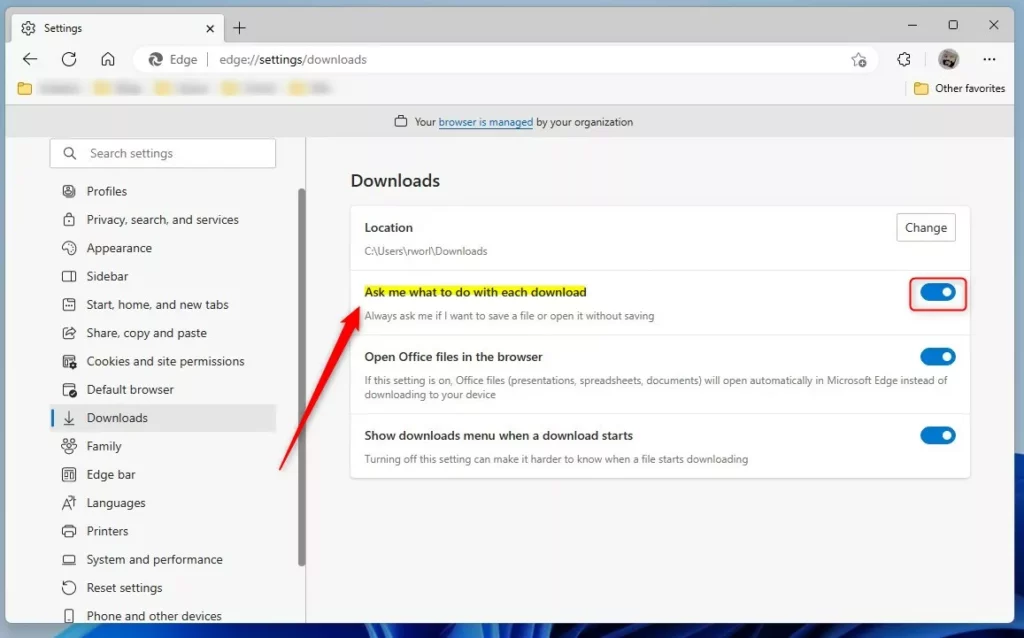
To enable or disable asking where to save downloads in Microsoft Edge, go to Settings > Downloads and toggle “Ask me what to do with each download” on or off. This setting controls whether Edge prompts you for a save location or downloads automatically.
Why Enable Download Prompts?
If you don’t always want to download a file to your computer, you can enable a feature that asks you first. This way, you can choose to open the file in the browser instead of saving it.
How to Turn On Download Prompts in Microsoft Edge
You can easily turn on the prompt that asks where to save downloads in Microsoft Edge right from the browser’s settings menu.
- Open the Microsoft Edge browser.
- Click the Settings and more button. This is the 3 horizontal dots on the top right corner. Then select Settings.
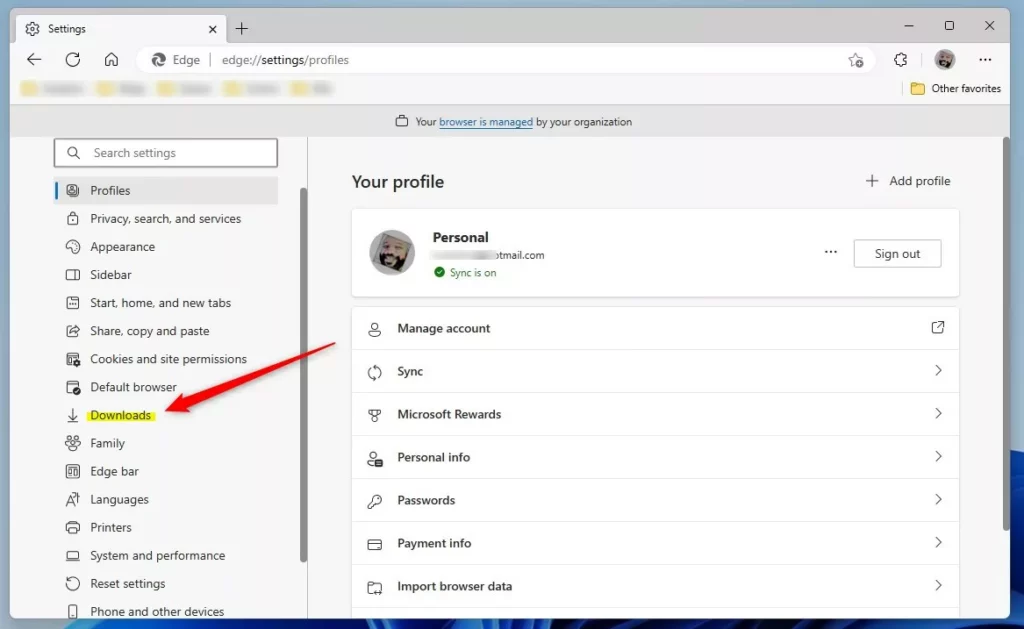
- Click Downloads on the left menu.
- Look for the option that says “Ask me what to do with each download”. Toggle the button On or Off.
What Happens?
When the toggle is Off, Edge won’t ask you what to do with each download. Files will download automatically.
When the toggle is On, Edge will always prompt you before downloading. You can then choose to save the file or open it in the browser.
Alternative Method: Using Windows Registry
For those comfortable with more advanced computer settings, you can also change Microsoft Edge download prompts by editing the Windows Registry.
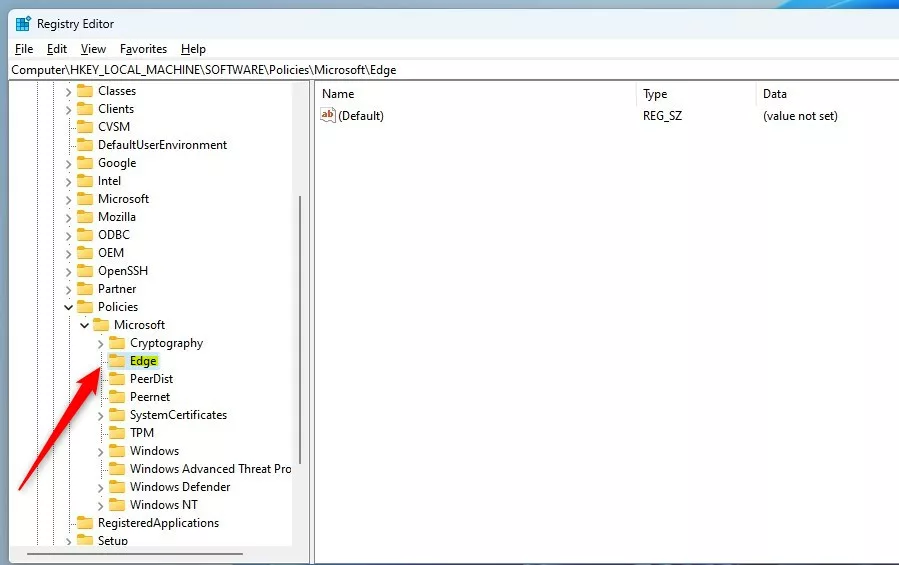
- ⚠️ Admin Privileges Required — Open the Windows Registry and navigate to the folder path below:
HKEY_LOCAL_MACHINE\SOFTWARE\Policies\Microsoft\Edge - If you don’t see the Edge folder, right-click on the Microsoft parent key. Then create a new subkey folder called Edge.
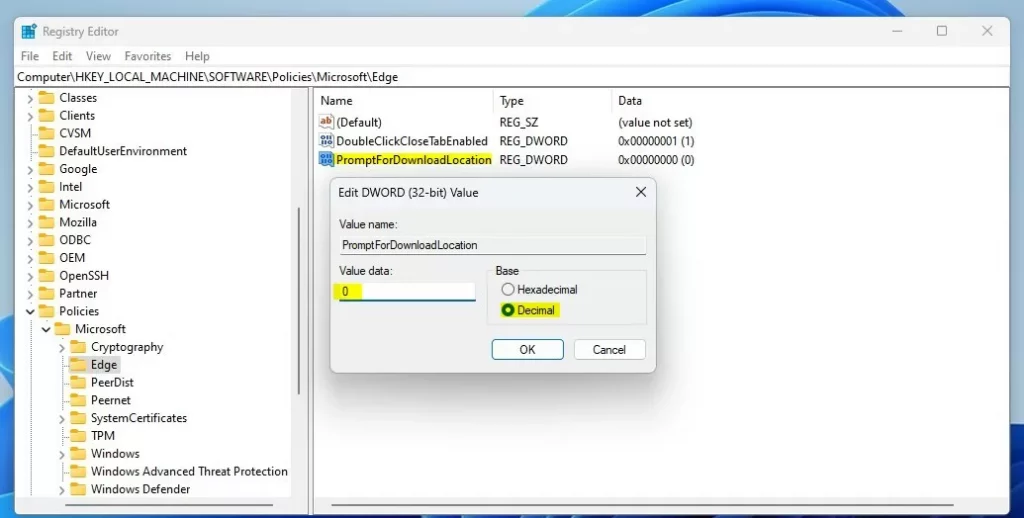
- Right-click in the empty space on the right side of the Edge folder. Select New → DWORD (32-bit) Value. Type the name
PromptForDownloadLocation. - Double-click the new value named
PromptForDownloadLocation. Enter the Value data:- Enter 1 to have Edge ask before downloading files
- Enter 0 to disable the prompt and download automatically
⚠️ Restart your computer to apply the registry changes.
Summary
You have simple ways to control where your downloads go in Microsoft Edge, choosing to be asked each time or letting Edge pick the spot.
- Use the Settings menu for a quick toggle
- Use the Windows Registry for more advanced control
If you use the Registry method, remember to restart your computer for the changes to take effect.
How to make Edge ask where to download?
To make Edge ask where to download files, open the browser’s Settings, go to Downloads, and look for the option to be prompted for each download.
How do I stop Edge from asking me to keep downloads?
Off by default that is probably enabled automatic downloads is probably enabled as you see mine is to disable it you just toggle this off now automatic downloads are disabled. And if it's toggled.
Was this guide helpful?

About the Author
Richard
Tech Writer, IT Professional
Richard, a writer for Geek Rewind, is a tech enthusiast who loves breaking down complex IT topics into simple, easy-to-understand ideas. With years of hands-on experience in system administration and enterprise IT operations, he’s developed a knack for offering practical tips and solutions. Richard aims to make technology more accessible and actionable. He's deeply committed to the Geek Rewind community, always ready to answer questions and engage in discussions.

Goal = disable the prompts to save and download.
When using the browser settings and the regEdit instructions here neither leave me withe expected outcome/goal. What could be blocking this?? It still prompts both save and download.