How to Create Microsoft Account Aliases


- 7 steps
- Includes a restart or sign-out
A Microsoft account alias is an extra email address or phone number that shares the same password, contacts, and subscription details as your main login. You can attach up to 10 active aliases to a single account. That lets you give a different address to newsletters and sign-up forms without exposing your primary email.
Mail sent to an alias lands in the same inbox as your main address, so there is only one mailbox to check. A new login ending in @outlook.com, @hotmail.com, or @live.com keeps your main address private while you manage all your files and settings in one place. If an alias starts attracting spam, you can stop using it and your real address stays clean.
Open your Microsoft account management page, sign in, go to sign-in settings, click Add email or Add phone number, type the new address, and click Add alias. The alias appears immediately in your sign-in options and shares the same password, inbox, and subscription as your main account.
How to Add an Alias
Aliases let you add extra email addresses or phone numbers to your existing account, and you can sign in with any of them. In short: open the Microsoft account management page, sign in, choose Add email or Add phone number, type the new details, and save with Add alias.
This works the same on Windows 11 Home and Pro, because it happens in your browser and not in Windows itself. You do not need to restart anything. The steps below walk through it one screen at a time.
- Open the official Microsoft account management page in your browser and sign in with the Microsoft account you want to add the alias to. You should land on your account overview page. If you have more than one account, check the name in the top-right corner before you go on.
- Go to the sign-in settings and click the Add email link. If you prefer to use a phone number, select Add phone number instead. A form should appear asking for the new address or number. If you cannot find these links, look for the Manage how you sign in section, which is where they usually sit. Microsoft changes the layout of this page from time to time, so the wording may differ slightly.
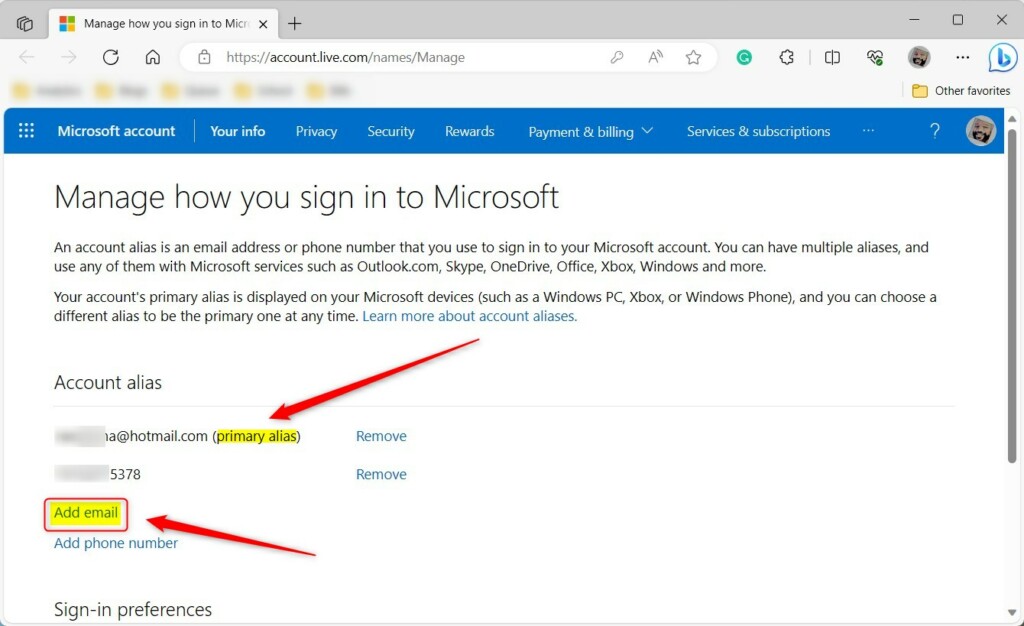
- Type in your new email address or phone number. If you want a brand-new address, pick the option to create one and choose the ending (@outlook.com, @hotmail.com, or @live.com). If you use an address you already own, you may be asked to confirm it with a code sent to that address. A phone number may need a text message code in the same way.
- Click the Add alias button to save it. The new alias should now appear in your list of sign-in addresses. Send a test message to it, or sign out and back in with it, to confirm it works.

If the name you typed is already taken, Microsoft shows an error message straight away. Try a variation, such as adding a number or changing the order of the words. Names that are available are accepted and added to your account immediately, with no waiting period.
Remove one you no longer use and try again.
Managing Your Primary Alias
Your primary alias is the main email address or phone number shown on your profile and used for sign-ins. To change it, open the Manage how you sign in section of your Microsoft account page, find the alias you want to use, and click Make primary next to it. The old primary stays on the account as a regular alias, so you do not lose it.
- Go to the Manage how you sign in section on your Microsoft account page. You should see every email address and phone number tied to the account.
- Find your preferred alias in the list.
- Click Make primary next to that address. The page should refresh and show the new alias as primary. If you change your mind, repeat these steps and pick the old address, keeping the weekly limit in mind.
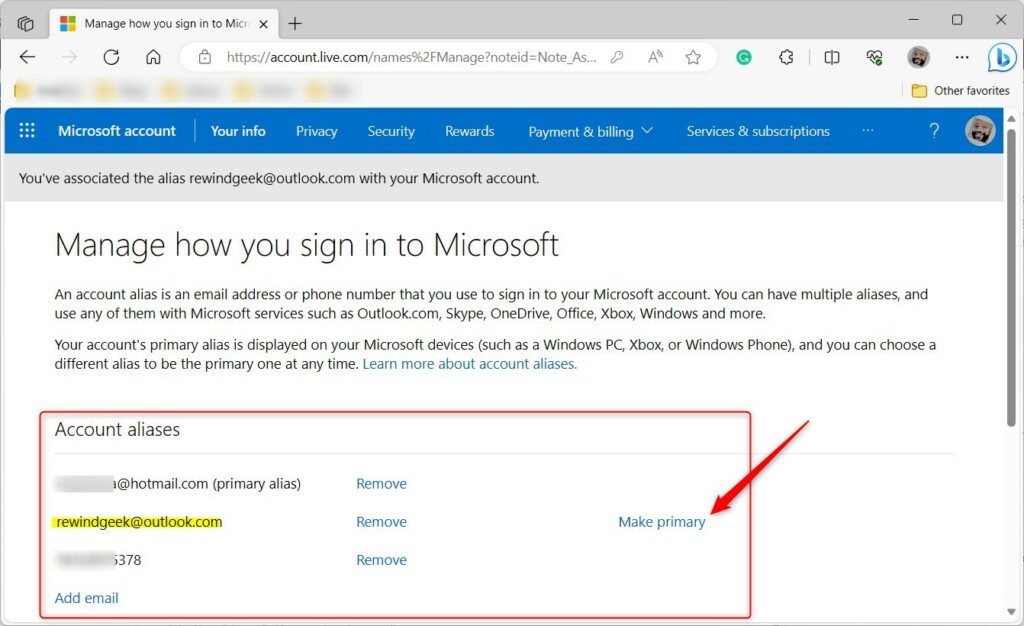
Microsoft limits changes to the primary alias to twice each week. If Make primary is greyed out or you get an error, you have probably hit that limit. Wait a few days and try again. Because of this limit, decide which address you want as primary before you switch, instead of testing different ones.
Business vs. Personal Accounts
Personal and business accounts handle aliases differently. On a personal Microsoft account, you add aliases yourself and they take effect instantly. Business and school accounts usually require an administrator to manage aliases through the Microsoft 365 admin center. If you sign in with a work address and the options described above are missing, that is the likely reason. Ask your IT admin to add the alias for you.
Troubleshooting and Security
If an alias will not connect or will not add, check two things first:
- Restricted domains. Some addresses, such as certain corporate email addresses, cannot be used as an alias. Try a different address.
- Account synchronization in Windows. Open Settings Accounts and confirm the right Microsoft account is signed in and syncing on your PC. Sign out and back in if the account shows an error.
Deleting a Microsoft domain alias removes it permanently, so make sure nothing important still sends mail to it or uses it to sign in.
Summary
Aliases simplify how you sign in. They help if you want to consolidate several identities into one account or start fresh with a new address while keeping your files and settings. Removing a primary Microsoft alias is permanent, so double-check before you do it. Consult the official Microsoft support page for additional guidance.
Have a question about this guide?
Answered by AI from this guide. Good questions may be added to this page — please don't include personal details.
Did this guide fix your problem?

About the Author
Richard
Tech Writer, IT Professional
Richard is a writer at Geek Rewind who turns complex IT tasks into clear, step-by-step guides. He draws on years of hands-on experience in system administration and enterprise IT operations, focusing on Windows, Linux and WordPress: the problems people actually run into, and the fixes that work. His server and WordPress guides come from systems he runs himself. Richard builds and maintains the platform behind Geek Rewind, from its Ubuntu servers and Nginx configuration to its custom WordPress plugins. Many new tutorials start with readers' questions, and he's always glad to answer them in the comments.
[…] can create account aliases with their Microsoft accounts. Multiple aliases can be created, and you can select any of them for sending and receiving email. […]
[…] in to Copilot with your Microsoft account if you have not […]