How to Use Cocreator in Windows 11 Paint App


Cocreator is a smart tool inside the Windows 11 Paint app. It uses artificial intelligence to turn your simple sketches and text descriptions into detailed artwork.
Why use it? It helps you create professional-looking images quickly, even if you are not an expert artist. It acts like a digital assistant that helps bring your ideas to life.
What happens when done? You will have a unique, AI-generated image on your canvas that you can save, edit further, or share with others.
To get started, you need a Copilot+ PC and you must update the Microsoft Paint app through the Microsoft Store. This feature runs on your computer using the Neural Processing Unit (NPU) for fast and private results.
How to Use Cocreator in Paint
- Open the Paint app on your computer.
- Look at the toolbar and click the Cocreator icon. A side panel will open.
- Type a description of what you want to see in the text box. For example, type “a cat in a garden.” The more details you provide, the better the result.
- Use your mouse or stylus to draw a basic sketch on the blank canvas. Using broad strokes and colors helps the AI understand your vision better.
- Watch the side panel as the AI creates your image based on your text and sketch.
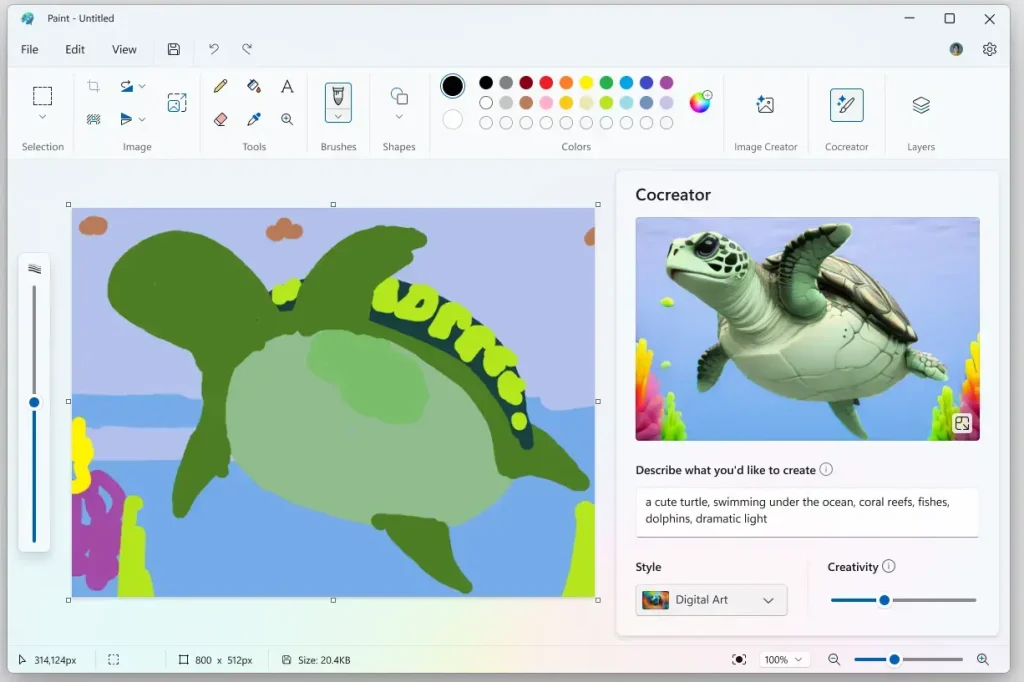
- Move the Creativity slider to choose how much the AI changes your sketch. A lower setting sticks closer to your drawing, while a higher setting lets the AI be more imaginative.
- Pick an art style from the menu, such as “Watercolor” or “Oil Painting.”
- When you like what you see, click the image in the side panel to add it to your main canvas.
You can now save your file to a folder like C:\Users\GenericUser\Pictures or continue editing your masterpiece.
Note: If you need to manage app permissions or update system components, you may require admin privileges.
Summary
Cocreator brings AI-powered art to the familiar Paint app. By combining your own sketches with text prompts, you can generate custom artwork easily. The tool uses your computer’s built-in hardware to keep your work private and efficient. For more details, check out Microsoft.com.
What is Cocreator in the Windows 11 Paint app?
Do I need a specific PC to use Cocreator?
How do I start using Cocreator in the Paint app?
Can I customize the AI-generated artwork in Cocreator?
How does Cocreator ensure my privacy while generating images?
Was this guide helpful?



Leave a Reply