How to name browser windows in Microsoft Edge

You can name browser windows in Microsoft Edge to easily identify and organize your open sessions.
Naming browser windows allows you to assign custom labels, like “Work,” “Shopping,” or “Research,” making it simple to switch between distinct browsing contexts.
Microsoft Edge, built on the Chromium engine, offers this organizational tool, which is particularly useful when managing multiple project windows or separating personal and professional browsing.
For instance, assigning the name “Project Phoenix” to one window helps you quickly locate relevant tabs for that specific task. This feature is available on the latest versions of Microsoft Edge.
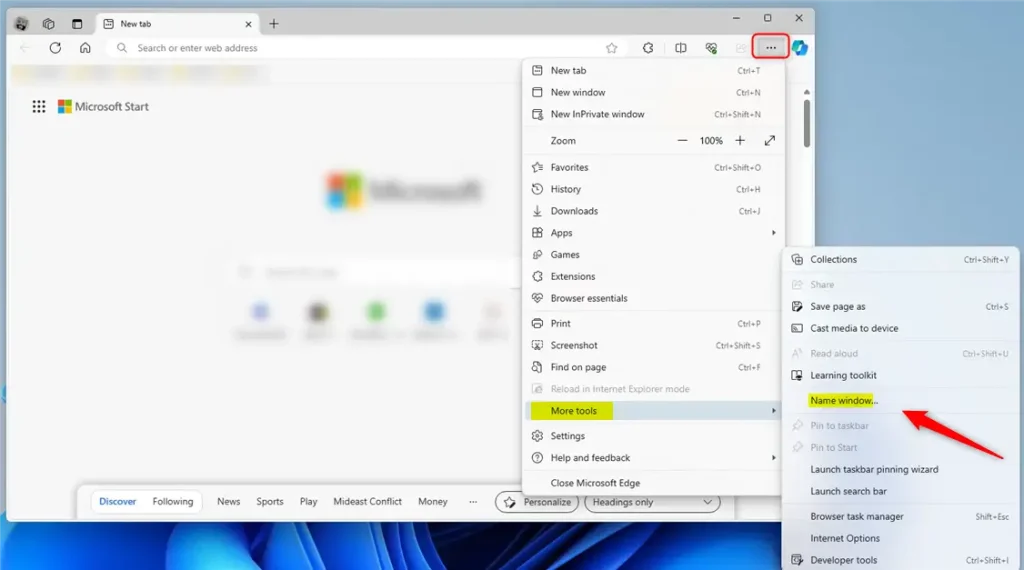
Right-click the title bar and select “Name window” to enter a custom name. You can also find this option under the three dots menu, in “More tools.” This helps you quickly identify different browser windows.
Name a window in Microsoft Edge
Naming a window in Microsoft Edge is a simple way to keep your browser organized and easily find the specific window you’re looking for.
Here’s how to do it.
First, open Microsoft Edge browser.
Once Edge is open, right-click the title bar and choose “Name window” from the menu that pops up.
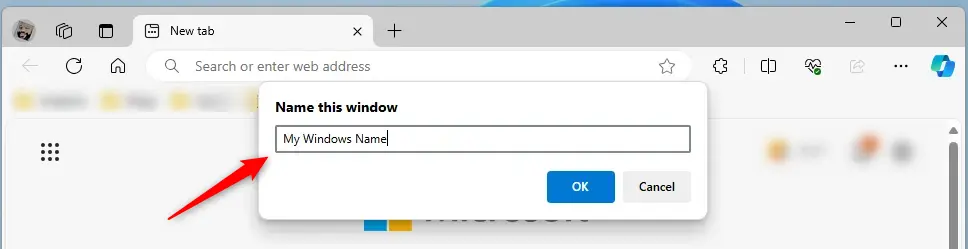
Then, enter a name for the window in the text box that appears and click “OK” to apply the name.
Alternatively, click on the Settings and more (Alt+F) three dots menu icon, select More tools, and click on Name window.
With multiple windows open, hover your mouse over the Microsoft Edge icon on the taskbar to display windows with their corresponding names.

That should do it!
Reference:
Conclusion:
- Naming windows in Microsoft Edge can significantly improve your browsing experience by helping you quickly identify and access the right window.
- Naming a window is straightforward, whether using the right-click method on the title bar or accessing the option through the “Settings and more” menu.
- Following the steps outlined in this article, you can efficiently manage multiple open windows in Microsoft Edge and enhance your productivity while browsing.
Can you name Windows in Microsoft Edge?
Yes, you can name windows in Microsoft Edge to help you keep track of different browsing sessions or tasks.
Why is no one using Edge?
It was instantly criticized for its performance, compatibility with web standards, and limited extension support. Worse still, many felt as though they were being force-fed Edge. Not only is it already there if you're using Windows, but as a key Windows component, it cannot be deleted.
Was this guide helpful?

About the Author
Richard
Tech Writer, IT Professional
Richard, a writer for Geek Rewind, is a tech enthusiast who loves breaking down complex IT topics into simple, easy-to-understand ideas. With years of hands-on experience in system administration and enterprise IT operations, he’s developed a knack for offering practical tips and solutions. Richard aims to make technology more accessible and actionable. He's deeply committed to the Geek Rewind community, always ready to answer questions and engage in discussions.



No comments yet — be the first to share your thoughts!