How to Exclude Websites from Recall Snapshots in Windows 11

Windows 11 has a cool feature called Recall & Snapshots. It works like a photo album for your computer screen—taking pictures (snapshots) of what you see, so you can quickly find things later.
Recall & Snapshots saves copies of your screen securely on your PC. You can control how much space it uses and even delete old snapshots if needed.
But what if you don’t want certain websites to be saved in these snapshots? Maybe for privacy reasons? No problem! You can tell Windows 11 to skip specific websites when saving these snapshots.
Which Browsers Work with This Feature?
- Microsoft Edge: Blocks websites and private browsing activity
- Firefox: Blocks websites and private browsing activity
- Opera: Blocks websites and private browsing activity
- Google Chrome: Blocks websites and private browsing activity
- Other Chromium-based browsers: Can filter private browsing activity but cannot block specific websites
Note:
- Filtering specific websites only works fully in browsers like Microsoft Edge or Chrome.
- Private browsing sessions won’t be saved by Recall in supported browsers.
- When you open Recall and click the Now button, it shows your current screen without saving a new snapshot.
How to Exclude Websites from Recall Snapshots
Follow these easy steps to stop Recall from saving snapshots of websites you don’t want recorded:
- Open Settings: Click the Start menu (Windows icon at the bottom left) and select Settings, or press
Windows key + Ion your keyboard. Learn more about opening Settings - Go to Privacy & Security: In the left menu, click Privacy & security.
- Open Recall & Snapshots: On the right side, find and click Recall & snapshots. Make sure “Save snapshots” is turned on.
- Add Websites to Filter: Scroll to the Filter lists section and click the Add website button. A box will appear where you can type the website address (for example,
example.com). - Confirm: After typing the website, click Add. That website will now be excluded from Recall snapshots.
Windows 11 Privacy & Security menu in Settings
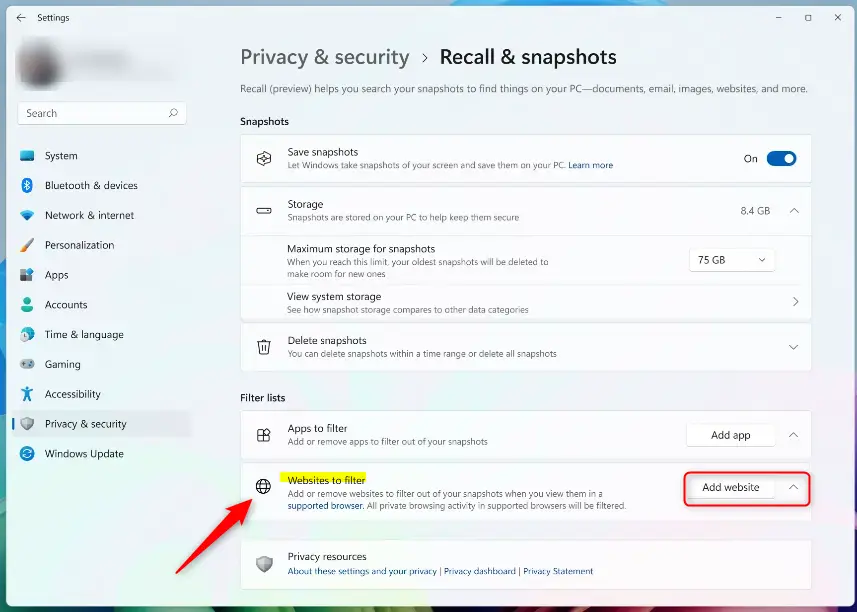
Adding websites to filter in Recall & Snapshots settings (Image: Microsoft)

Type website name and click Add to exclude it (Image: Microsoft)
That’s it! Now Recall won’t save snapshots of the websites you added to the filter list.
Why Use This Feature?
- Keep your private or sensitive websites out of Recall’s saved snapshots.
- Control what information your PC stores about your browsing history.
- Improve your privacy and feel more secure when using your computer.
Want to learn more? Visit the official Microsoft support page about privacy and control over your Recall experience.
Summary
Windows 11’s Recall & Snapshots feature takes automatic pictures of your screen to help you find things later. However, you can exclude websites you want to keep private. Most modern browsers like Microsoft Edge, Chrome, Firefox, and Opera support blocking specific websites from being saved. To exclude a website, simply go to Settings, find Privacy & Security, open Recall & Snapshots, and add the website address to the filter list. This gives you control over your privacy and keeps sensitive browsing activity out of your snapshots.
Was this guide helpful?
No comments yet — be the first to share your thoughts!