

This article explains how to turn on or off a feature with Narrator that allows it to announce the Arrow, Tab, and other navigational keys when you type in Windows 11.
Narrator is a screen-reading app built into Windows that reads the text on your screen aloud and describes events for users with low vision or blindness.
When you use the Narrator app, you can enable or disable Narrator phonetic reading, pause for punctuation, adjust how the Narrator read advanced details, adjust the way capitalized text is read, add a braille display with Narrator, change input and output language for braille with Narrator, enable the Narrator announcing function keys, modifier keys, and more.
Another feature you can change is having the Narrator announce when you type the Arrow, Tab, and other navigational keys. This feature can be turned on and off at any time.
Why use this feature? Announcing navigational keys with Narrator when typing in Windows can be helpful for individuals with visual impairments or other disabilities. It provides auditory feedback to help them navigate the interface, making it easier for them to use the computer.
Turn on or off the Narrator announcing navigational keys
Users can turn on or off the Narrator announcing navigational keys as they type in Windows. Here’s how to do it.
Step 1: Open the Settings app
First, open the Windows Settings app.
You can do this by clicking on the Start menu and selecting Settings. Or press the keyboard shortcut Windows key + I to launch the Settings app.
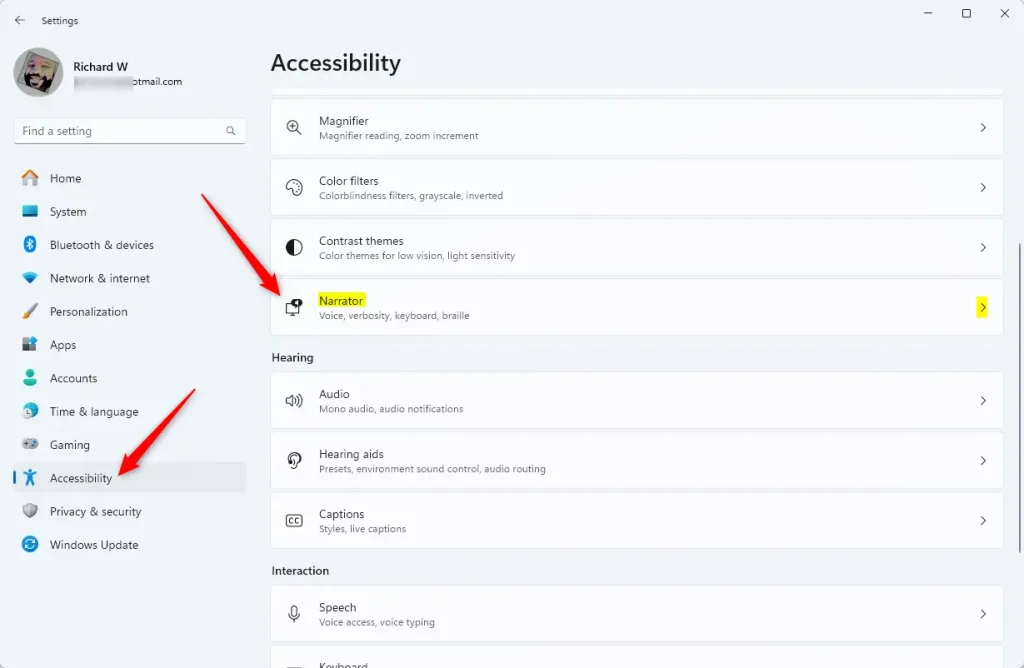
Step 2: Go to Accessibility settings
When the Settings app opens, click the Accessibility button on the left and select the Narrator tile on the right to expand it.
Step 3: Find the Narrator typing announcements
On the Narrator settings pane, under “Verbosity,” expand the “Have Narrator announce when I type” tile to access additional settings.
Step 4: Toggle the navigational keys option
You can toggle the [Arrow, Tab, and other navigational keys] option to hear these keys as you type.
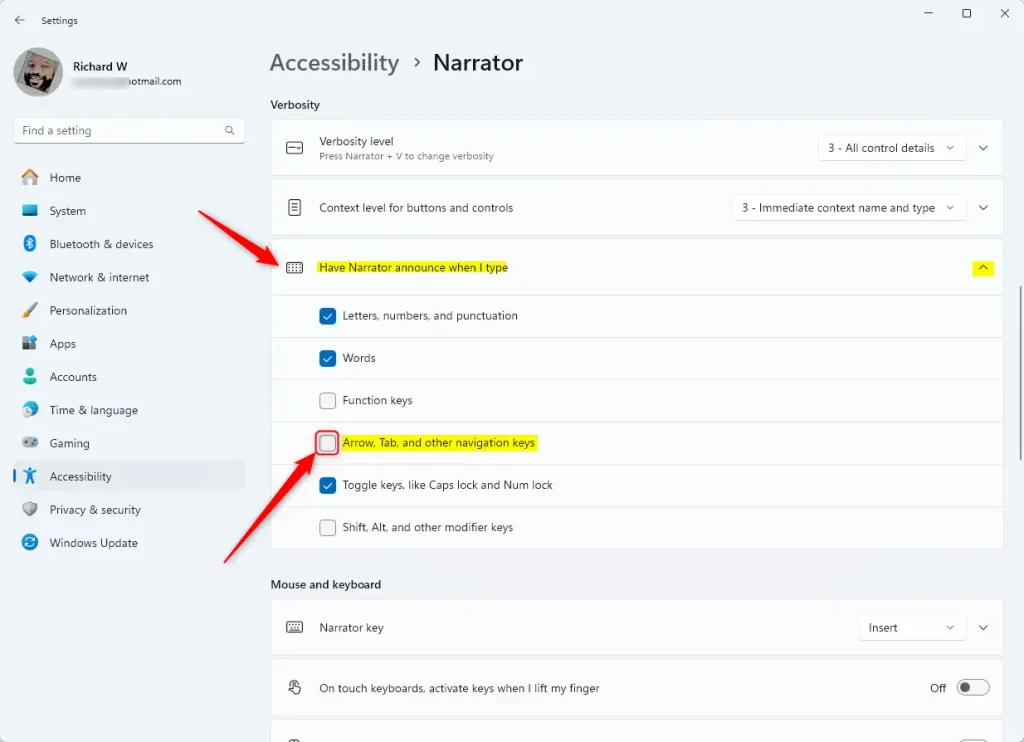
That should do it! What happens when done? The Narrator will now announce when you type navigational keys, providing you with auditory feedback as you navigate Windows 11.
Summary
Toggling the feature to announce when you type navigational keys in Windows 11 can greatly benefit users with visual impairments or other disabilities. The step-by-step guide provided in this article offers a clear and simple process to turn on or off the Narrator announcing the navigational keys feature. Navigational keys, such as the Arrow and Tab keys, play a crucial role in navigating the interface, and auditory feedback from the Narrator can enhance the user experience for individuals with specific accessibility needs.
Leave a Reply Cancel reply