How to Show or Hide Week Day in Ubuntu Top Bar


You can show or hide the weekday in the Ubuntu top bar using a simple toggle in the system settings.
The Ubuntu top bar, also known as the GNOME Shell top bar, displays essential information like time, date, and system status. By default, it often shows the time and date, but not the day of the week.
As of Ubuntu 23.10, you can easily add or remove the weekday display directly from the system settings panel, making it a quick adjustment.
This feature helps you personalize your Ubuntu desktop for better visibility or a cleaner look. Some users prefer having the weekday visible for quick reference throughout their day.
Display “Week Day” on the top bar in Ubuntu Linux
As mentioned above, users can easily display “Week Day” on the top bar in Ubuntu Linux with a single click.
Here’s how to do it.
First, click the system menu on the top right corner and select the Settings (gear) button.

In the Settings panel, the Date & Time button on the left menu.

Next, select the Week Day tile on the Date & Time settings panel. Then, toggle the switch button to the On position to display the Seconds on the clock and calendar.
To disable it, toggle the switch button to the Off position.
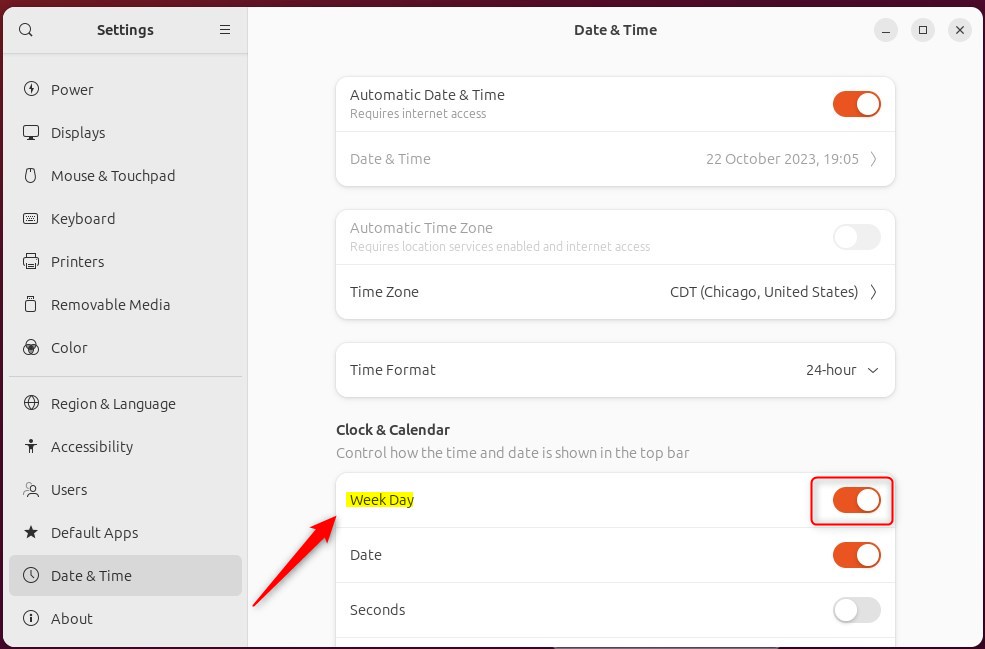
When turned on, you will see the “Week Day” on the clock top bar.
That should do it!
Conclusion:
- Adding or removing the “Week Day” on the top bar in Ubuntu Linux can be easily accomplished through the Settings panel in Ubuntu 23.10 and later.
- Users can choose whether they prefer the visibility of the weekday for personal preference or to maintain a cleaner interface.
- By following the steps outlined in this article, users can conveniently toggle the “Week Day” display on the top bar in Ubuntu Linux based on their preference.
Frequently Asked Questions
How can I show the weekday on the top bar in Ubuntu?
Is it possible to hide the weekday in Ubuntu's top bar?
What version of Ubuntu allows toggling the weekday display?
Why would someone want to hide the weekday on the top bar?
Can I display the weekday without showing the seconds in Ubuntu?
Was this guide helpful?

About the Author
Richard
Tech Writer, IT Professional
Richard, a writer for Geek Rewind, is a tech enthusiast who loves breaking down complex IT topics into simple, easy-to-understand ideas. With years of hands-on experience in system administration and enterprise IT operations, he’s developed a knack for offering practical tips and solutions. Richard aims to make technology more accessible and actionable. He's deeply committed to the Geek Rewind community, always ready to answer questions and engage in discussions.




No comments yet — be the first to share your thoughts!