How to Reset Network Adapters in Windows 11

Resetting your network adapters in Windows 11 fixes internet problems by reinstalling and reconfiguring them to default settings.
This process clears corrupted data and conflicting configurations, resolving issues like slow speeds, dropped connections, or no internet access at all.
For example, if you just installed new network drivers and are suddenly experiencing connection issues, a network adapter reset often solves the conflict.
After you perform this reset, you will need to re-enter your Wi-Fi passwords.
Open Settings, go to Network & Internet, then Advanced network settings, and finally click Network reset. Confirm the action, and your PC will restart to apply the changes, requiring you to reconnect to your Wi-Fi.
What is a Network Adapter Reset?
Resetting your network adapter in Windows 11 means telling your computer to fix any network connection problems by refreshing its network settings.
How to Reset Your Network Adapter in 🪟 Windows 11
Resetting your network adapter in Windows 11 is a straightforward process that can fix many internet issues.
- Open Windows Settings. Press
Windows key + Ion your keyboard. Or click the Start button (the Windows icon) in the bottom-left corner, then click Settings. - In the Settings window, click Network & Internet from the list on the left side.
- On the right side, scroll down and click Advanced network settings.
- Under the More settings section, click Network reset.
- Windows will ask you to confirm. Click Yes or Reset now.
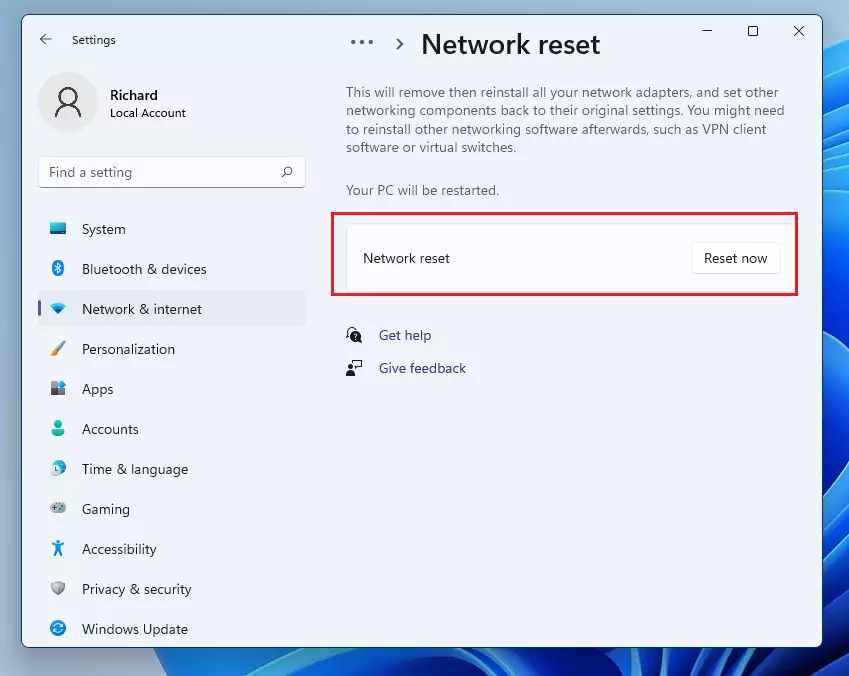
windows 11 reset network button - Your PC will restart in a few minutes to apply the changes.
Important: After your computer restarts, you will need to reconnect to your Wi-Fi network. This means selecting your Wi-Fi name and typing the password again.
Why Reset Network Adapters?
- Fixes common internet problems like no connection, slow speeds, or trouble joining networks.
- Clears out bad or old network settings that might be causing issues.
- Easy for anyone to do — no special computer skills needed!
Tips
Before you reset your network adapter in Windows 11, it’s a good idea to have your Wi-Fi password handy.Summary
In summary, resetting your network adapter in Windows 11 is a quick and easy fix for most internet connection problems.
Is it okay to reset a network adapter?
Generally, network reset should not be performed as a preferred option. A network reset will delete any installed network adapters and their Settings. After you restart your computer, all network adapters should be reinstalled and the network adapter Settings will be restored to their default values.
Should I do a network reset in 🪟 Windows 11?
Using network reset should be the last step you try. Consider using it if the steps above don't help to get you connected. This can help solve connection problems you might have after upgrading from Windows 10 to Windows 11.
Was this guide helpful?

About the Author
Richard
Tech Writer, IT Professional
Richard, a writer for Geek Rewind, is a tech enthusiast who loves breaking down complex IT topics into simple, easy-to-understand ideas. With years of hands-on experience in system administration and enterprise IT operations, he’s developed a knack for offering practical tips and solutions. Richard aims to make technology more accessible and actionable. He's deeply committed to the Geek Rewind community, always ready to answer questions and engage in discussions.

No comments yet — be the first to share your thoughts!