How Do I Enable Spotify Focus Sessions on Windows 11?

Here’s how to turn Spotify on or off within Windows 11’s Focus sessions via the Clock app.
Open the Clock app and go to Settings. Toggle the Spotify option on or off to control its integration with Focus sessions. This lets you play music during your focus time or hide the Spotify tile.
What is Focus and Why Use It?
Focus is a Windows feature that helps you concentrate by minimizing distractions, making it easier to get work done or study without interruptions.
Why Connect Spotify to Focus Sessions?
You can link your Spotify account to the Clock app. This lets you play music from Spotify while you’re in a focus session. Many people find that the right music helps them concentrate better.
What Happens When You Turn Spotify On or Off?
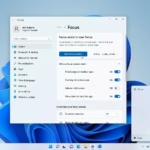
When you enable Spotify in Focus sessions, a special tile pops up on your Clock app’s Focus page. This tile lets you play music during your dedicated focus time. Turn it off, and the tile vanishes.
How to Turn Spotify On or Off in Focus Sessions
- Open the Clock app.
- Click or tap on Settings in the left pane of the Clock app.
- Turn Spotify on (this is the default setting) or off depending on what you want.
Summary
Windows 11’s Focus feature helps you concentrate by cutting down on distractions, and you can even connect Spotify to play music during your focus sessions.
What does a focus session do in 🪟 Windows 11?
A focus session in Windows 11 acts like a productivity booster, helping you concentrate by reducing digital distractions and managing your work periods.
How do I turn off focus session in 🪟 Windows 11?
To end a focus session in Windows 11, open the Clock app and go to the Focus dashboard. If a session is running, click the ‘Stop focus session’ button. You can also adjust your preferences or turn off the feature permanently in the Clock app’s Settings menu.
Is Spotify compatible with 🪟 Windows 11?
Yes, Spotify works perfectly with Windows 11. You can grab the official Spotify app from the Microsoft Store or their website. Plus, Windows 11 has built-in integration with the Clock app, letting you link your account and control your music right from your scheduled focus sessions.
How to start a jam session on Spotify on desktop?
Starting a Spotify Jam session on your desktop is simple: just pick a song or playlist, then click the ‘Connect’ device icon and choose ‘Start a Jam.’
Was this guide helpful?

About the Author
Richard
Tech Writer, IT Professional
Richard, a writer for Geek Rewind, is a tech enthusiast who loves breaking down complex IT topics into simple, easy-to-understand ideas. With years of hands-on experience in system administration and enterprise IT operations, he’s developed a knack for offering practical tips and solutions. Richard aims to make technology more accessible and actionable. He's deeply committed to the Geek Rewind community, always ready to answer questions and engage in discussions.
📚 Related Tutorials

No comments yet — be the first to share your thoughts!