How to Access Command Prompt in Windows 11

You access the Command Prompt in Windows 11 by using a keyboard shortcut or by searching for it.
Command Prompt is a command-line interpreter, a powerful text-based interface that lets you run commands to manage your PC.
For example, pressing Windows key + R, typing “cmd”, and then pressing Enter instantly opens it on any current Windows 11 version.
This tool is essential for advanced troubleshooting and system configuration tasks.
You can open Command Prompt in Windows 11 by pressing Windows key + R, typing cmd, and hitting Enter. Alternatively, press Windows key + S, type cmd, and click the Command Prompt app. Some tasks require running it as an administrator.
Open Command Prompt via Windows Terminal
You can also open Command Prompt through Windows Terminal. While it often starts with PowerShell, you can switch it over to Command Prompt.
Open Command Prompt from Windows Search
Opening the Command Prompt in Windows 11 using the search bar is the quickest method for most users.
- Open Windows Search or press the Windows key + S on your keyboard.
- Type
cmdin the search box. - Click on the Command Prompt app to open it.
Open Command Prompt from the Run Box
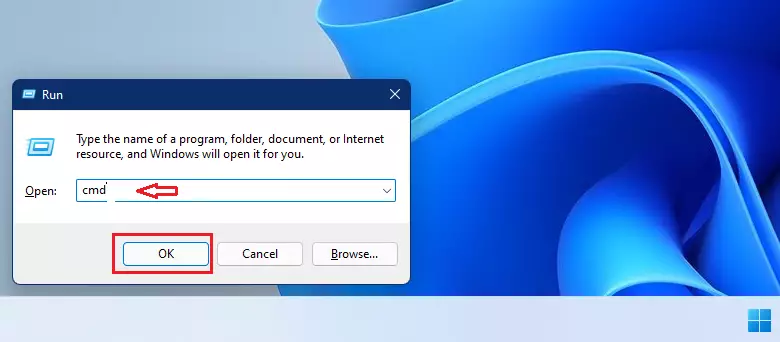
Now, let’s look at opening it from the Run box. This is a quick way to launch programs if you know their names.
- Press the Windows key + R on your keyboard.
- Type
cmdin the box. - Press Enter or click OK.
Open Command Prompt from File Explorer
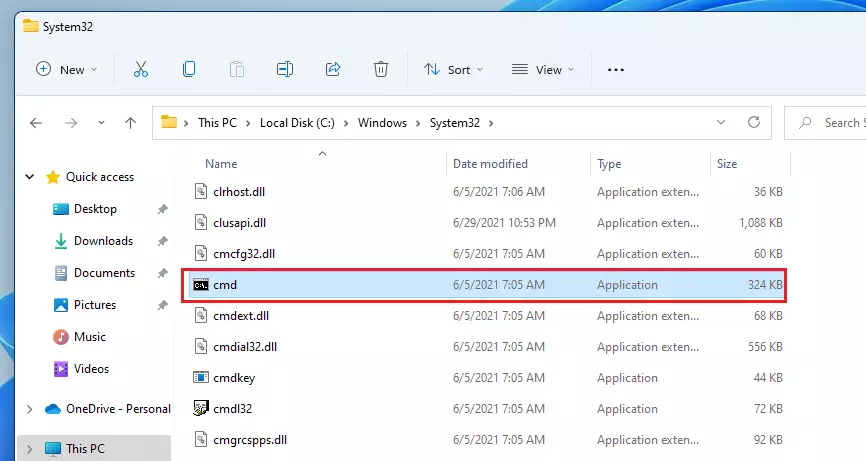
You can open the Command Prompt in Windows 11 by finding its program file directly within File Explorer.
- Open File Explore or press the Windows key + E.
- Go to this folder:
C:\Windows\System32. - Find
cmd.exeand double-click it.
Open Command Prompt using the Power User Menu
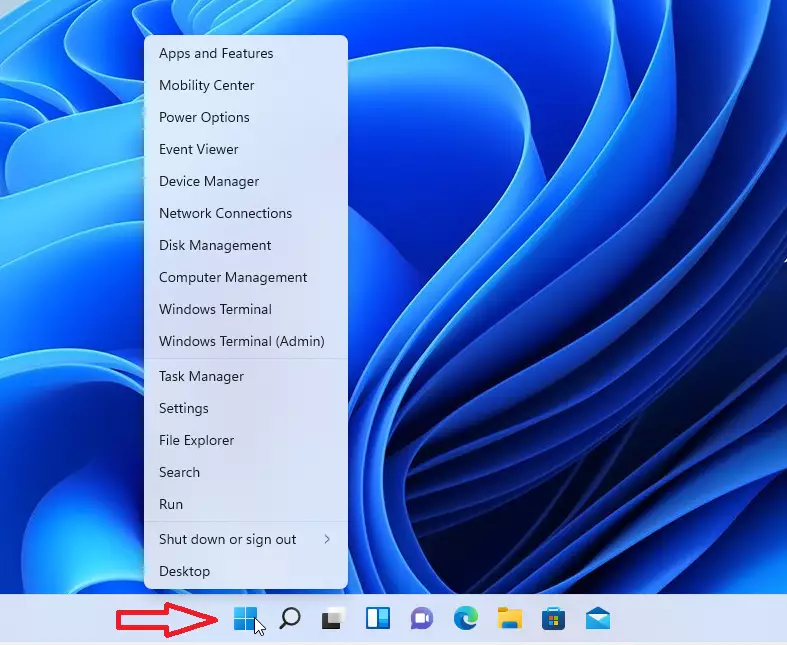
This menu gives you quick access to system tools.
- Press the Windows key + X on your keyboard or right-click the Start button.
- Select Windows Terminal from the list.
Open Command Prompt as an Administrator
Note: Some commands require special permissions to work. To do this, you need to run the app as an administrator.
Summary
- The Command Prompt is a text-based way to control your Windows 11 PC.
- You can access it through Search, the Run box, File Explorer, or the Power User menu.
- Some tasks require Administrator privileges to run successfully.
- It is a highly useful skill to learn for troubleshooting your computer.
The Command Prompt in Windows 11 is a text-based tool that lets you control your computer using typed commands.
How do I use the Command Prompt in 🪟 Windows 11?
Open Command Prompt in Windows 11 Press the Windows key + r. In the Run box, type cmd, and then click Ok. This opens the Command Prompt window.
Was this guide helpful?

About the Author
Richard
Tech Writer, IT Professional
Richard, a writer for Geek Rewind, is a tech enthusiast who loves breaking down complex IT topics into simple, easy-to-understand ideas. With years of hands-on experience in system administration and enterprise IT operations, he’s developed a knack for offering practical tips and solutions. Richard aims to make technology more accessible and actionable. He's deeply committed to the Geek Rewind community, always ready to answer questions and engage in discussions.

No comments yet — be the first to share your thoughts!