
This guide will show you how to turn on or off Narrator extensions in Windows 11. Narrator is a tool built into Windows that reads out loud what’s on your screen, helping people who have trouble seeing.
Narrator reads text and tells you about what’s happening on your screen. It’s very helpful if you have low vision or blindness.
With Narrator, you can also change how it reads text, like:
- Reading words by sound (phonetic reading)
- Pausing when there is punctuation
- Reading special details like help messages
- How capital letters are read
- Using a braille display
- Changing braille language settings
- Announcing keys you press, like function keys and modifier keys (Shift, Alt, etc.)
There’s a new, experimental feature that lets you add extensions to Narrator. These extensions can improve how Narrator works with some apps by adding extra features. When you turn this on, Windows will check for new extensions every time Narrator starts.
How to Turn On or Off Narrator Extensions in Windows 11
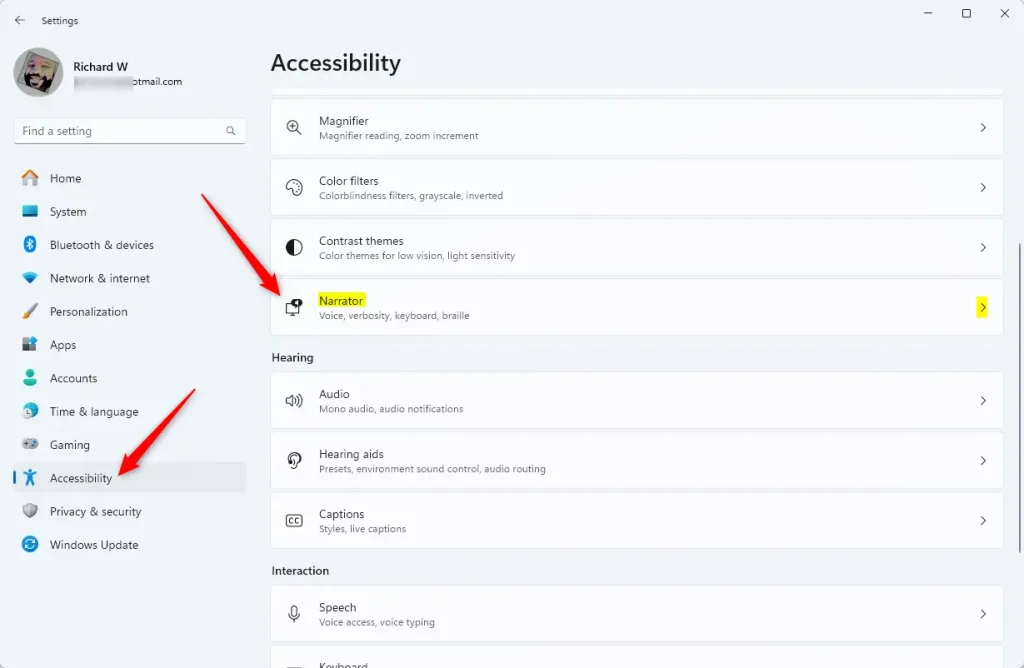
Follow these simple steps to enable or disable the Narrator extensions feature:
- Open Settings: Click the Start menu (the Windows icon in the bottom-left corner), then click Settings.
Or, press the keyboard shortcut Windows key + I to open Settings quickly. - In the Settings window, click on Accessibility in the left menu.
- On the right side, scroll down and click on Narrator to open its settings.
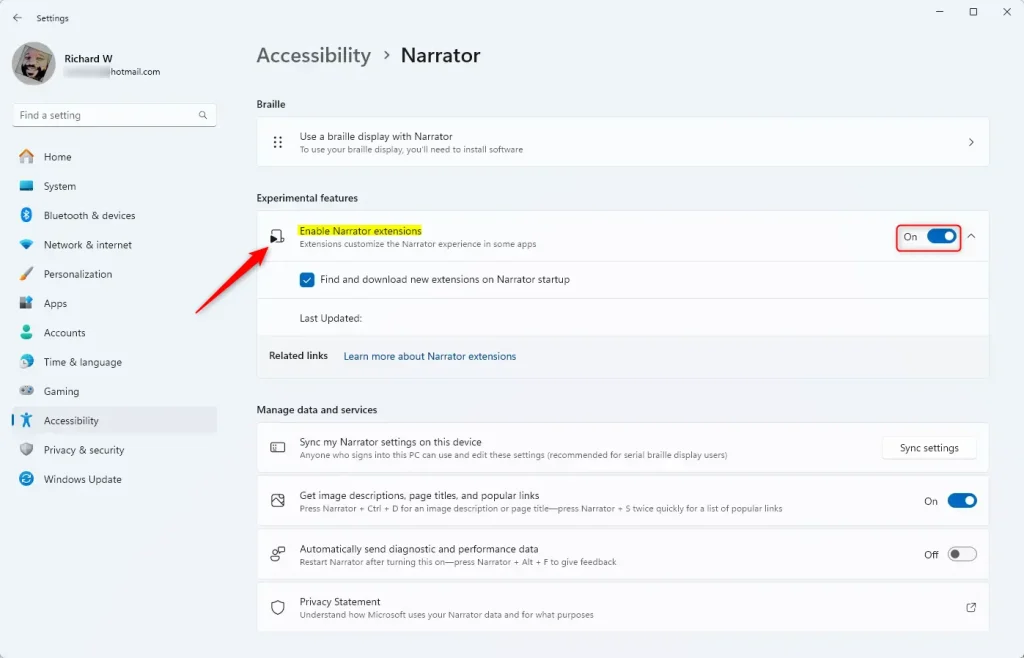
- Look for the section called Experimental Features.
- Find the option Enable Narrator extensions and toggle the switch to On to enable it or Off to disable it.
- Click the arrow next to this option to expand it, and you can check or uncheck the box for “Find and download new extensions on Narrator startup” if you want Windows to update extensions automatically.
Here are some screenshots to help you:
That’s all! You have successfully turned on or off Narrator extensions.
Why Use Narrator Extensions?
- Extensions can make Narrator work better with specific apps.
- They add new features that can improve your experience.
- Enabling extensions can help make Windows easier to use if you rely on Narrator.
If you want to learn more about Narrator and other helpful tips, check out this detailed guide.
Leave a Reply