How to Verify WiFi 6 Support on Windows 11

You verify WiFi 6 support on Windows 11 by checking your network adapter’s properties within Device Manager.
WiFi 6, also known as 802.11ax, is the current standard for wireless networking, designed to offer faster speeds and better performance, especially in busy environments with many connected devices.
It provides significant improvements over older standards like WiFi 5 (802.11ac) by enabling features like OFDMA and MU-MIMO for more efficient data transmission.
To confirm your Windows 11 PC supports WiFi 6, you need to find your wireless network adapter and examine its specifications for the 802.11ax protocol. This ensures you can take advantage of enhanced security and faster internet speeds.
You can verify WiFi 6 support by opening Command Prompt as administrator and typing “netsh wlan show drivers”. Look for “802.11ax” listed under “Radio types supported” to confirm compatibility. Alternatively, check your wireless adapter’s properties in Device Manager.
Check for Windows Updates
Before checking your hardware, ensure your system is up to date. Windows 11 needs the latest drivers to recognize new hardware features. Click the Start button, go to Settings, select Windows Update, and click Check for updates. Learn more about updating your system here How to update Windows 11.
Check Hardware Compatibility via Command Line
You can easily check if your computer’s hardware supports WiFi 6, or 802.11ax, using a simple command in Windows.
- Open the Command Prompt (run as administrator). [Requires Admin Privileges]
- Type the following command and press Enter:
netsh wlan show drivers- Look for the line labeled Radio types supported.
- If you see 802.11ax, your hardware supports WiFi 6.
Using Device Manager for Adapter Details
Device Manager provides a straightforward visual method to see if your network adapter is compatible with WiFi 6 (802.11ax).
- Right-click the Start button and select Device Manager.
- Expand the Network adapters section.
- Right-click your wireless adapter (often labeled with Intel, Qualcomm FastConnect, or Realtek) and select Properties.
- Go to the Advanced tab and look for 802.11ax or Wireless Mode settings.
Troubleshooting Missing WiFi 6
If your router supports WiFi 6 but your computer doesn’t seem to connect, checking drivers and router settings can often fix the issue.
- Driver Issues: Visit your laptop manufacturer’s website to download the latest network adapter drivers.
- Router Compatibility: Ensure your router is actually broadcasting a WiFi 6 signal. Some routers require you to enable 802.11ax mode in the router settings.
- WPA3 Security: Some WiFi 6 features require WPA3 authentication. Check if your router is set to WPA2/WPA3 mixed mode.
Check Your Current Connection
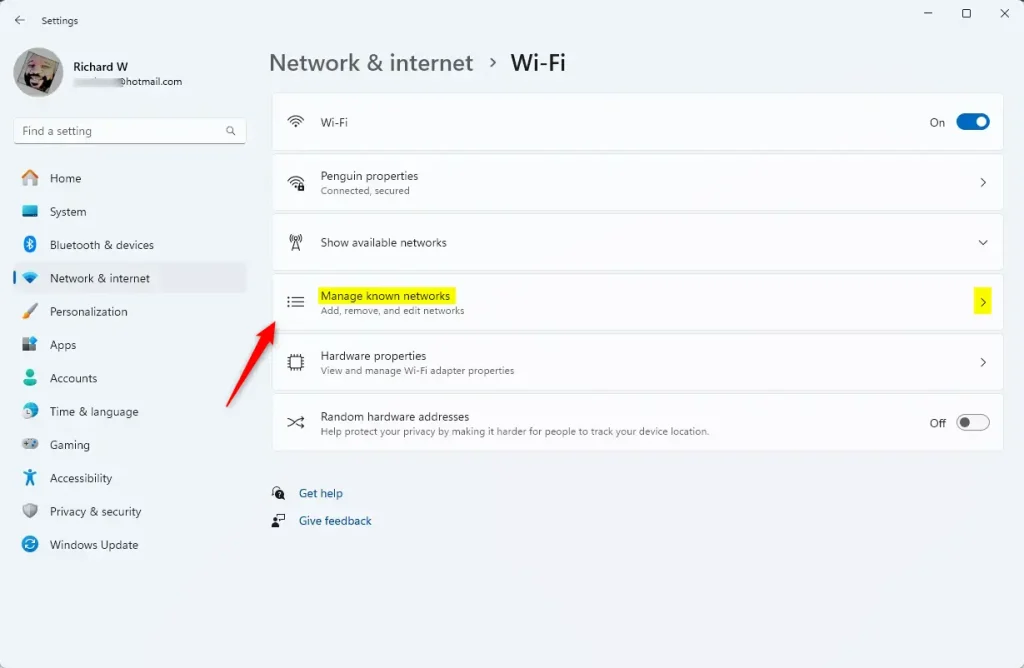
- Click the WiFi icon on your taskbar or go to Settings > Network & internet > WiFi.
- Select Manage WiFi connections.
- Click Properties next to your current network name.
- Look for the Protocol field. It will display WiFi 6 (802.11ax) if you are actively connected via the WiFi 6 standard.
Summary
Verifying WiFi 6 support on Windows 11 is simple using the command line or Device Manager to check your hardware.
Does 🪟 Windows 11 require a specific driver for WiFi 6?
Yes, Windows 11 requires a driver that supports the 802.11ax protocol. If your driver is outdated, the operating system may not be able to utilize the WiFi 6 features of your hardware. Always check the manufacturer’s website for the latest driver updates to ensure full compatibility and performance.
Why does my settings show WiFi 6 but my router is WiFi 6E?
This usually happens because your computer’s wireless adapter only supports WiFi 6 (802.11ax) and not the 6GHz band required for WiFi 6E. While you can connect to the router, you are limited to the 2.4GHz or 5GHz bands and cannot access the faster 6GHz frequency reserved for 6E devices.
Was this guide helpful?

About the Author
Richard
Tech Writer, IT Professional
Richard, a writer for Geek Rewind, is a tech enthusiast who loves breaking down complex IT topics into simple, easy-to-understand ideas. With years of hands-on experience in system administration and enterprise IT operations, he’s developed a knack for offering practical tips and solutions. Richard aims to make technology more accessible and actionable. He's deeply committed to the Geek Rewind community, always ready to answer questions and engage in discussions.


[…] Our previous post showed you how to join a Wi-Fi network and provided tips on verifying if your Windows 11 device supports Wi-Fi 6 WLAN. […]