
This article explains how to install UNetbootin on Ubuntu 24.04.
UNetbootin is a time-saving tool for users who want to create bootable USB drives to install the OS of their choice or run live sessions. Installing UNetbootin simplifies setting up a USB stick with various Linux distributions, allowing users to quickly select an ISO image, configure the USB drive, and make it bootable.
This tool can create a bootable USB drive for an operating system. It runs excellently in Ubuntu; the steps below show you how to do it.
Run UNetbootin without installing
You can run the UNetbootin tool on Ubuntu without installing it. If you only need to run it once to create a bootable USB drive, run it without installing it.
To do that, visit the UNetbootin download page.
Download the binary version for your system.
You can also use the terminal to download the file. Run the command below to do it.
wget https://github.com/unetbootin/unetbootin/releases/download/702/unetbootin-linux64-702.bin
Next, run the command below to make the file executable then run it.
chmod +x ./unetbootin-linux*
sudo ./unetbootin-linux*
Use it to make a bootable drive.
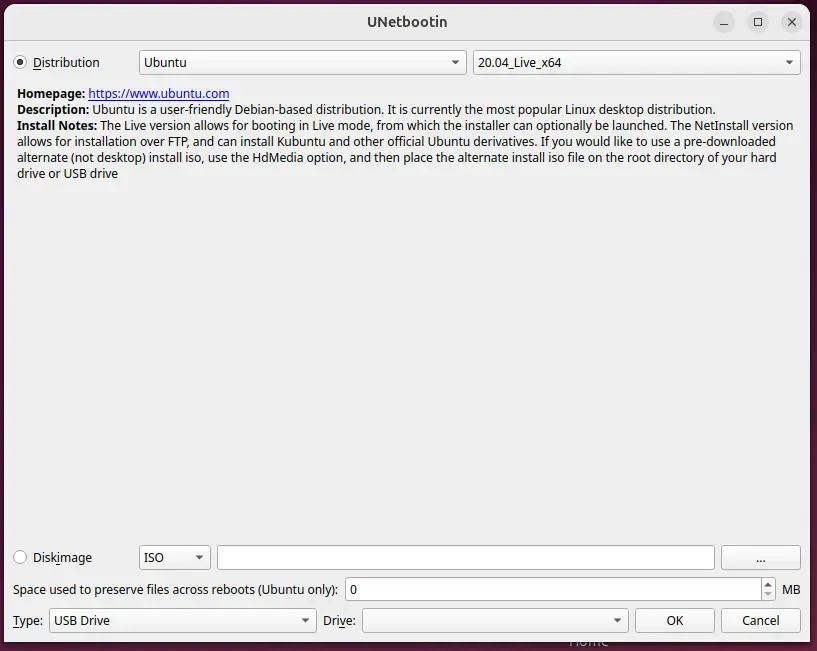
Install UNetbootin on Ubuntu
If you wish to install UNetbootin on Ubuntu, use the steps below. Installing is helpful if you often create bootable USB drives.
First, run the command below to add its personal PPA package repository to Ubuntu.
sudo add-apt-repository ppa:gezakovacs/ppa
Next, run the command below to update Ubuntu packages and install UNetbootin.
sudo apt-get update
sudo apt-get install unetbootin
That should do it!
Conclusion:
In summary, UNetbootin is an effective tool for creating bootable USB drives on Ubuntu. Here are the key takeaways:
- Versatility: It supports a variety of Linux distributions, making it useful for different users.
- Ease of Use: Both the runnable and installable versions are straightforward to use.
- Time-Saving: Quickly set up USB drives for installations or live sessions without complications.
- PPA Support: The availability of a Personal Package Archive simplifies the installation process.
- Accessibility: It can be run directly from the download link, freeing users from the need for installation if needed only once.
Following the instructions, you can effectively utilize UNetbootin to enhance your operating system experience.

Leave a Reply