

This article explains how to view the history of your Microsoft Account purchase order.
Your Microsoft Account records all the transactions made using that account. This includes purchases of software, apps, games, subscriptions (like Microsoft 365), and digital content from the Microsoft Store. Users can view details such as the date of purchase, the items bought, payment methods used, and any order status updates.
If you want to know all the purchases made through your Microsoft account, the steps below can help you.
You can then use the record to reconcile your bank or credit card statements.
View your Microsoft account purchases
As mentioned above, users can view all purchases through their Microsoft account.
Here’s how to do it.
First, open the Windows Settings app.
You can do that by clicking on the Start menu and selecting Settings. Or press the keyboard shortcut (Windows key + I) to launch the Settings app.
When the Setting app opens, click the Account button on the left and select the Order history tile to open your order history online.
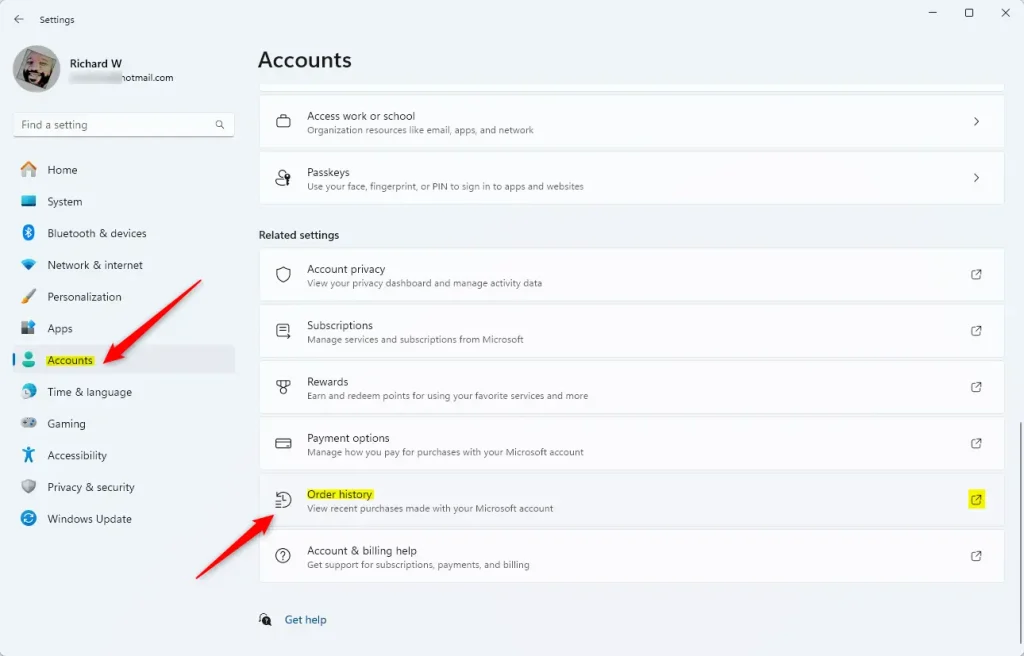
Alternatively, sign in to your Microsoft account and select the Order history page.
Once on the order history page, select the order type category you want to see in the View drop menu. Then, choose the order time frame to list some or all available orders from the Ordered within drop menu.
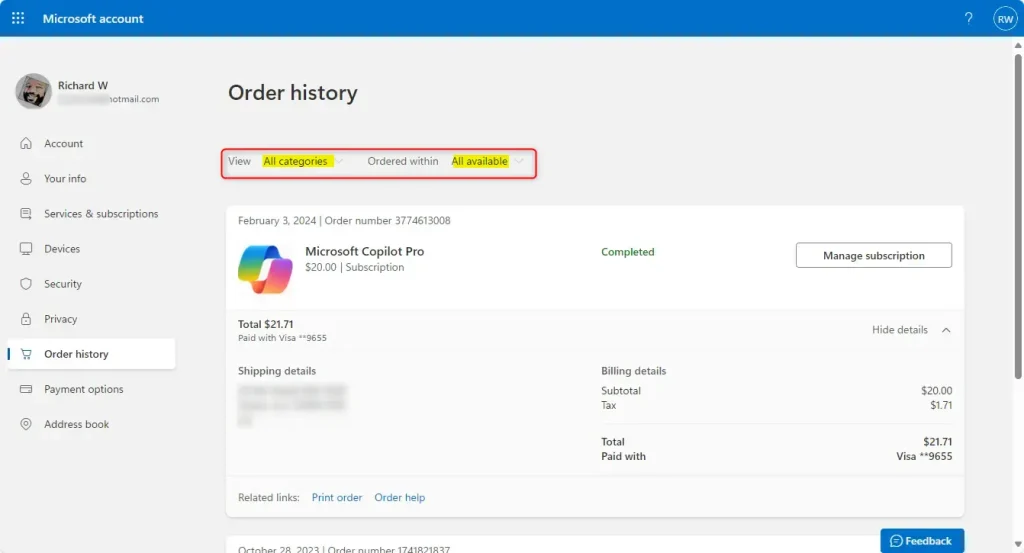
You can select Show details for an order item to see more available options and details.
That should do it!
Conclusion:
In summary, viewing your Microsoft Account purchase history is a straightforward process that allows you to manage and track your digital transactions effectively. Here are the key takeaways:
- Your Microsoft Account keeps a detailed log of all purchases, including software, apps, games, and subscriptions.
- You can easily access your order history through the Windows Settings app or directly via the Microsoft Account website.
- Options to filter by order type and time frame enable you to find specific transactions quickly.
- Reviewing your purchase history can help reconcile bank and credit card statements, ensuring accurate financial tracking.
Following these steps lets you stay informed about your purchases and manage your digital assets efficiently.

Leave a Reply