How to Enable PowerToys Text Extractor in Windows 11

You enable PowerToys Text Extractor in Windows 11 by opening PowerToys settings and activating the Text Extractor module.
PowerToys Text Extractor is a utility that uses optical character recognition (OCR) to capture text directly from your screen, allowing you to copy it into your clipboard.
This feature lets you grab text from any application, including images and even some videos, eliminating the need for manual typing. For example, you can extract text from a screenshot of a website or an older application that doesn’t allow direct text selection.
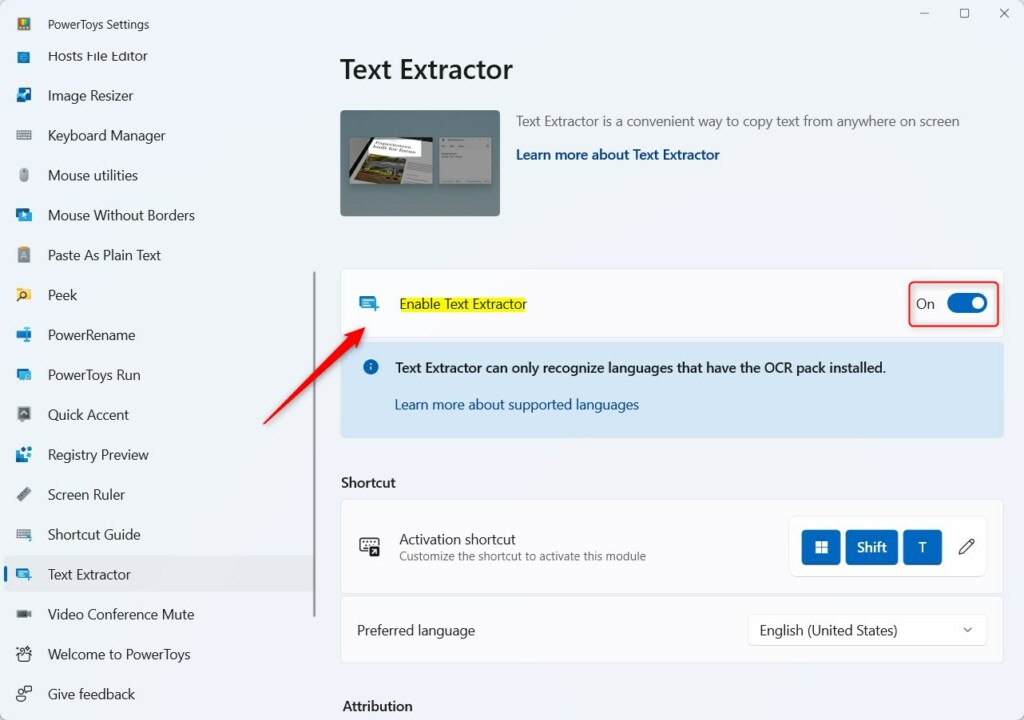
Open PowerToys, select Text Extractor from the left menu, and toggle the “Enable Text Extractor” switch to On. You can then use the shortcut Windows Key + Shift+T to capture text from your screen.
How to Turn Text Extractor On or Off
You can easily turn the PowerToys Text Extractor on or off right from the PowerToys app settings.
On the right side of the screen, find the Enable Text Extractor box. Click the switch to turn it On. To turn it off later, just click the switch back to Off.
How to Use Text Extractor
Using the PowerToys Text Extractor is simple: just press Windows Key + Shift+T to start capturing text from your screen.
How to Install OCR Language Packs
PowerToys Text Extractor needs language packs to read text in languages other than English, so you’ll want to install them in Windows settings.
1. Open Settings and go to Time & language > Language & region.
2. Click Add a language and select your preferred language.
3. Ensure the Language pack option is checked and click Install.
You can check which languages your computer supports by using PowerShell. Note: This step requires admin privileges.
[Windows.Media.Ocr.OcrEngine, Windows.Foundation, ContentType = WindowsRuntime]
Troubleshooting and Advanced Usage
If the tool is not working, ensure PowerToys is running in the background. Check your OCR configuration in the PowerToys settings menu. If you prefer a different shortcut, you can change it in the Text Extractor settings under Activation shortcut.
Summary
The PowerToys Text Extractor is a handy tool that lets you copy text from anywhere on your screen, like images or documents.
Why is Text Extractor not working on my screen?
If your PowerToys Text Extractor isn’t working, check that the PowerToys app is running and that no other app is using the same shortcut.
Does PowerToys Text Extractor support non-English languages?
Yes, it supports many languages. It relies on the OCR language packs installed on your Windows system. If you need to extract text in a specific language, ensure that the corresponding language pack is fully downloaded and installed through your Windows Language & region settings menu.
Can I use Text Extractor on videos?
Yes, you can use it on videos. Simply pause the video at the frame containing the text you need. Activate the tool with the keyboard shortcut, draw a box around the text, and it will be copied to your clipboard just like text from a static image.
Was this guide helpful?

About the Author
Richard
Tech Writer, IT Professional
Richard, a writer for Geek Rewind, is a tech enthusiast who loves breaking down complex IT topics into simple, easy-to-understand ideas. With years of hands-on experience in system administration and enterprise IT operations, he’s developed a knack for offering practical tips and solutions. Richard aims to make technology more accessible and actionable. He's deeply committed to the Geek Rewind community, always ready to answer questions and engage in discussions.




No comments yet — be the first to share your thoughts!