How to Auto-Open Xbox Controller Bar and Xbox Mode on Windows 11

You can auto-open the Xbox Controller Bar and Xbox Mode on Windows 11 by enabling a specific setting within the Xbox Game Bar. The Xbox Controller Bar is a streamlined interface that appears automatically when you connect an Xbox controller, offering quick access to gaming features without needing your mouse and keyboard.
This feature is especially handy for handheld PCs like the Asus ROG Ally X, enhancing their console-like functionality. By activating this option, your gaming setup becomes more fluid.
The controller interface will immediately display upon plugging in your gamepad, allowing you to dive into your games faster.
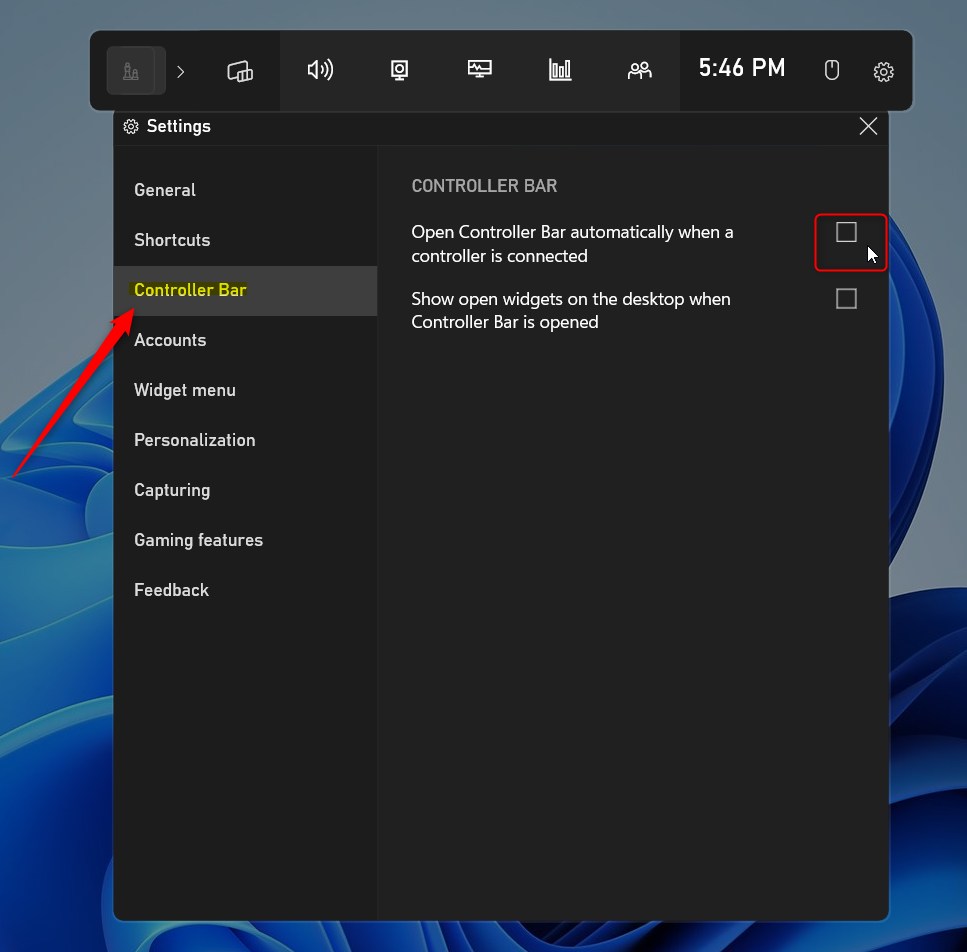
Open the Xbox Game Bar (Windows key + G), go to Settings, select the Controller Bar tab, and check “Open Controller Bar automatically when a controller is connected.” This ensures the controller-friendly interface launches when you connect your gamepad.
Xbox Game Bar vs. Xbox Mode: What is the difference?
The Xbox Game Bar is an overlay you see on your desktop, while Xbox Mode is a full-screen view that works best with a controller, like on an Xbox console.
System Requirements and Compatibility
Xbox Mode works best on the latest Windows 11 updates, especially if you’re in the Insider Preview program, and it’s great for handheld PCs that feel like a console.
How to enable the automatic Controller Bar
To make the Xbox Controller Bar open automatically on Windows 11, you just need to change one setting in the Xbox Game Bar itself.
- Open the Xbox Game Bar by pressing the Windows key + G on your keyboard.
- Click the Settings (gear icon) button inside the Game Bar menu.
Note: You must have a user account with standard permissions to access these settings. [ADMIN PRIVILEGES REQUIRED: If you are unable to save settings, ensure your user profile has administrative rights to modify system-wide app configurations.]
- On the left side of the window, click on the Controller Bar tab.
- On the right side, under the CONTROLLER BAR section, check the box that says “Open Controller Bar automatically when a controller is connected.”
Troubleshooting and Updates
If your Controller Bar isn’t showing up, first check the Microsoft Store for updates, as this often fixes the problem.
Summary
Setting the Controller Bar to open automatically in Windows 11 makes your gaming feel more like a console, giving you better control over your hardware.
How do I update my PC to support the new Xbox Controller interface?
To support the latest controller-optimized interface, ensure your Windows 11 is fully updated via Windows Update. Additionally, open the Microsoft Store, go to your Library, and click ‘Get updates’ to ensure the Xbox Game Bar app is running the latest version compatible with your hardware.
Can I disable the Xbox Controller Bar if I prefer the standard desktop?
Yes, you can disable it. Open the Xbox Game Bar using Windows key + G, navigate to the Settings menu, select the Controller Bar tab, and uncheck the box labeled ‘Open Controller Bar automatically when a controller is connected.’ This restores your standard desktop behavior.
Was this guide helpful?

About the Author
Richard
Tech Writer, IT Professional
Richard, a writer for Geek Rewind, is a tech enthusiast who loves breaking down complex IT topics into simple, easy-to-understand ideas. With years of hands-on experience in system administration and enterprise IT operations, he’s developed a knack for offering practical tips and solutions. Richard aims to make technology more accessible and actionable. He's deeply committed to the Geek Rewind community, always ready to answer questions and engage in discussions.
No comments yet — be the first to share your thoughts!