Enable Early Edge Releases: A Guide for Windows Insider Users

You can enable early Microsoft Edge releases to get the newest features before they officially launch.
This setting allows Windows Insider Program members on the Beta or Dev channels to access bleeding-edge Edge updates directly, bypassing the need for separate Canary builds.
Microsoft Edge, now built on Chromium, is the default Windows 11 browser, and you control these early releases from within its settings menu. New features often roll out on a four-week cycle.
By activating this option, you can experiment with upcoming browser changes and share your feedback, directly influencing Edge’s development.
Open Microsoft Edge, go to Settings and more (…), then About Microsoft Edge. Toggle “Preview Microsoft Edge releases early” to the On position to enable early access. Restart the browser to apply the changes.
Enable or disable “Preview Microsoft Edge releases early”
Windows Insiders can turn on “Preview Microsoft Edge releases early” to get new features before anyone else, right in their regular Edge browser. You don’t need to download a separate Canary version to try these early Edge releases. Here’s how to switch this setting on or off.
You can test out the feature without downloading the Canary version of Edge.
Here’s how to do it.
First, open Microsoft Edge.
Then, look for the ‘Settings and more’ icon – those three dots (…) in the top right corner – and click it to open the Settings menu. You can also press Alt+F.
On the Settings page, find the left-hand panel and click on the About Microsoft Edge button.
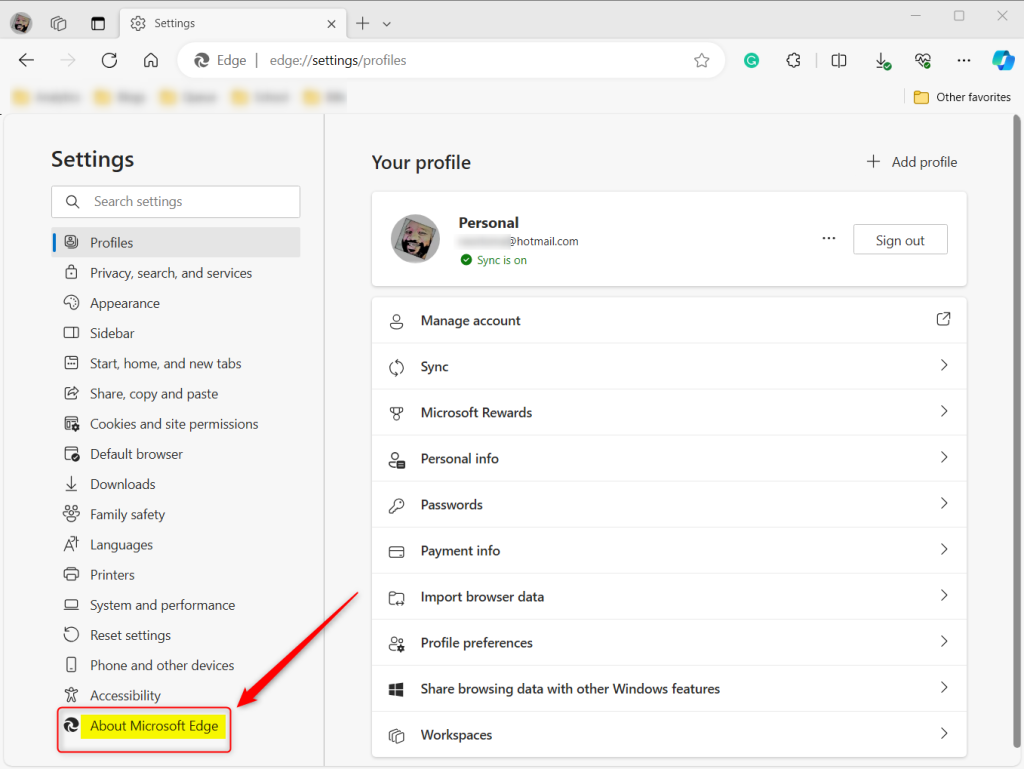
Now, on the right side, under the ‘About’ section, you’ll see the “Preview Microsoft Edge releases early” tile. Toggle the switch button to the On position to enable it.
To disable it, toggle the switch button to the Off position.
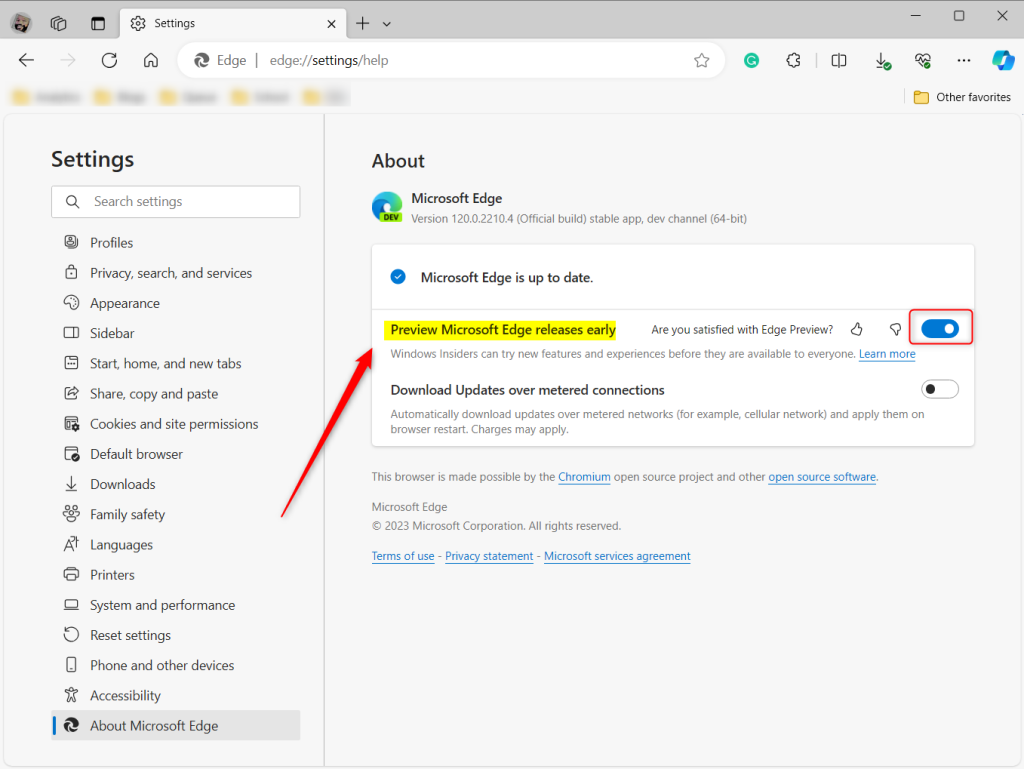
You will be prompted to restart to apply the changes.
That should do it!
Reference:
Conclusion:
- Enabling early releases of Microsoft Edge provides access to new features and updates before their public release
- Testing new features before they become widely available allows users to stay up-to-date and provide valuable feedback to improve the overall browsing experience
- By following the steps above, users can easily enable or disable “Preview Microsoft Edge releases early” and stay informed about the latest developments in the Microsoft Edge browser.
Was this guide helpful?

About the Author
Richard
Tech Writer, IT Professional
Richard, a writer for Geek Rewind, is a tech enthusiast who loves breaking down complex IT topics into simple, easy-to-understand ideas. With years of hands-on experience in system administration and enterprise IT operations, he’s developed a knack for offering practical tips and solutions. Richard aims to make technology more accessible and actionable. He's deeply committed to the Geek Rewind community, always ready to answer questions and engage in discussions.


[…] with Snipping Tool (version 11.2503.27.0) for Windows Insiders channels, Microsoft has added a text extractor feature designed to simplify the process of […]