How to Check if Your Windows 11 PC is Protected by LSA

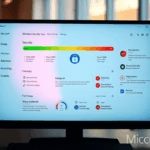
You check if your Windows 11 PC is protected by LSA Protection by looking for the LSA Protection setting in your Windows Security app.
LSA Protection, also known as Local Security Authority Protection, is a crucial security feature in Windows that helps prevent malicious actors from tampering with sensitive security data. Enabling it guards against credential theft and other sophisticated attacks.
For instance, LSA Protection is a critical defense against credential harvesting malware that attempts to steal passwords and authentication tokens stored by the Local Security Authority Subsystem Service (LSASS).
If the setting is toggled on, your system is actively protected. You can confirm this by navigating to Windows Security > Device security > Core isolation details.
You can check LSA Protection in Windows Security under Device security > Core isolation details. If the setting is toggled on, your system is protected. Alternatively, open Event Viewer and filter for Event ID 12 from the Wininit source to see if LSASS.exe is running as a protected process.
What is LSA Protection?
LSA Protection is a key Windows security feature that helps keep your computer’s sensitive information, like passwords and login details, safe from hackers.
LSA Protection adds an extra layer of security. It runs this important part of your computer in a special protected mode. This makes it much harder for hackers or bad software to break in and tamper with it.
Windows also has another protection called Core Isolation, which works in a similar way to keep your PC safe.
How to Check if LSA Protection is On
You can easily check if LSA Protection is on in Windows 11 by using the Event Viewer tool to look at your system’s logs.
- Open Event Viewer: Click the Start button, type
eventvwr.msc, and press Enter.Event Viewer System View - Find System Logs: In the left panel, click the arrow next to Windows Logs to expand it. Then click on System.
- Filter the Logs: Right-click on System and choose Filter Current Log…
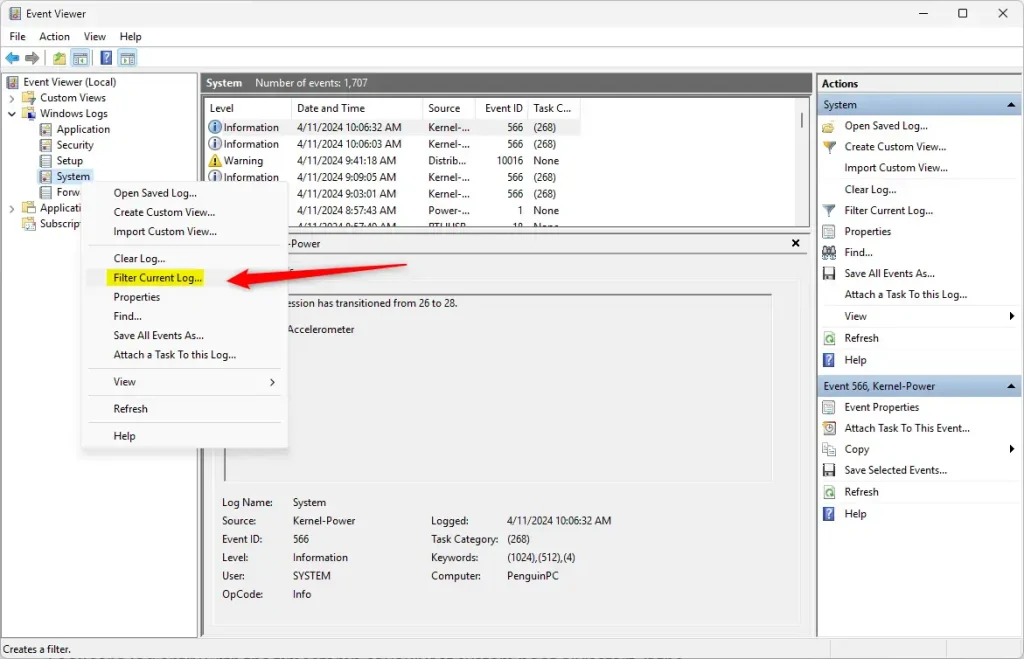
Filter Current Log in Event Viewer - Enter Filter Details: In the filter box, type
12in the Event IDs box. Then click the dropdown for Event sources and select Wininit. Click OK.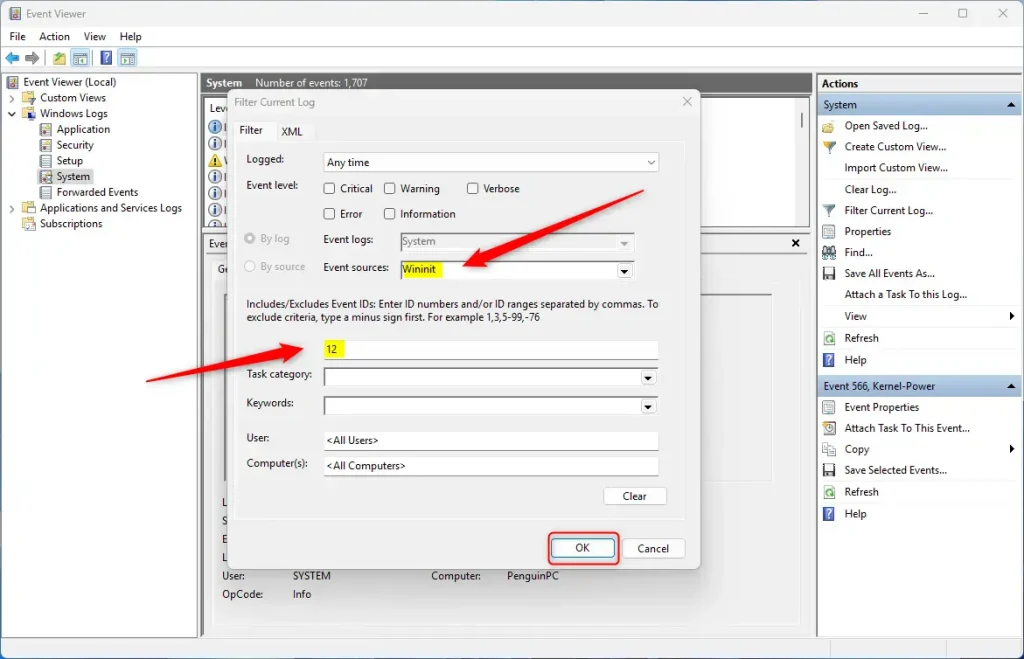
Set Event ID and Source Filter - Check the Log Message: Look for a message that says: “LSASS.exe was started as a protected process with level 4”. This message means LSA Protection is active on your PC.
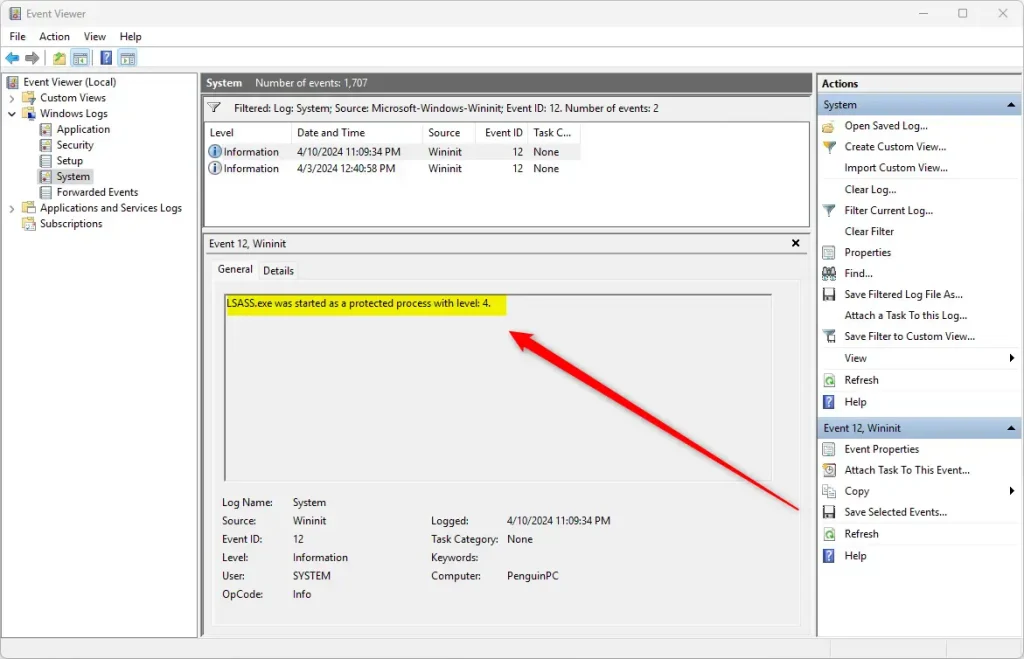
LSASS Protected Process Log
That’s it! If you see that message, your computer is better protected against attacks that target the security process.
Why Does This Matter?
Having LSA Protection turned on means your computer’s security information is much harder for hackers to steal, giving you peace of mind.
Checking this yourself gives you peace of mind that your PC is secure. It’s a good habit to check security features regularly to stay protected.
If you want to learn more about Windows security features, check out this guide on Core Isolation.
Summary
LSA Protection is a vital Windows security feature that shields your passwords and login details, and you can confirm it’s active using Event Viewer.
Should I turn on LSA in 🪟 Windows 11?
LSA protection makes LSASS more secure. This security feature runs LSASS as a protected process (PPL), which prevents untrusted code (even with administrative rights) from injecting into it.
What is LSA in 🪟 Windows 11?
Local Security Authority (LSA) protection Windows has several critical processes to verify a user's identity. Verification processes include Local Security Authority (LSA), which is responsible for authenticating users, and verifying Windows sign-ins.
What does LSA protection do?
LSA performs security related tasks such as the verification of logon attempts and password changes. It also creates access tokens, enforces local security policies, and protects and adds security protection for stored credentials.
What is LSA protection set to enabled?
Enabling this setting provides added security for the credentials that LSA stores and manages. Impact: If additional LSA protection is enabled, Administrators will not be able to debug a custom LSA plugin. A debugger cannot be attached to LSASS when it's a protected process.
Was this guide helpful?

About the Author
Richard
Tech Writer, IT Professional
Richard, a writer for Geek Rewind, is a tech enthusiast who loves breaking down complex IT topics into simple, easy-to-understand ideas. With years of hands-on experience in system administration and enterprise IT operations, he’s developed a knack for offering practical tips and solutions. Richard aims to make technology more accessible and actionable. He's deeply committed to the Geek Rewind community, always ready to answer questions and engage in discussions.


No comments yet — be the first to share your thoughts!