
Do you use Windows 11 and want your computer to read out loud the keys you press? Keys like Arrow, Tab, and others can be announced as you type. This guide shows you how to turn this feature on or off.
What Is Narrator?
Narrator is a tool built into Windows that reads what’s on your screen out loud. It helps people who have trouble seeing or reading text.
Narrator can also announce special keys you press. This includes arrow keys and the tab key. You’ll know exactly what you’re typing and navigating.
Why Use This Feature?
- It helps people who have trouble seeing by speaking which keys they press.
- It makes typing easier if you listen for sound feedback.
- Arrow and Tab keys help move through menus and text. Hearing them improves your experience.
How to Turn On or Off Narrator Announcing Keys
Follow these simple steps to enable or disable Narrator announcing keys like Arrow and Tab:
- Open Windows Settings: Click the Start menu (Windows icon at the bottom left) and select Settings. Or press
Windows key + Ion your keyboard. - Go to Accessibility: In the Settings window, click Accessibility on the left sidebar.
- Open Narrator settings: Scroll down and click Narrator on the right panel to see options.
- Find “Have Narrator announce when I type”: Under the Verbosity section, click the arrow next to Have Narrator announce when I type to open more options.
- Turn on or off announcing keys: Look for the option that says Arrow, Tab, and other navigational keys and toggle the switch to turn it ON or OFF.
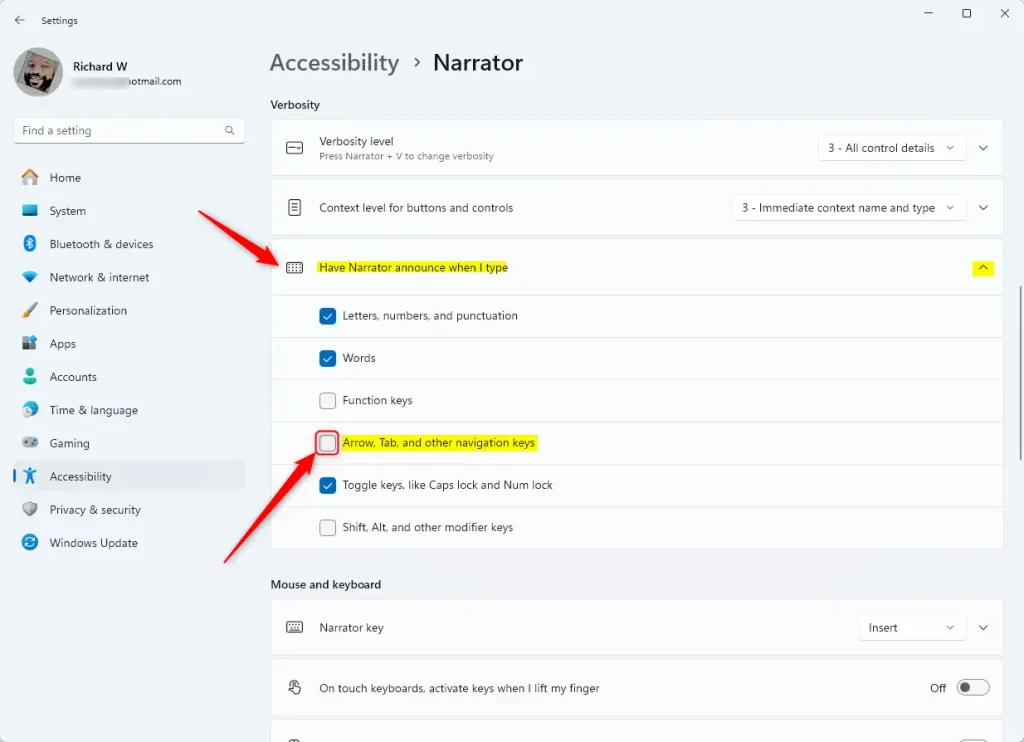
That’s it! Now your Narrator will speak (or stop speaking) the Arrow, Tab, and other keys as you type.
What Happens When You Enable This?
Once turned on, your computer will announce each navigational key you press. This gives you spoken feedback while you work. Turn it off if you find it annoying or distracting.
For more tips on using Narrator and making Windows easier to use, visit the full Narrator guide.
Summary
Narrator announcing keys is a helpful accessibility feature in Windows 11. It reads out loud when you press navigation keys like Arrow and Tab. You can turn this on or off in Settings by going to Accessibility > Narrator > Have Narrator announce when I type. Then toggle the switch next to Arrow, Tab, and other navigational keys. This feature helps people who have trouble seeing and makes keyboard navigation easier by providing spoken feedback.


Leave a Reply Cancel reply