How to Turn On or Off End of Session Sound in Windows 11 Focus

You turn off the end-of-session sound in Windows 11 Focus to stop the audible notification that plays when your Focus timer concludes.
Windows 11’s Focus feature is designed to enhance your concentration by limiting distractions. It works hand-in-hand with the Clock app, allowing you to schedule and manage your work intervals. When a Focus session finishes, a specific sound plays by default.
This distinct chime signals the completion of your dedicated work time. By disabling this sound, you create a more serene environment, which is particularly useful if you find the alert disruptive during deep work.
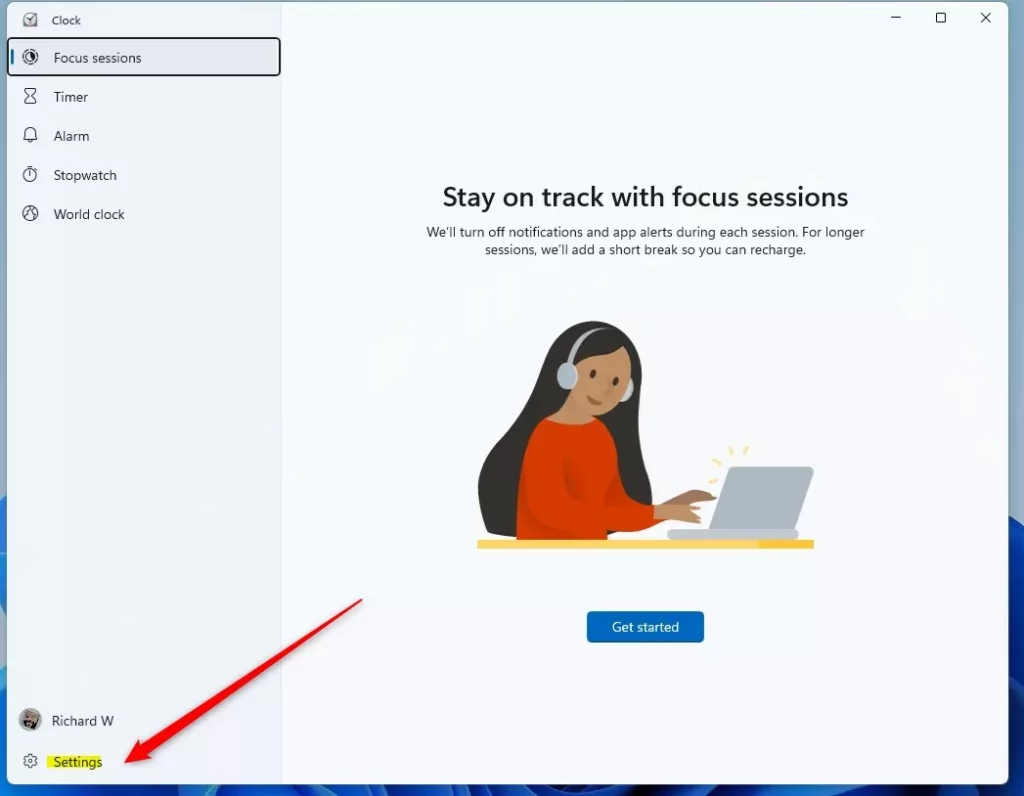
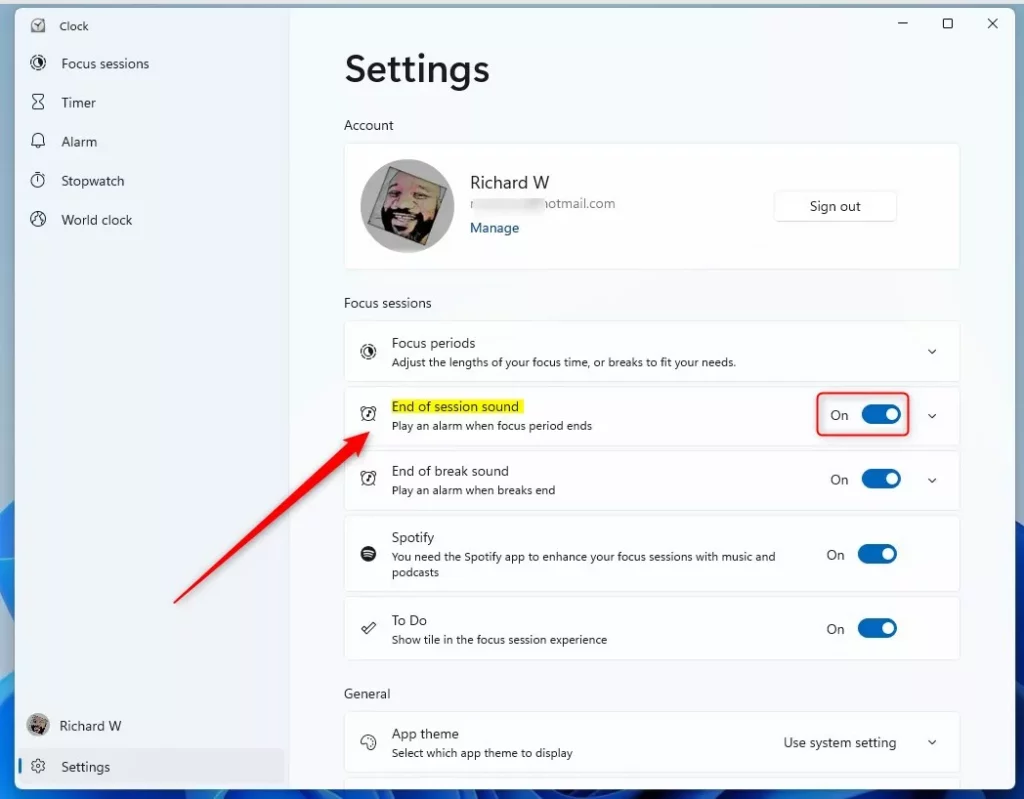
You can turn the end of session sound on or off within the Clock app. Open the Clock app, click Settings in the bottom left, and use the toggle under the End of session sound tile.
Why change this setting?
Some people like the alert to know their time is up. Others find the noise distracting or annoying while they work. You can choose to keep the sound on or turn it off, matching how you prefer to work.
What happens when you are done?
Once you finish these steps, your computer will respect your choice. It will either silence the alarm or play it as expected when your next focus session ends. This helps you maintain a distraction-free environment.
How to manage the End of Session sound
You can turn the End of Session sound on or off directly in the Clock app on Windows 11. This sound plays when a Focus session ends, letting you know it’s time to take a break. Managing this setting is simple and helps you stay focused or know when your session is complete.
- Open the Start menu.
- Type “Clock” into the search box.
- Select the Clock app from the results to open it.
Once the app opens, follow these steps:
- Click the Settings button located at the bottom left corner of the app.
- Look for the End of session sound tile.
- Use the toggle switch on the right to turn the sound On or Off.
Customization and Limitations
Many users ask if they can upload their own MP3 files for the alarm. Currently, Windows 11 does not support custom audio files for Focus Sessions. You must use the default sounds provided by the Clock app. This limitation helps keep the system running smoothly and without issues.
Troubleshooting Focus Session Sounds
If your Focus Session sound isn’t playing in Windows 11, first check your system volume and make sure your speakers aren’t muted.
For more details, visit the official Microsoft Clock app documentation.
Summary
Windows 11 lets you control the alarm sound that plays when a focus session ends, giving you flexibility for your work routine.
How do I change the alarm sound for 🪟 Windows 11 Focus Sessions?
Currently, Windows 11 does not allow you to change the specific alarm sound file for Focus Sessions. You can only toggle the default sound on or off within the Clock app settings. Microsoft may add more customization options for the productivity timer in future updates to the Clock app.
Why can’t I hear my Focus Session alarm?
If your Focus Session alarm is silent in Windows 11, check if Do Not Disturb mode is on or if your computer’s master volume is turned down.
Was this guide helpful?

About the Author
Richard
Tech Writer, IT Professional
Richard, a writer for Geek Rewind, is a tech enthusiast who loves breaking down complex IT topics into simple, easy-to-understand ideas. With years of hands-on experience in system administration and enterprise IT operations, he’s developed a knack for offering practical tips and solutions. Richard aims to make technology more accessible and actionable. He's deeply committed to the Geek Rewind community, always ready to answer questions and engage in discussions.


[…] recent updates, Microsoft made Do Not Disturb easier to use. It’s part of the new Focus tools that help you stay focused by hiding distractions but still letting important alerts come […]