
This guide will help you turn on or off DNR (Discovery of Network-designated Resolvers) in Windows 11.
What is DNR?
DNR is a new feature that helps your computer find and use special secure DNS servers automatically. Why does this matter? These servers keep your internet browsing safer and more private by encrypting DNS traffic. What happens when you use DNR? Your online activities become harder to spy on or tamper with.
Note: DNR is a new feature that’s only available if you are part of the Windows Insider Preview program. This program lets you try new Windows features before they’re made available to everyone.
How to Turn On DNR in Windows 11
If you’re in the Windows Insider Preview program, follow these simple steps:
Step 1: Open the Registry Editor
- Press
Windows + Ron your keyboard. - Type
regeditand press Enter. - ⚠️ Admin Required: If a message appears asking for permission, click Yes.
Step 2: Go to the DNS Cache Location
- Navigate to this location in the Registry Editor:
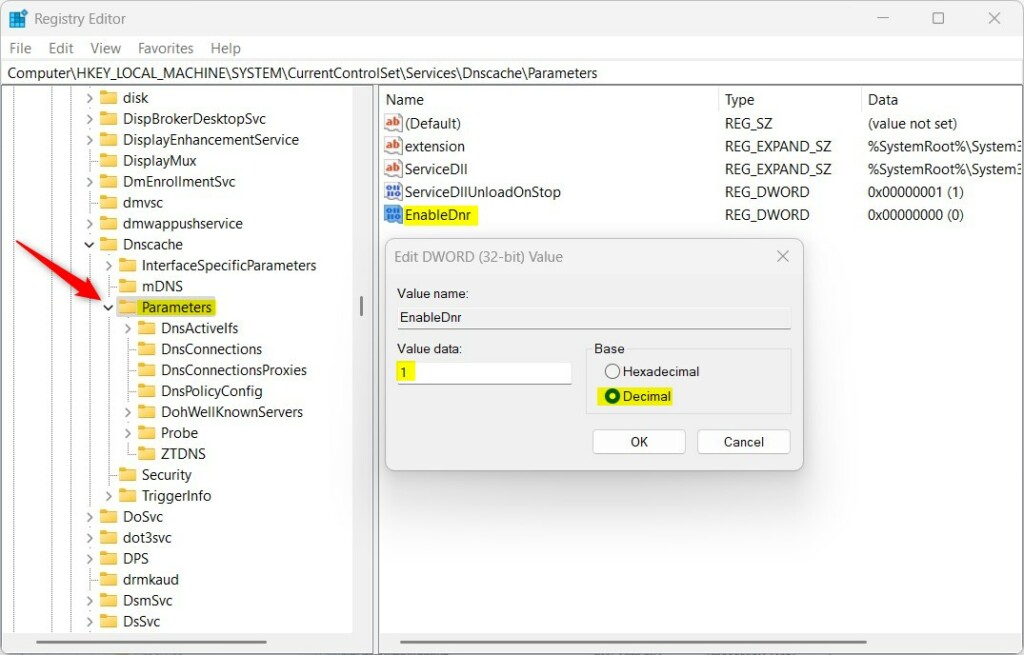
Computer\HKEY_LOCAL_MACHINE\SYSTEM\CurrentControlSet\Services\Dnscache\Parameters
Step 3: Find or Create the EnableDnr Setting
If EnableDnr already exists:
- Look for
EnableDnrin the right pane. - Double-click it.
- Change the value to
1to turn on DNR. - Change the value to
0to turn it off.
If EnableDnr is missing:
- Right-click on an empty space in the right pane.
- Choose
New → DWORD (32-bit) Value. - Name it
EnableDnr. - Double-click it and set its value to
1to enable.
Step 4: Restart Your Computer
- Close Registry Editor.
- Restart your computer to apply the changes.
That’s it! Your Windows 11 device will now use encrypted DNS servers automatically, making your internet use more secure.
More About DNR
DNR automatically discovers encrypted DNS servers using new internet standards (like DNS over HTTPS or DNS over TLS). What does this mean for you? You don’t have to set anything up manually to get better privacy and security online. The process happens in the background automatically.
Remember, this feature is still new and only works if you’re part of the Windows Insider Preview program. If you want to join, check out this easy guide: How to Get Windows 11 Insider Preview.
Helpful Links and References
- How to Open the Registry Editor in Windows 11
- Official Microsoft post about DNR support
- Join Windows Insider Preview
Summary
- DNR helps your PC find and use secure DNS servers automatically.
- This improves your online privacy by encrypting DNS requests.
- It’s only available in Windows 11 Insider Preview builds for now.
- You can turn DNR on or off by editing a simple setting in the Windows Registry.
- If you want safer browsing and are part of the Insider program, turning on DNR is a great step!

Leave a Reply Cancel reply