How to Exit S Mode in Windows 11

You can exit S Mode in Windows 11 to unlock the ability to install any application you want, not just those from the Microsoft Store.
S Mode is a specialized, lockdown version of Windows 11 that prioritizes security and performance by limiting software installations to verified apps within the Microsoft Store.
This mode is often found on new PCs, especially those released starting in 2021, to provide a safe and stable computing experience right out of the box.
Switching out of S Mode is a straightforward process within your Windows 11 settings and usually takes just a couple of minutes to complete.
Go to Settings > System > Activation, then click “Open Store” and the “Get” button on the Microsoft Store page to switch out of S mode. This process is free and permanent, allowing you to install apps from any source.
Why Exit S Mode?
You might want to exit S mode in Windows 11 if you need to install apps not found in the Microsoft Store, like popular web browsers or specific software for work or hobbies.
What happens when done? Your computer will run a standard version of Windows 11. You can install any program, but you cannot return to S mode. This change is permanent.
Security and Performance Risks
Switching out of S mode means your computer is less protected against viruses and malware because you can install apps from anywhere, not just the Microsoft Store.
How to Exit S Mode
Exiting S mode on Windows 11 is a straightforward process that involves a few clicks within the Settings app and the Microsoft Store.
- Open the Start menu and select Settings.
windows 11 new settings button - Click on System in the left-hand sidebar.
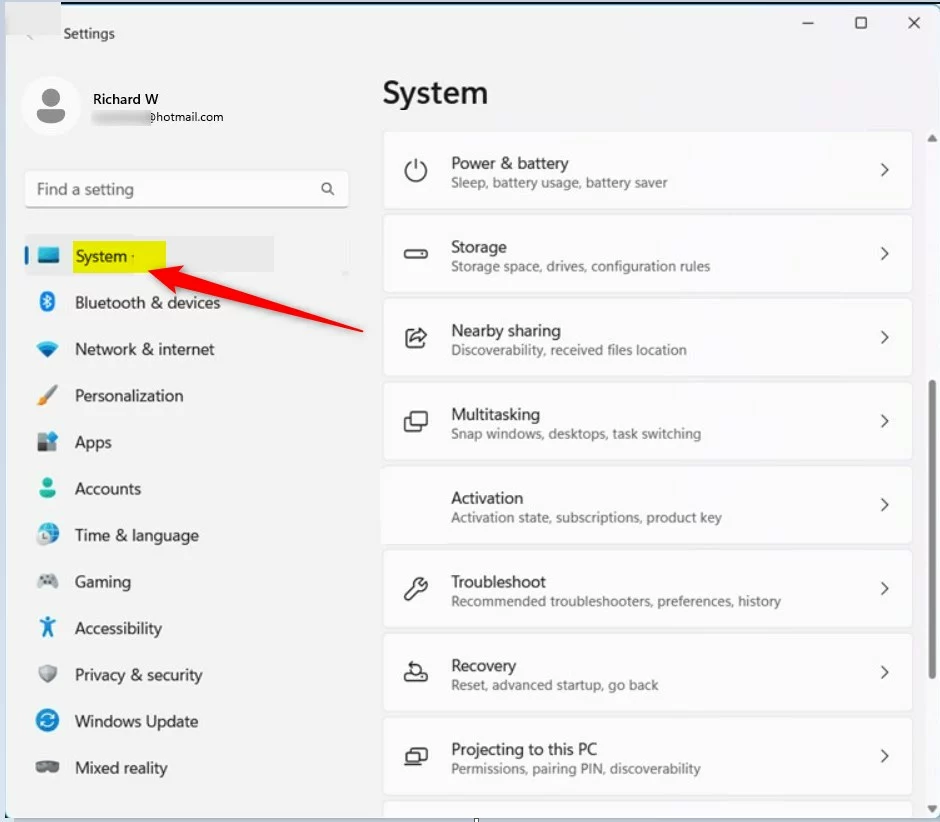
windows 11 system in settings app - Select Activation from the list.
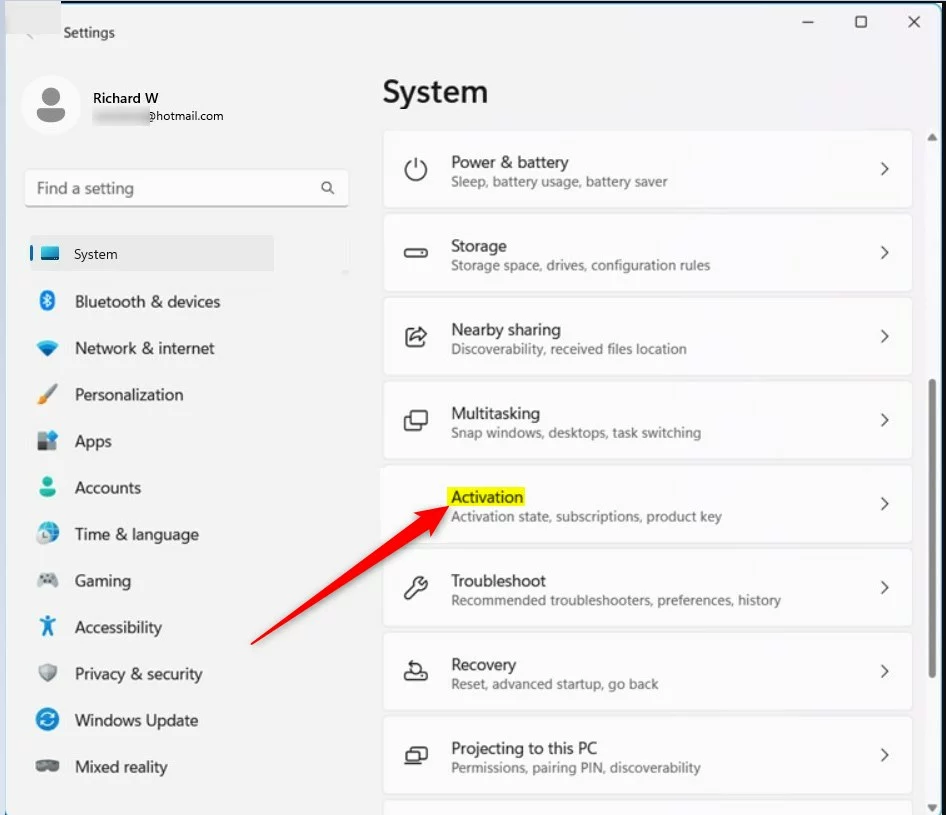
windows 11 activation in system settings app - Look for the S mode section and click the arrow to expand it.
- Click the Open Store button.
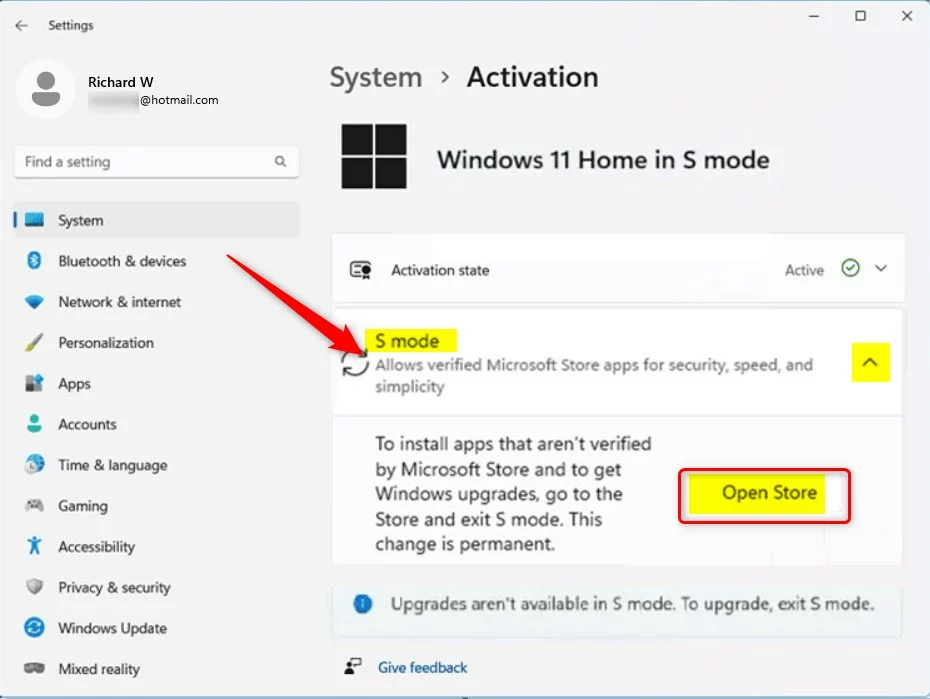
windows 11 activation s mode open store button - In the Microsoft Store, you will see the Switch out of S mode page. Click the Get button.
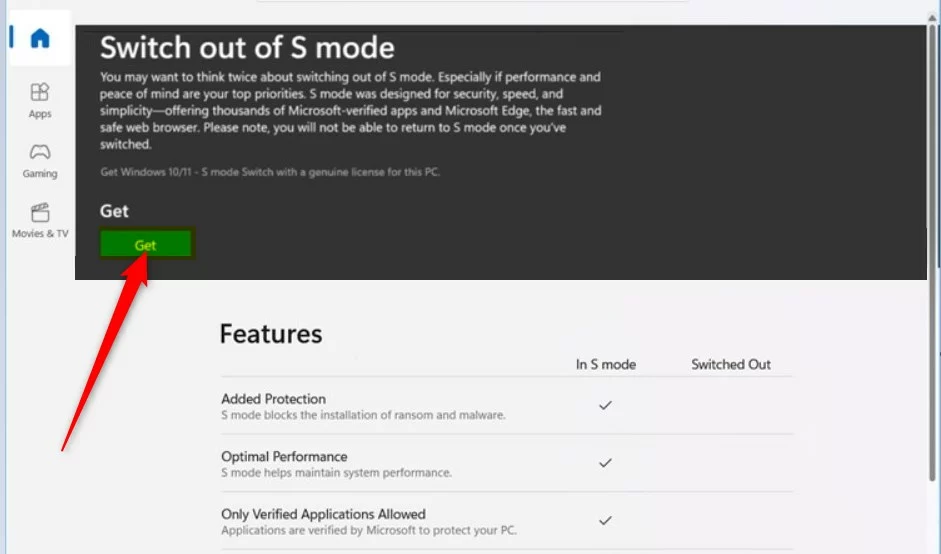
windows 11 switch out of s mode get button
Once the process completes, you will see a confirmation message. You can now install apps from any source.
Troubleshooting Common Issues
If the ‘Get’ button is missing, ensure you are signed into a valid Microsoft Account. Sometimes, a pending Windows Update can block the process. Check for updates by navigating to Settings > Windows Update. If you encounter an error, restart your computer and try again.
Summary
Exiting S mode is a permanent, free, and one-way process that allows you to install software from any source. While it offers more freedom, remember that you lose the added security of the Microsoft Store-only environment. Ensure you have reliable antivirus software installed once you make the switch.
Does exiting S mode void my laptop warranty?
No, switching out of S mode is a software configuration change provided by Microsoft. It does not void your hardware warranty. However, if you install software that causes system instability, the manufacturer may not cover the cost of software-related repairs or technical support for those specific third-party applications.
Does exiting S mode cost money?
No, switching out of S mode is completely free. You do not need to pay for any upgrades to move from Windows 11 Home in S mode to the standard version of Windows 11 Home. If you are prompted for payment, ensure you are on the official Microsoft Store page.
Was this guide helpful?

About the Author
Richard
Tech Writer, IT Professional
Richard, a writer for Geek Rewind, is a tech enthusiast who loves breaking down complex IT topics into simple, easy-to-understand ideas. With years of hands-on experience in system administration and enterprise IT operations, he’s developed a knack for offering practical tips and solutions. Richard aims to make technology more accessible and actionable. He's deeply committed to the Geek Rewind community, always ready to answer questions and engage in discussions.


[…] The blocklist is enabled on systems that have memory security (aka Hypervisor-protected Code Integrity (HVCI)) enabled or run Windows in S Mode. […]