How to sign out of your Microsoft account on all devices

You can sign out of your Microsoft account on all devices by visiting the security overview page on your Microsoft account website.
Your Microsoft account is your central login for Windows, Office, OneDrive, and other Microsoft services. Signing out remotely is a crucial step to secure your account and protect your data across every connected device and application.
This process will log you out of web browsers, apps, and other linked services within 24 hours. Keep in mind that Xbox consoles require a manual sign-out and are not included in this automated remote sign-out feature.
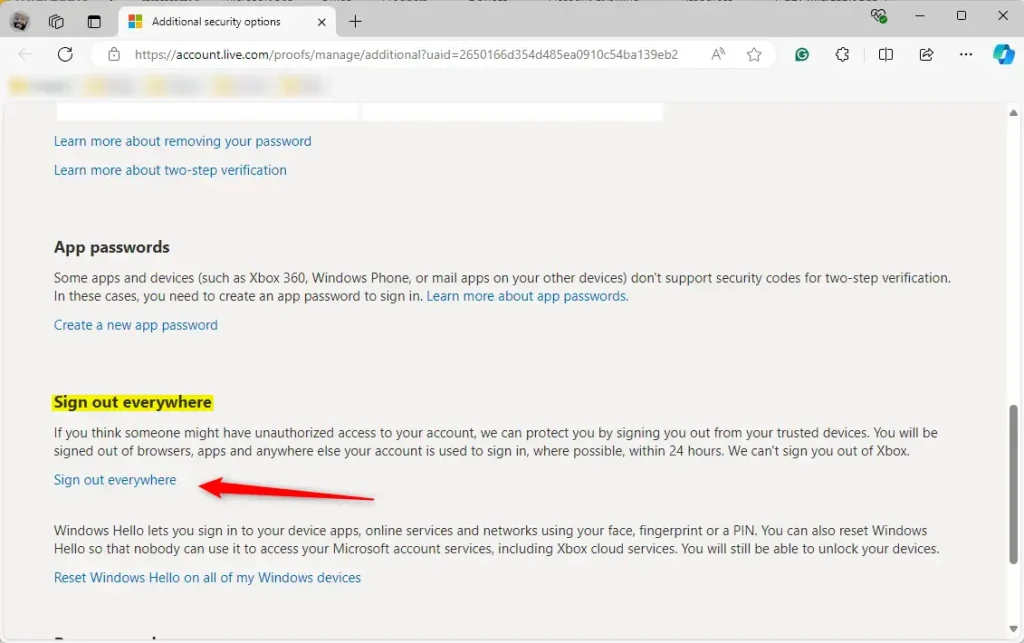
Visit the Advanced security options page for your Microsoft account online and sign in. Scroll down to the “Sign out everywhere” section and click the link, then confirm your choice to sign out from all devices within 24 hours.
How to sign out everywhere
Force a sign-out from any device by following these steps:
- Sign in to your account on the Advanced security options page.
- Scroll down until you see the section labeled “Sign out everywhere.”
- Click the link that says “Sign out everywhere.”
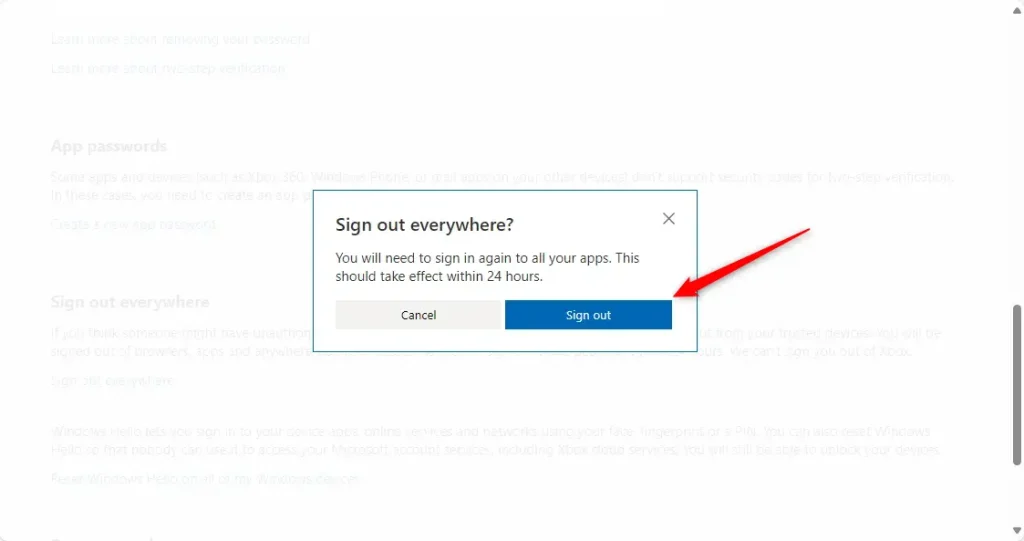
A window will pop up to confirm your choice. Click the “Sign out” button to finish.
Note: You do not need admin privileges on your local computer to perform these steps, as this is managed through your online account settings.
Summary
If you suspect someone has access to your account, use the “Sign out everywhere” feature in your Microsoft security settings. This clears your active sessions on all connected devices within 24 hours. Make sure to check your security settings often to keep your account safe.
Reference: Microsoft.com
Was this guide helpful?

About the Author
Richard
Tech Writer, IT Professional
Richard, a writer for Geek Rewind, is a tech enthusiast who loves breaking down complex IT topics into simple, easy-to-understand ideas. With years of hands-on experience in system administration and enterprise IT operations, he’s developed a knack for offering practical tips and solutions. Richard aims to make technology more accessible and actionable. He's deeply committed to the Geek Rewind community, always ready to answer questions and engage in discussions.



No comments yet — be the first to share your thoughts!