How to Install Microweber with Nginx on Ubuntu 24.04

You install Microweber with Nginx on Ubuntu 24.04 by configuring your server environment and setting up the web application.
Microweber is an open-source Content Management System featuring drag-and-drop editing and built-in e-commerce capabilities, ideal for creating websites and online stores quickly.
Using Nginx, a high-performance web server, alongside Microweber on Ubuntu 24.04 provides a secure and efficient platform. This setup is perfect for deploying dynamic web applications.
Install Nginx and MariaDB using `apt install nginx mariadb-server`. Create a database and user for Microweber within MariaDB, then install PHP with `apt install php-fpm php-intl php-mysql php-curl php-cli`.
Install Nginx HTTP server on Ubuntu
You’ll need a web server for Microweber to work, and Nginx is a great choice for Ubuntu.
To do that, open the Ubuntu terminal and run the commands below to install the Nginx web server.
sudo apt update
sudo apt install nginx
Once Nginx is installed, the commands below can start, stop, and enable the Nginx web server to start automatically when your server boots up.
sudo systemctl stop nginx
sudo systemctl start nginx
sudo systemctl enable nginx
You can test the Nginx web server by opening your web browser and browsing to the server’s localhost or IP address.
http://localhost
When you see the Welcome to nginx!, it means the Nginx HTTP server is successfully installed.
Additional help on installing Nginx on Ubuntu is in the link below.
Install the MariaDB database server on Ubuntu
Microweber needs a database to keep its information safe, and MariaDB is a popular option for Ubuntu.
To install and use the MariaDB database server, use the instructions below.
Open the Ubuntu terminal and run the commands below to install the MariaDB database server.
sudo apt update
sudo apt install mariadb-server
Once the MariaDB database server is installed, use the commands below to stop, start, and enable the MariaDB server to start automatically when the server boots.
sudo systemctl stop mariadb
sudo systemctl start mariadb
sudo systemctl enable mariadb
Run the following commands to validate and test if the MariaDB database server is installed successfully.
sudo mariadb
Once you run the commands above, it will log you onto the MariaDB console and display a message similar to the one below.
Welcome to the MariaDB monitor.  Commands end with ; or g.
Your MariaDB connection id is 32
Server version: 10.11.2-MariaDB-1 Ubuntu 23.04

Copyright (c) 2000, 2018, Oracle, MariaDB Corporation Ab and others.

Type 'help;' or 'h' for help. Type 'c' to clear the current input statement.

MariaDB [(none)]>
The message tells you that the server is installed successfully.
Additional help on installing MariaDB.
- How to install MariaDB on Ubuntu Linux
- MariaDB without password prompt
Create a Microweber database
Once MariaDB is ready, you need to make a special database just for Microweber.
As part of the setup, we will create a microweberdb database and a user account called microweberdbuser.
Finally, we’ll grant the microweberdbuser full access to the microweberdb database.
All the database steps above can be done using the commands below:
But first, log on to the MariaDB database server:
sudo mariadb
Then run the commands below to complete the steps:
CREATE DATABASE microweberdb CHARACTER SET utf8mb4 COLLATE utf8mb4_general_ci;
CREATE USER microweberdbuser@localhost IDENTIFIED BY 'type_your_password_here';
GRANT ALL ON microweberdb.* TO microweberdbuser@localhost WITH GRANT OPTION;
FLUSH PRIVILEGES;
exit
Ensure to replace ‘type_your_password_here ‘with your password.
Install PHP on Ubuntu Linux
Microweber is built with PHP, so you need to install it on your Ubuntu system to get it running.
Then, run the commands below to install the latest PHP version.
sudo apt install php-fpm php-intl php-mysql php-curl php-cli php-zip php-xml php-gd php-common php-mbstring php-xmlrpc php-bcmath php-json php-sqlite3 php-soap php-zip
Additional help on installing PHP
Download Microweber files
It’s time to get the Microweber application files onto your Ubuntu server.
To always install the latest version, check the download page for Microweber. Get the download link and download the archived package to your computer. Then, extract it.
First, navigate to the /tmp/ directory and download the Microweber files. Next, extract the content into the Microweber folder in the Nginx root directory.
The final step is to change the permissions. This will allow the Nginx web server to interact safely with the files, ensuring a secure environment for your Microweber installation.
cd /tmp/
wget https://updater.microweberapi.com/builds/master/microweber.zip
sudo unzip microweber.zip -d /var/www/microweber
sudo chown -R www-data:www-data /var/www/microweber
Once you have completed all the above steps, continue configuring the Nginx web server below to serve the Microweber content.
Run the commands below to create a Nginx virtual host file for Microweber.
sudo nano /etc/nginx/sites-available/microweber.conf
Then, copy and paste the content block below into the Nginx server block.
server {
    listen 80;
    listen [::]:80;
    root /var/www/microweber;
    index  index.php;
    server_name  microweber.example.com;

    access_log /var/log/nginx/example.com.access.log;
    error_log /var/log/nginx/example.com.error.log;

    location / {
         try_files  $uri $uri/ /index.php$is_args$args;
    }

    location ~ .php$ {
         include snippets/fastcgi-php.conf;
         fastcgi_pass unix:/var/run/php/php8.3-fpm.sock;
         fastcgi_param SCRIPT_FILENAME $document_root$fastcgi_script_name;
         include fastcgi_params;
    }

    location ~ /(vendor|src|config|storage|.git|.env) {
         deny all;
         return 404;
   }

}
Save the file.
Then, run the commands below to enable the virtual host and restart the Nginx server.
sudo ln -s /etc/nginx/sites-available/microweber.conf /etc/nginx/sites-enabled/
sudo systemctl restart nginx
Setup Let’s Encrypt SSL/TLS for Microweber
You should set up a free Let’s Encrypt SSL certificate to keep your Microweber site secure.
Please read the post below for additional resources on installing and creating Let’s Encrypt SSL certificates for Nginx.
How to set up Let’s Encrypt SSL certificate for Nginx on Ubuntu Linux
Once you have restarted the Nginx web server, open your browser and browse to the server hostname or IP address defined in the Nginx server block.
http://microweber.example.com
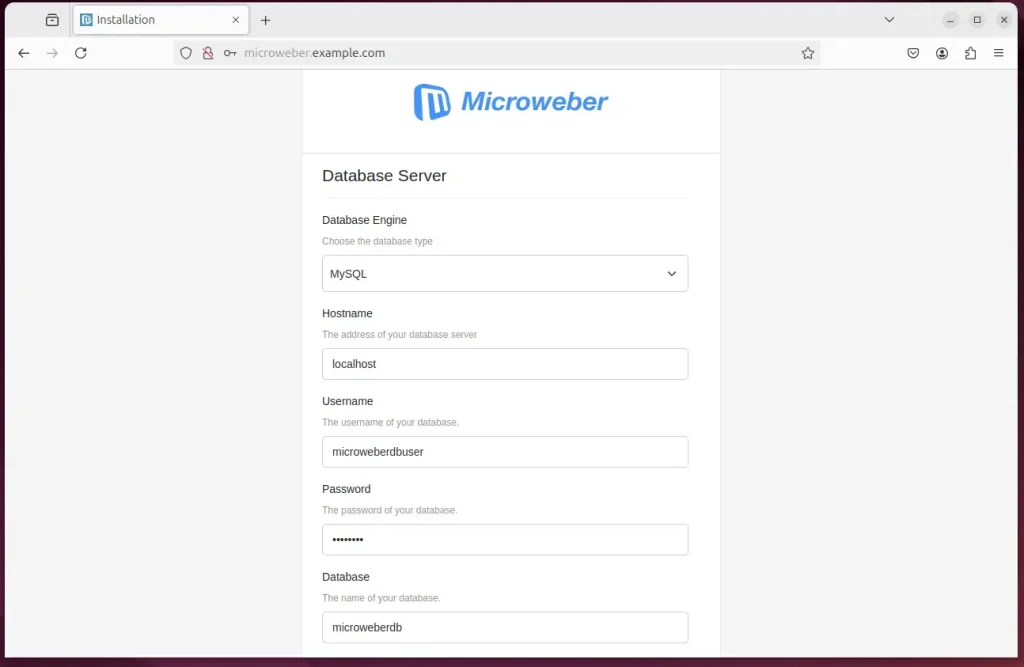
A Microweber installation wizard page should appear. Type in the database details created above.
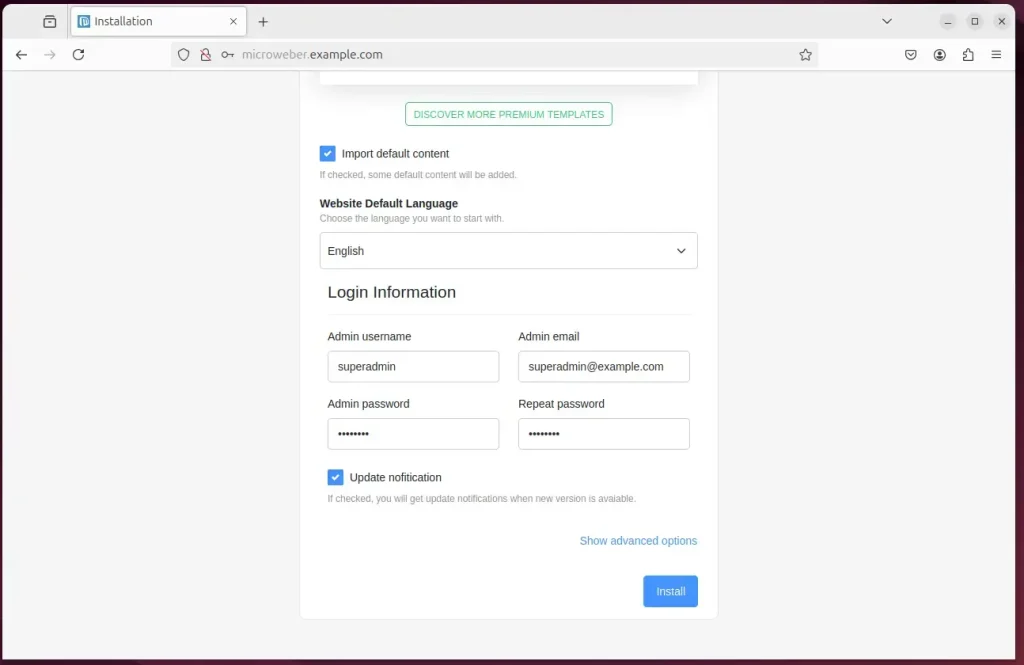
Create an admin account and click Install.
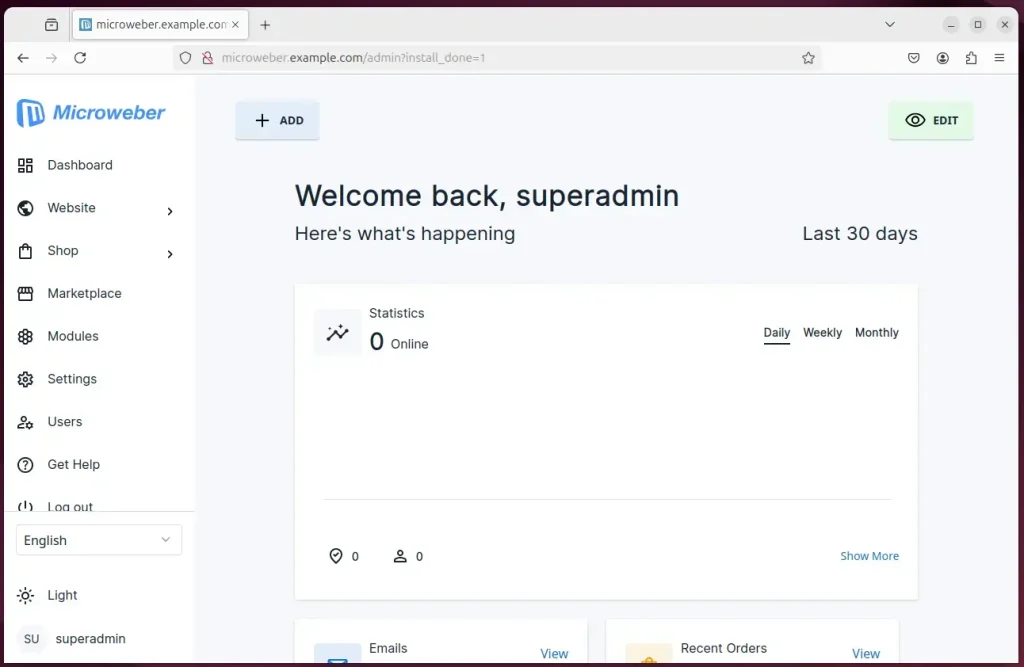
Microweber should be installed and ready to use.
That should do it!
Conclusion:
Installing Microweber CMS with Nginx on Ubuntu 24.04 provides a robust platform for building websites and online stores. Here are the key takeaways:
- User-Friendly: Microweber offers an intuitive drag-and-drop interface and real-time text editing, making website creation accessible to all users.
- Integrated Features: It includes built-in e-commerce capabilities, which are ideal for users setting up online stores.
- Stable Environment: Nginx and Ubuntu create a secure and efficient web server environment.
- Database Management: Utilizing MariaDB ensures efficient data management and performance for your CMS.
- Flexible Configuration: PHP support allows customization and extensibility according to project needs.
- Enhanced Security: Implementing Let’s Encrypt SSL/TLS certificates strengthens security measures for your website.
Following the outlined steps, you can easily set up Microweber and build your online presence effectively. Happy building!
Can nginx run on Ubuntu?
Nginx is available in Ubuntu's default repositories. Install it using the apt packaging system. First, update the local package index to access the most recent package listings, then install nginx : sudo apt update.
How do I know if nginx is installed on Ubuntu?
You can verify that nginx is running via this command: $ sudo systemctl status nginx ● nginx. service – A high performance web server and a reverse proxy server Loaded: loaded (/lib/systemd/system/nginx.
Was this guide helpful?

About the Author
Richard
Tech Writer, IT Professional
Richard, a writer for Geek Rewind, is a tech enthusiast who loves breaking down complex IT topics into simple, easy-to-understand ideas. With years of hands-on experience in system administration and enterprise IT operations, he’s developed a knack for offering practical tips and solutions. Richard aims to make technology more accessible and actionable. He's deeply committed to the Geek Rewind community, always ready to answer questions and engage in discussions.


No comments yet — be the first to share your thoughts!