Install Angular CLI on Ubuntu: A Step-by-Step Guide

This guide helps you set up the Angular CLI on Ubuntu Linux. The Angular CLI is a tool you run in your terminal. It helps you start, build, and manage your web projects easily.
Why use it? It automates complex tasks, letting you focus on writing code instead of configuring settings.
What happens when done? You will have a professional development environment ready to build modern, high-performance web applications.
How to install and use Angular CLI on Ubuntu Linux
We recommend using NVM (Node Version Manager) to install Node.js. This avoids using “sudo” for global installs, which keeps your system secure.
First, open your terminal. Run this command to install NVM from the official source:
curl -o- https://raw.githubusercontent.com/nvm-sh/nvm/v0.40.1/install.sh | bash
Now, refresh your profile so the terminal recognizes the command:
source ~/.bashrc
Next, install the latest Active LTS version of Node.js. In 2026, this is version 22 install Node.js:
nvm install 22
Verify your installation by checking the versions of Node and NPM Node.js version 16 LTS:
node -v
npm -v
Now, install the Angular CLI globally using NPM:
npm install -g @angular/cli
Modern Angular Development
Newer versions of Angular are much faster. The CLI now uses advanced build pipelines (like Esbuild) to make your development server start almost instantly.
To create a new project, use the standard command:
ng new my-first-project
Modern Angular projects default to “Standalone” components. This means the old style of using NgModules is no longer required for most apps, making your code cleaner and easier to manage.
Check your version to confirm everything is ready:
ng version

Running your project
Move into your project folder and start the server:
cd my-first-project
ng serve
Open your web browser and go to http://localhost:4200/ to see your app running.
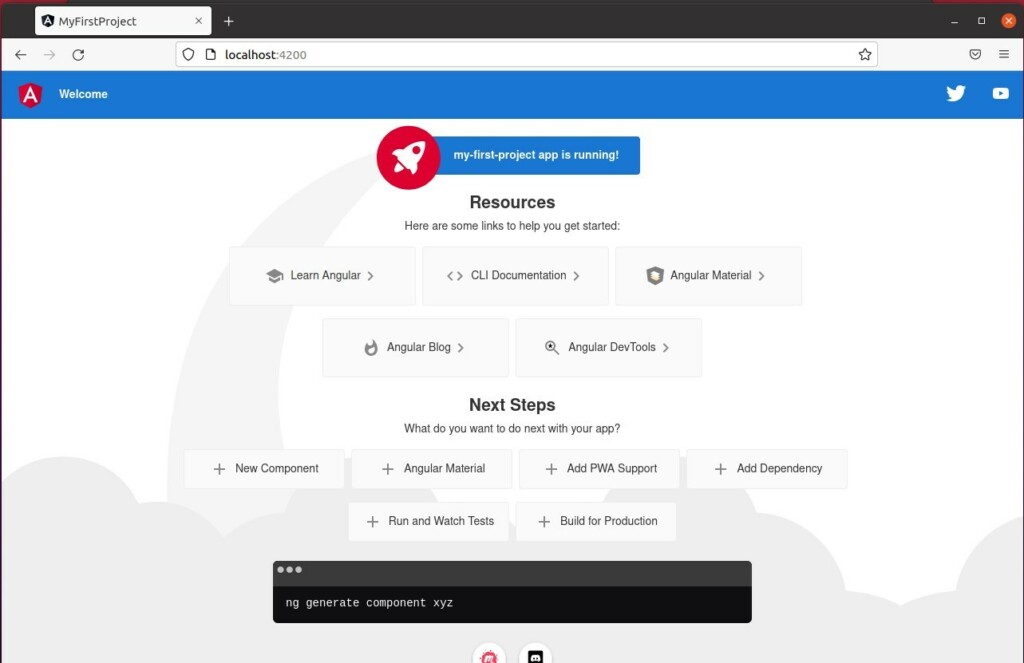
When you run the ng serve command, the CLI watches your files. Every time you save a change, the browser will update automatically.
Conclusion
By following these steps, you have a modern setup using NVM and the latest Angular tools. You are now ready to build fast, efficient web applications on Ubuntu.
For a list of all available versions, check here: https://github.com/angular/angular-cli/releases
Was this guide helpful?



Leave a Reply Cancel reply