How to Enable RGB Accent Color Matching in Windows 11
Windows 11 lets you automatically match your RGB accessories to your chosen accent color using Dynamic Lighting.
This feature synchronizes the RGB illumination on your keyboard, mouse, and other compatible peripherals with your Windows theme, creating a unified visual experience.
To enable this, you’ll use the “Match my Windows accent color” setting within the Dynamic Lighting options in Windows 11, available from version 22H2 onwards.
⚡ Quick Answer
Open Settings, go to Personalization, then Dynamic Lighting. Choose a solid color effect and toggle “Match my Windows accent color” on. Your RGB accessories will now sync with your chosen Windows accent color.
What is Dynamic Lighting?
Dynamic Lighting is a new Windows 11 feature that lets your computer control the RGB lights on your accessories, like keyboards or speakers, without needing extra software. It helps your lights look great and work smoothly with Windows.
Open the Settings app on your PC. You can do this by clicking the ⊞ Start button and choosing the gear icon or pressing Windows + I.
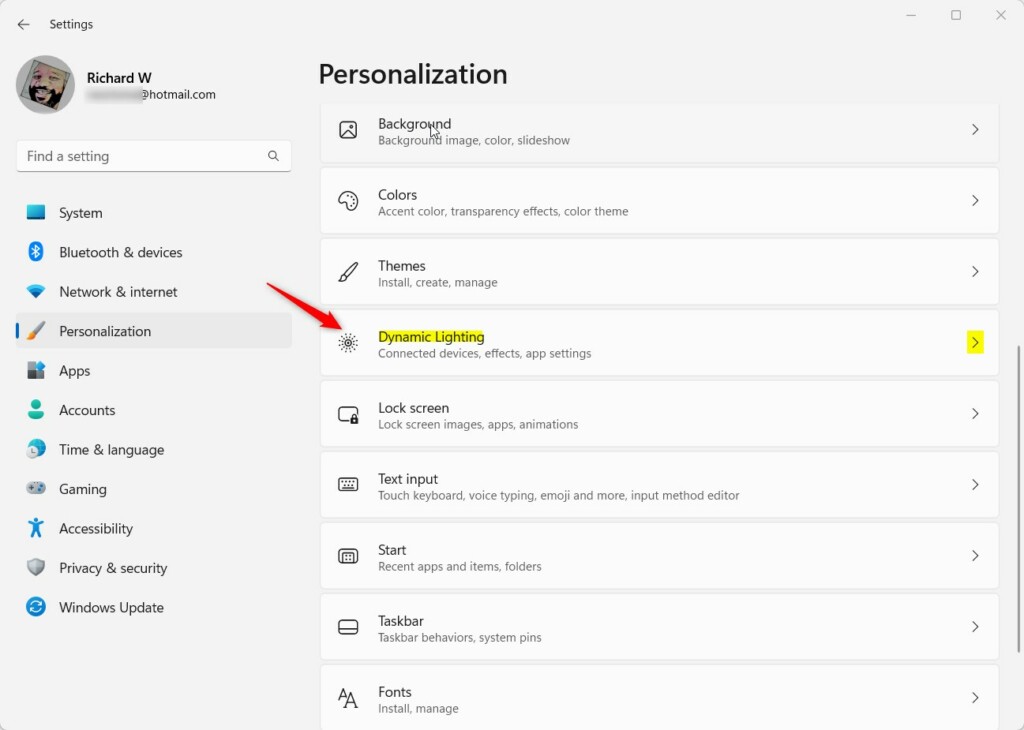
Click Personalization.
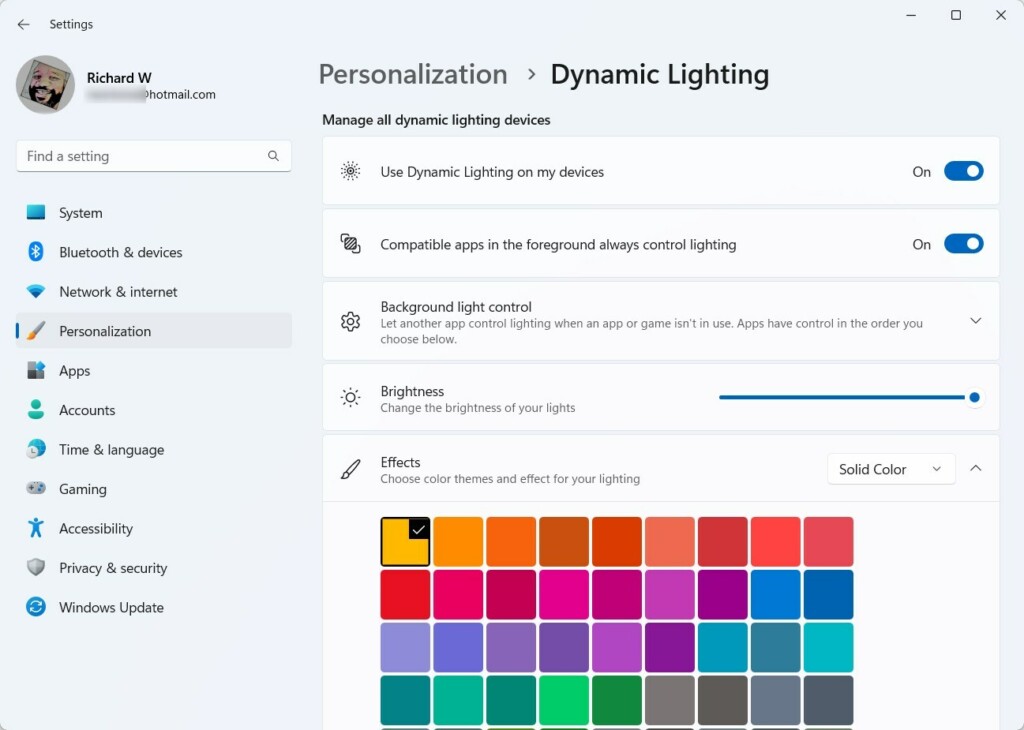
Find and click the Dynamic Lighting section. Open Personalization in SettingsWindows 11 Personalization in the Settings app Windows 11 Dynamic Lighting settings Dynamic Lighting Settings
Under Effects, pick a color style that you like (choose a solid color).
Turn on the toggle for Match my Windows accent color. Match my Windows accent color toggle Turn on “Match my Windows accent color”
Now your RGB accessories like your keyboard, mouse, and other devices will light up using your Windows accent color!
Windows 11 RGB accent color matching lets your lights sync with your chosen theme, creating a cool, unified look for your PC setup. To get started, make sure Dynamic Lighting is turned on, which you can do through Windows 11 settings.
Summary
Dynamic Lighting lets Windows 11 control RGB lights on your devices without extra apps.
You can set your lights to match your Windows accent color for a unified look.
Just ⚙️ open Settings > Personalization > Dynamic Lighting to set it up.
Toggle “Match my Windows accent color” on or off whenever you want.
Windows 11’s Dynamic Lighting feature lets you control your RGB lights directly from settings, no extra software needed. You can easily set your lights to match your Windows accent color for a cohesive look across your devices. Just head to Settings, then Personalization, and finally Dynamic Lighting to turn this feature on or off.
How to change accent color in 🪟 Windows 11?
To change accent color: In the Settings app on your Windows device, select Personalization > Colors. You can let Windows automatically pick an accent color from your background, or you can choose your own color. To have Windows automatically pick an accent color, select Automatic.
How do I turn off accent color in 🪟 Windows 11?
To prevent the accent color from changing every time you select a mode, you may need to adjust the mode (dark, light, or custom) under Settings > Personalization > Colors. Next, choose "Manual" under Accent color and select your desired color.
Richard, a writer for Geek Rewind, is a tech enthusiast who loves breaking down complex IT topics into simple, easy-to-understand ideas. With years of hands-on experience in system administration and enterprise IT operations, he’s developed a knack for offering practical tips and solutions.
Richard aims to make technology more accessible and actionable. He's deeply committed to the Geek Rewind community, always ready to answer questions and engage in discussions.




No comments yet — be the first to share your thoughts!