How to Enable Bing’s Scroll to Open Copilot Feature
This article explains enabling or disabling the “Scroll to open Copilot” feature in Bing search results.
The Scroll to open Copilot feature in Bing search results allows you to access Copilot by scrolling or swiping quickly. You can scroll/swipe up to the top to open Copilot or scroll/swipe down to close it.
Using the Copilot settings, you can choose whether you would like Copilot to open when you scroll/swipe up at the top of the page.
Turn on or off the “Scroll to open Copilot” feature in Bing search results
As mentioned, users can enable or disable the “Scroll to open Copilot” feature in the Bing search results.
Here’s how to do that.
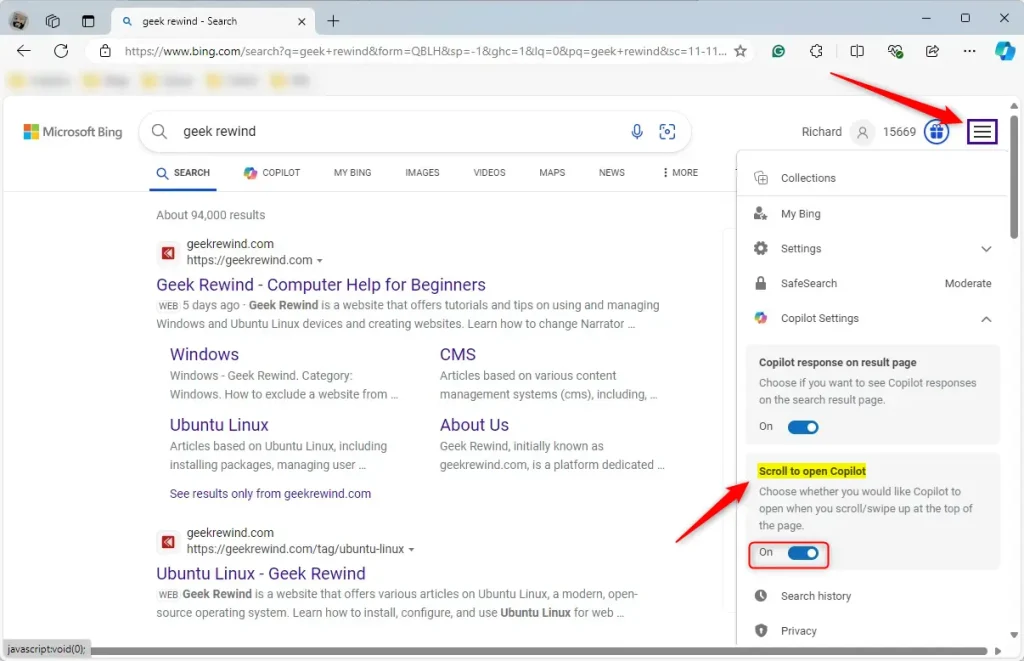
Open Bing, perform a search for any query, click the menu icon (≡) in the top-right corner, select Copilot Settings, and toggle the “Scroll to open Copilot” option on or off.
That should do it!
Conclusion:
– You’ve learned how to enable or disable the “Scroll to open Copilot” feature in Bing search results. – Follow the steps to customize your Copilot settings based on your preferences. – Feel free to leave a comment if you have any feedback or additional insights to share.
Frequently Asked Questions
What is the Scroll to open Copilot feature in Bing?
The Scroll to open Copilot feature in Bing allows users to access the Copilot by scrolling or swiping quickly. You can scroll up to open it or scroll down to close it, enhancing your search experience.
How do I enable the Scroll to open Copilot feature?
To enable the Scroll to open Copilot feature, open Bing, perform a search, click the menu icon in the top-right corner, and select Copilot Settings. From there, toggle the 'Scroll to open Copilot' option on.
Can I disable the Scroll to open Copilot feature?
Yes, you can disable the Scroll to open Copilot feature by following the same steps to access Copilot Settings. Simply toggle the 'Scroll to open Copilot' option off to disable it.
What happens when I scroll down on Bing's search results?
When you scroll down on Bing's search results, the Copilot will close if it is currently open. This feature allows for a smooth transition between browsing search results and using Copilot.
Is the Scroll to open Copilot feature available on all devices?
The Scroll to open Copilot feature is generally available on devices that support Bing's interface, including desktops and mobile devices. However, the exact functionality may vary depending on your device and browser.


Leave a Reply