

This post describes how to turn the metered connection in Ubuntu Linux on or off.
A metered network connection will try to control and reduce data usage. For example, if your Ubuntu Linux device detects a cellular connection, it will automatically meter data flowing through it.
You can manually set Wi-Fi and Ethernet network connections to metered if you want to reduce the amount of data apps and services used on those networks. However, if the meter is set on your networks, some updates and other large downloads will not automatically start.
Metered connections allow users to control the data so that they do not incur unnecessary network billing costs.
It is good when your device is connected via a mobile hotspot or other prepared networks.
Below is how to turn on metered connections for a Ubuntu Linux network.
How to turn on or off the metered connection in Ubuntu Linux
As described above, the metered connection allows you to control and reduce the amount of data used by apps and services on that network.
Some updates and other large downloads will not automatically start when enabled. Not downloading updates and packages may make your system vulnerable to threats.
Below is how to enable or disable in Ubuntu Linux.
Ubuntu Linux has a centralized location for the majority of its settings. From system configurations to creating new users and updating, all can be done from the System Settings panel.
To get to System Settings, open the Activities overview and start typing Settings.
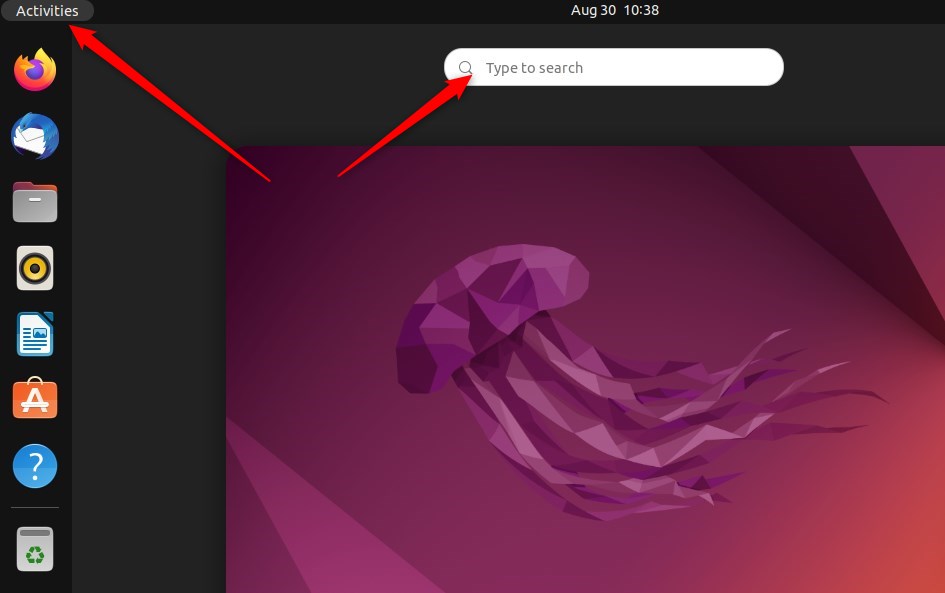
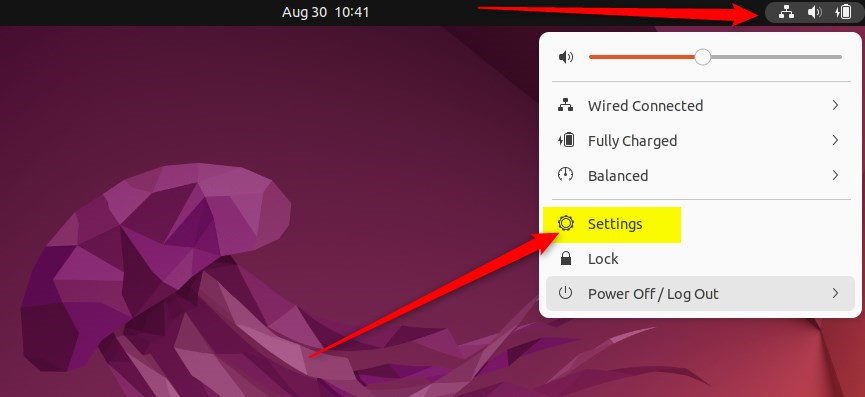
Alternatively, click on the System menu at the top-right corner of the top bar on your desktop.
On the System menu, select Settings, as highlighted below.
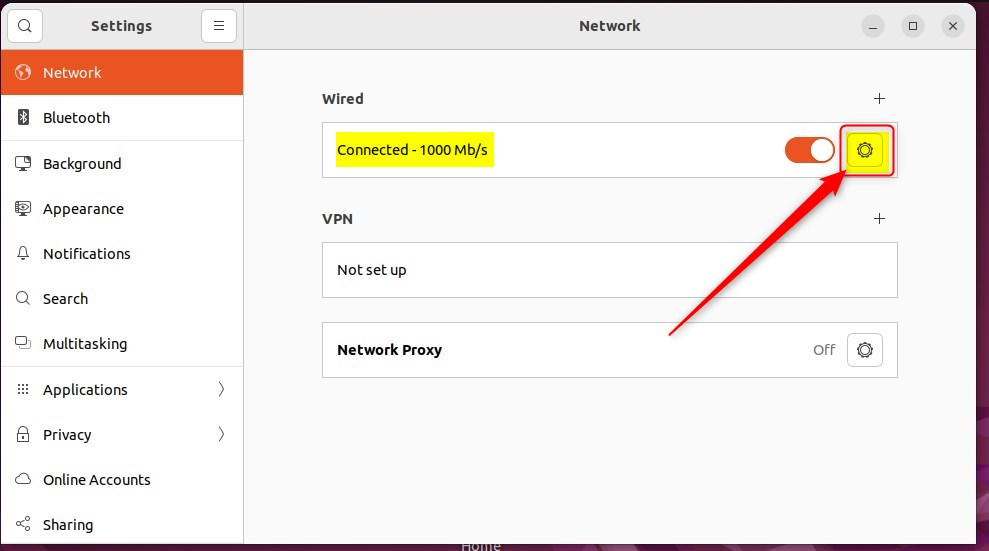
In the Settings app, click on the Network tile.
Select the network adapter in the System Settings -> Network settings pane to enable the metered connection.
If Ubuntu Linux detects a network adapter, it will appear in the Network control panel.
Then click on the settings gear for the network.
On the network interface settings window, under Details, check the box for Metered connection, as highlighted below, then click Apply to save your changes.

Once you turn it on, data on that network should be reduced and limited. Some apps might work differently on a metered connection to help reduce your data usage.
That should do it! You can now close the Settings app.
Conclusion:
- Metered connections in Ubuntu Linux are useful for controlling and reducing data usage on specific networks.
- Enabling a metered connection can prevent automatic downloads of updates and large packages, although it’s important to stay vigilant about system security.
- Ubuntu Linux’s centralized System Settings panel makes it easy to manage network settings, including enabling the metered connection feature.
- Once enabled, apps may adapt their behavior to reduce data usage, providing a more efficient experience while on a metered network.
Leave a Reply