How to Enable or Disable Copilot in Notepad on Windows 11

You enable or disable Copilot in Notepad on Windows 11 to control AI-powered text generation and editing assistance within the app.
Copilot acts as an AI assistant, offering features like content creation, summarization, and rewriting directly within your Notepad sessions.
This integrated AI functionality is available in newer versions of Notepad that leverage Microsoft’s cloud-based AI services.
By adjusting specific settings, you gain full control over whether Copilot’s AI capabilities are active or hidden when you’re working with your text files.
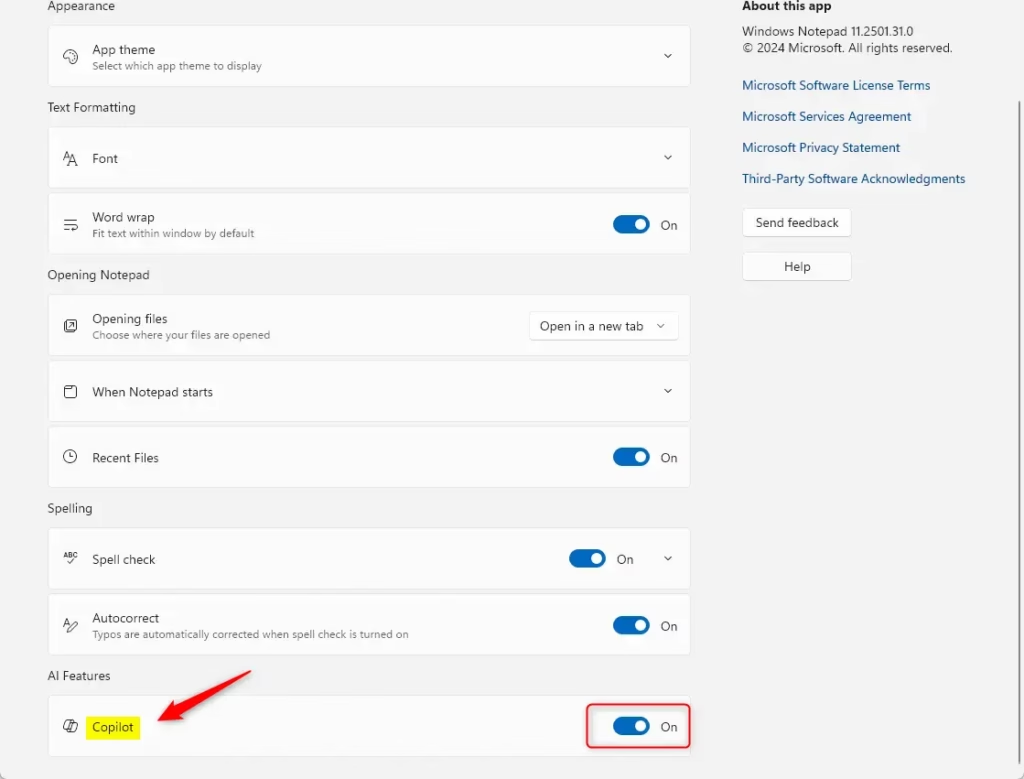
Open Notepad, click the Settings gear icon, and toggle the Copilot button in the AI Features section to enable or disable this AI assistance. This setting controls whether Copilot’s generative AI tools are available within Notepad.
How to Turn Copilot On or Off in Notepad
You can enable or disable the Copilot AI feature in Notepad. Here’s how.
Step 1Open Notepad
First, open the Notepad app.
Step 2 Click Settings
When the app opens, click the Settings (gear) button at the top right.
Step 3Toggle Copilot On or Off
Look for the AI Features section. Flip the Copilot switch to turn the feature on or off. What happens? Copilot will either become available or disappear from your Notepad.
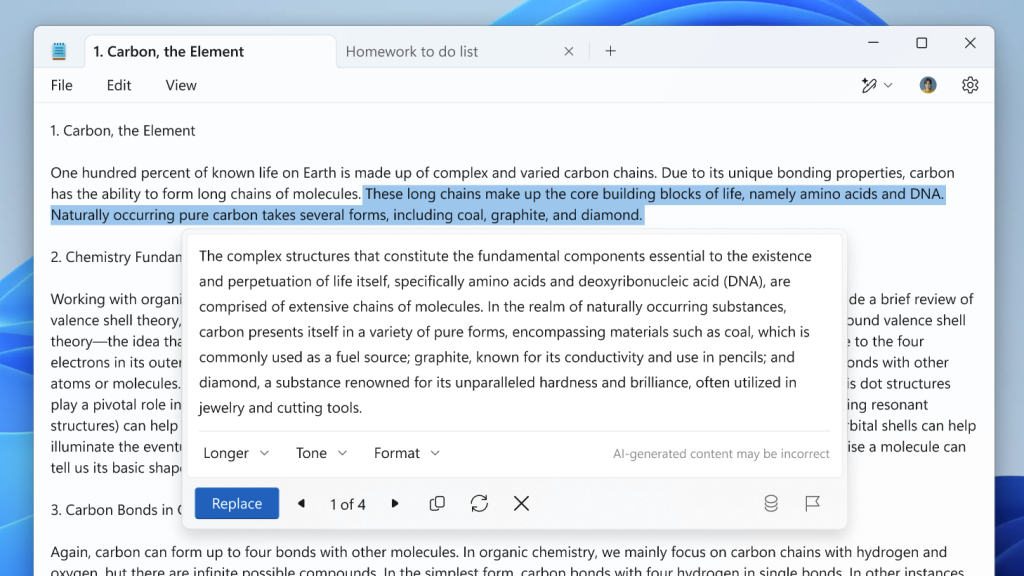
Step 4Use the Rewrite Feature (Optional)
To use Copilot’s rewrite feature, select the text you want to rewrite. Then right-click and choose Rewrite, select Rewrite from the menu bar, or use the Ctrl + I keyboard shortcut.
And that’s it! You’ve now enabled or disabled Copilot in Notepad.
Summary
- What is Copilot? It’s an AI feature in Notepad that helps you rewrite and summarize text.
- How do you turn it on? Open Notepad, click Settings, and toggle Copilot in the AI Features section.
- How do you use it? Select text, right-click, and choose Rewrite, or use
Ctrl + I. - Can you turn it off? Yes. Use the same Settings toggle to disable it anytime.
- Why use it? Copilot helps improve your writing by rephrasing and condensing text quickly.
How do I add Copilot in Notepad?
To use features like ‘Rewrite’, you’ll need to sign in to your Microsoft account.
Is Microsoft removing Copilot from Notepad?
Microsoft has updated how Copilot appears in some apps. In Notepad, the Copilot icon is now labeled ‘Writing Tools’ to be more descriptive.
How do I enable my Copilot?
You’ll typically need an active Microsoft 365 Personal, Family, or Pro subscription. Visit account.microsoft.com to sign in.
Was this guide helpful?

About the Author
Richard
Tech Writer, IT Professional
Richard, a writer for Geek Rewind, is a tech enthusiast who loves breaking down complex IT topics into simple, easy-to-understand ideas. With years of hands-on experience in system administration and enterprise IT operations, he’s developed a knack for offering practical tips and solutions. Richard aims to make technology more accessible and actionable. He's deeply committed to the Geek Rewind community, always ready to answer questions and engage in discussions.




No comments yet — be the first to share your thoughts!