How to Manage OneDrive Upload and Download Rates in Windows 11

The OneDrive app helps you sync your files to the cloud. This lets you reach your files from your phone or other computers. By default, your device backs up your Desktop, Documents, and Pictures folders automatically to the Microsoft cloud.
Open OneDrive settings, go to Sync and backup, then Advanced settings. Use the “Limit download rate” and “Limit upload rate” options to set your desired speeds. Choose “Adjust automatically” for uploads if preferred.
Why do this? If OneDrive is using all your internet speed, other apps may run slowly. Limiting your upload and download speeds keeps your connection balanced.
What happens when done? OneDrive will respect the speed limits you set, leaving more bandwidth available for gaming, streaming, or browsing.
To control your speeds, first set up OneDrive in Windows 11. Open the OneDrive app from the Start menu or at 📁C:\Program Files\Microsoft OneDrive\OneDrive.exe. You can also click the OneDrive icon in the Taskbar overflow.

Follow these steps to change your settings:
- Click the Help & Settings (gear) icon.
- Select Settings.
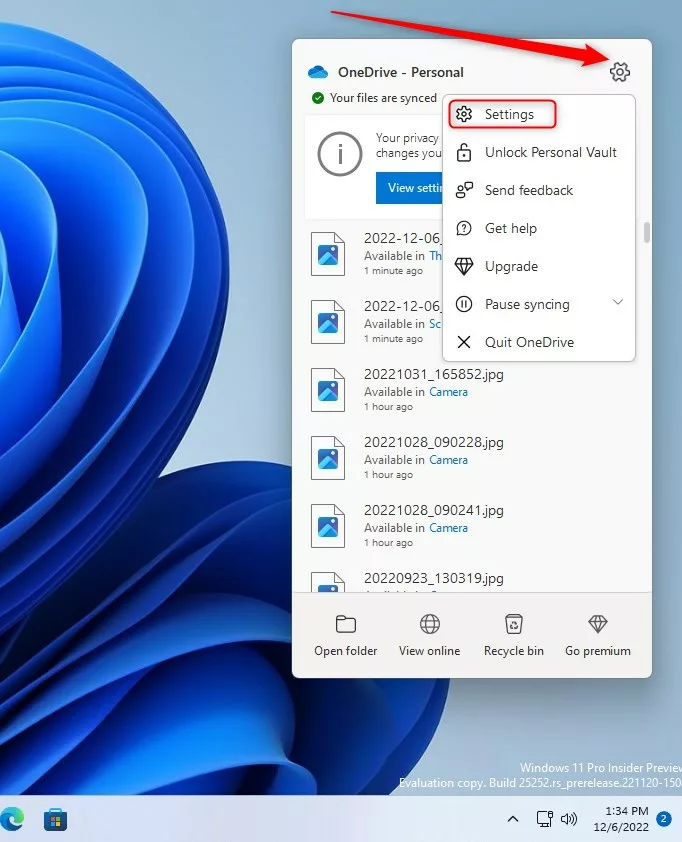
- On the Settings menu, click Sync and backup.
- Click Advanced settings to see more options.

- Look for the Limit download rate and Limit upload rate sections.
- To limit downloads, turn on the switch and enter your desired speed.
- To limit uploads, you can choose Adjust automatically or set a specific speed limit.
Enterprise Administrative Control (GPO & Intune)
[ADMIN PRIVILEGES REQUIRED] IT administrators can manage OneDrive sync client performance across an entire company using Group Policy Objects (GPO) or Microsoft Intune.
Using Administrative Templates, you can enforce specific upload and download rates. This ensures that users do not consume all available network bandwidth. You can configure these settings in the Registry under 🗝️HKEY_LOCAL_MACHINE\SOFTWARE\Policies\Microsoft\OneDrive.
Can I set different upload and download limits for different users? Yes, by using security groups in Active Directory, you can apply different GPO policies to different sets of users.
Troubleshooting Sync Speed Issues
If your sync is slow, check your network bandwidth utilization. You can use the Task Manager to see which apps are using your internet. If OneDrive is stuck, try pausing and resuming the sync.
Automatic Bandwidth Management
Does OneDrive automatically adjust bandwidth based on network traffic? Yes, the Adjust automatically feature allows the app to detect when your network is busy. It will then throttle its own usage to ensure your other tasks remain fast. This is the recommended setting for most home users.
Summary
Managing your OneDrive upload and download control is essential for a smooth internet experience. Whether you are a home user adjusting manual settings or an admin using GPO to manage network traffic, these tools keep your connection stable. Always monitor your sync health to ensure your files are safe.
Reference: Microsoft Support
How do I troubleshoot OneDrive sync speed issues?
First, check your internet connection speed. If it is slow, pause the sync. Next, ensure you have not set a manual limit in the Advanced settings that is too low. Finally, check for any other apps consuming your bandwidth or try restarting the OneDrive sync client to refresh the connection.
Was this guide helpful?

About the Author
Richard
Tech Writer, IT Professional
Richard, a writer for Geek Rewind, is a tech enthusiast who loves breaking down complex IT topics into simple, easy-to-understand ideas. With years of hands-on experience in system administration and enterprise IT operations, he’s developed a knack for offering practical tips and solutions. Richard aims to make technology more accessible and actionable. He's deeply committed to the Geek Rewind community, always ready to answer questions and engage in discussions.



No comments yet — be the first to share your thoughts!