
Do you use Windows 11 and need to make changes in the Registry Editor? Here’s a simple tip to help you switch between two important parts called HKCU and HKLM.
What is the Registry Editor?
The Registry Editor is a tool in Windows that lets you see and change settings that control how your computer and apps work.
Understanding HKCU and HKLM
Inside the Registry Editor, you will find “hives” — big folders of settings. Two common ones are:
- HKCU (HKEY_CURRENT_USER): This holds settings just for the user who is logged in right now.
- HKLM (HKEY_LOCAL_MACHINE): This holds settings that apply to the whole computer, for all users.
Why Switch Between HKCU and HKLM?
Sometimes you need to check or change a setting in both places. Luckily, Windows lets you quickly jump between the same spot in HKCU and HKLM if that key exists in both. This saves you time from manually browsing through the Registry tree.
How to Switch Between HKCU and HKLM Keys
- Open Registry Editor by typing
regeditin the Start menu search and pressing Enter. - Navigate to a key under HKCU or HKLM that you want to check.
- Right-click on the key (folder) in the left panel.
- Look for the option “Go to HKEY_LOCAL_MACHINE” if you are in HKCU, or “Go to HKEY_CURRENT_USER” if you are in HKLM, and click it.
- The Registry Editor will instantly open the same key in the other hive, if it exists there.
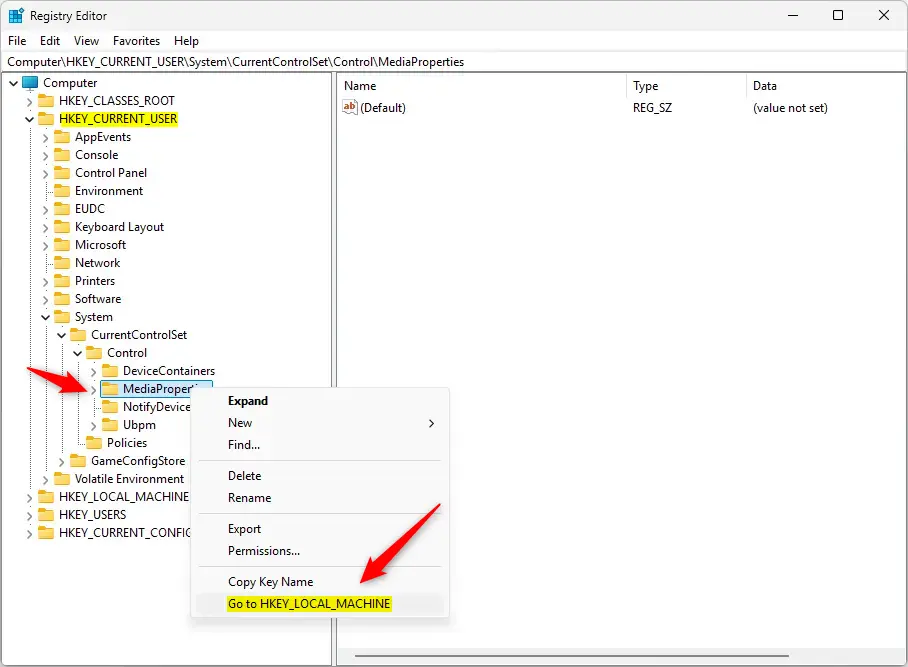
Right-click a key and choose “Go to HKEY_LOCAL_MACHINE” to switch.
You can do the same from HKLM back to HKCU:
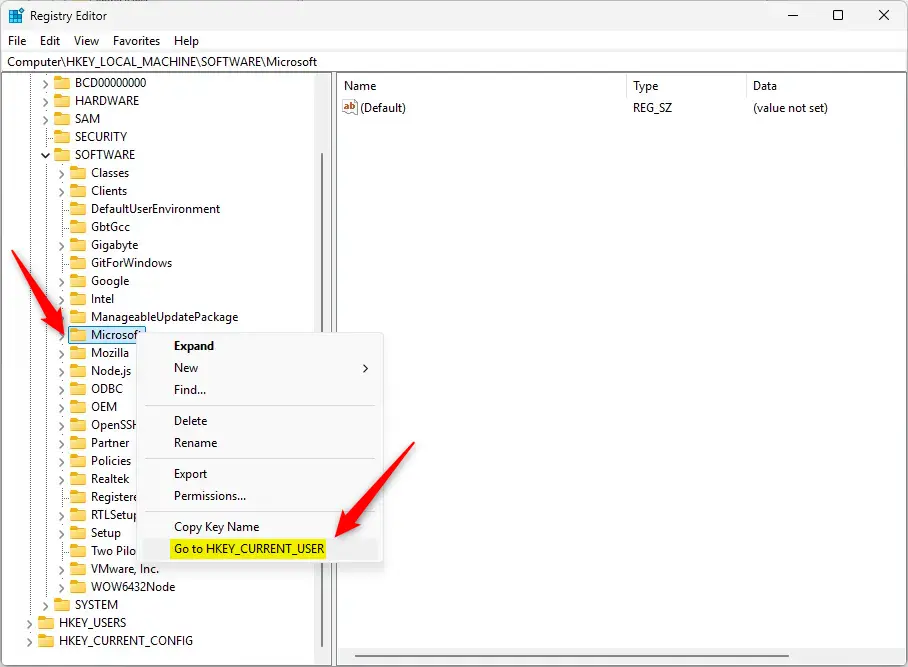
Right-click a key and choose “Go to HKEY_CURRENT_USER” to switch.
Important Note
This shortcut only works if the key exists in both HKCU and HKLM. If it doesn’t, the option won’t appear.
What Happens When You Use This Shortcut?
When you click the “Go to” option, you instantly jump to the same location in the other hive. This means you don’t have to manually search through folders again. You save time and stay organized when working with settings in both locations.
Summary
- The Registry Editor helps you manage important Windows settings.
- HKCU is for user-specific settings; HKLM is for computer-wide settings.
- You can quickly jump between the same keys in HKCU and HKLM using the “Go to” command.
- Be careful when editing the Registry — wrong changes can cause problems with Windows.
- For more beginner-friendly tips on using the Registry Editor, check out this helpful guide.


Leave a Reply Cancel reply