How to Install Pure-FTPd on Ubuntu 24.04


Pure-FTPd on Ubuntu 24.04 creates a fast and secure file transfer server that lets you move files between your computer and a remote server safely. This free file transfer program sets up dedicated user accounts for file sharing without giving people full login access to your entire system.
You can run this lightweight server on Ubuntu 24.04 to keep your data safe while handling personal projects or team websites. The tool manages connections reliably through simple terminal commands while keeping outside access locked down.
Update your package list with `sudo apt update`, then install Pure-FTPd using `sudo apt-get install pure-ftpd`. The server will start automatically after installation.
Install Pure-FTPd
To install Pure-FTPd on Ubuntu 24.04, open your terminal and run the standard package manager commands. This process downloads and sets up the server software on your machine so you can start moving files. Run sudo apt update followed by sudo apt-get install pure-ftpd to get the program on your system right away.
sudo apt update
sudo apt-get install pure-ftpd
After installing Pure-FTPD, the commands below can be used to stop, start, and enable the server service to always start up when the server boots.
sudo systemctl stop pure-ftpd.service
sudo systemctl start pure-ftpd.service
sudo systemctl enable pure-ftpd.service
The main configuration file is at [/etc/pure-ftpd/pure-ftpd.conf].
The basic configuration is secure and appropriate for most environments, so there’s nothing to do.
Add accounts to the [/etc/ftpusers] file to prevent access to the FTP server.
Pure-FTPd is now accessible through any FTP client. All user accounts not listed in the ftpusers file will receive access.
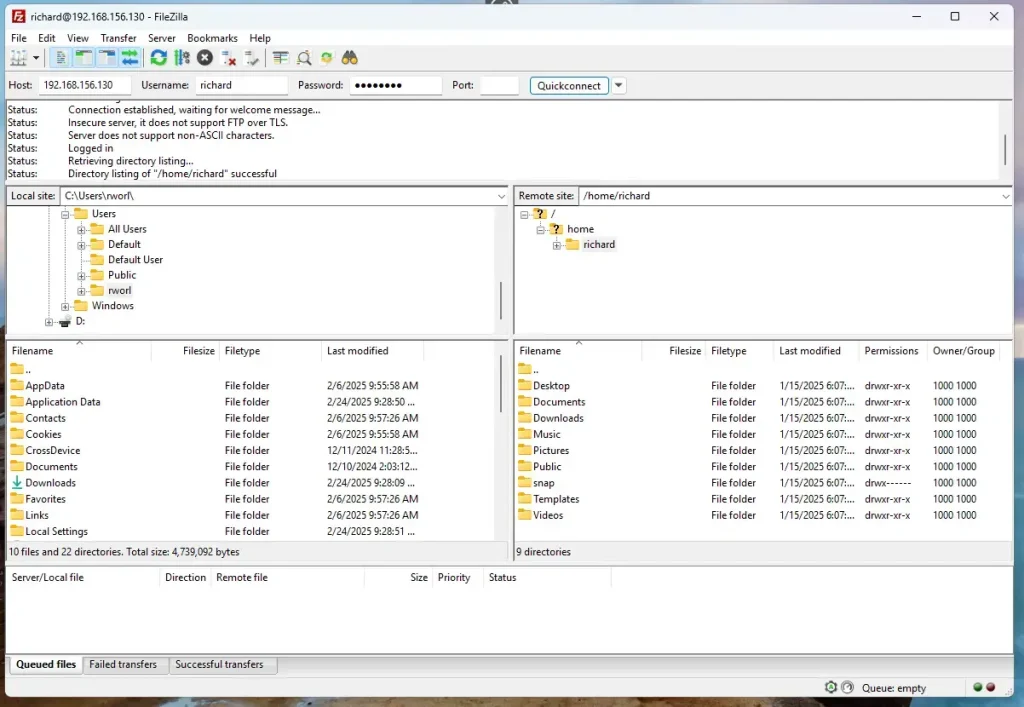
Access Pure-FTPd over SSL/TLS
Access Pure-FTPd over SSL/TLS (Secure Sockets Layer/Transport Layer Security, the technologies that encrypt web traffic) to keep your file transfers private and safe. Encrypting your connection makes sure sensitive information sent and received through the server stays protected from anyone trying to snoop on your network. You need an SSL certificate, like one from Let's Encrypt, set up on your server before you start.
Use a public certificate like Let's Encrypt or a self-signed on your server.
For this post, we'll create a self-signed certificate for Pure-FTPd.
Run the command below to generate a self-signed certificate with Pure-FTPd.
sudo openssl req -x509 -nodes -newkey rsa:3072 -keyout pure-ftpd.pem -out pure-ftpd.pem -days 3650
When prompted, enter the certificate details.
Country Name (2 letter code) [AU]:US
State or Province Name (full name) [Some-State]:NY
Locality Name (eg, city) []:Brooklyn
Organization Name (eg, company) [Internet Widgits Pty Ltd]:GeekRewind
Organizational Unit Name (eg, section) []:IT
Common Name (e.g. server FQDN or YOUR name) []:pureftpd.example.com
Email Address []:
sudo cp pure-ftpd.* /etc/ssl/private
sudo chmod 600 /etc/ssl/private/pure-ftpd.pem
Once you've generated the server private key and certificate files, configure Pure-FTPD to use the SSL/TLS certificate created above.
To do that, run the commands below as root (sudo bash) to force Pure-FTPD to communicate over TLS.
sudo bash
echo "2" > /etc/pure-ftpd/conf/TLS
After adding the highlighted lines to the file, save it. Then, run the commands below to restart the Pure-FTPD server.
sudo systemctl restart pure-ftpd
With SSL/TLS configured, open your FTP client and set up the sites to use SSL/TLS.
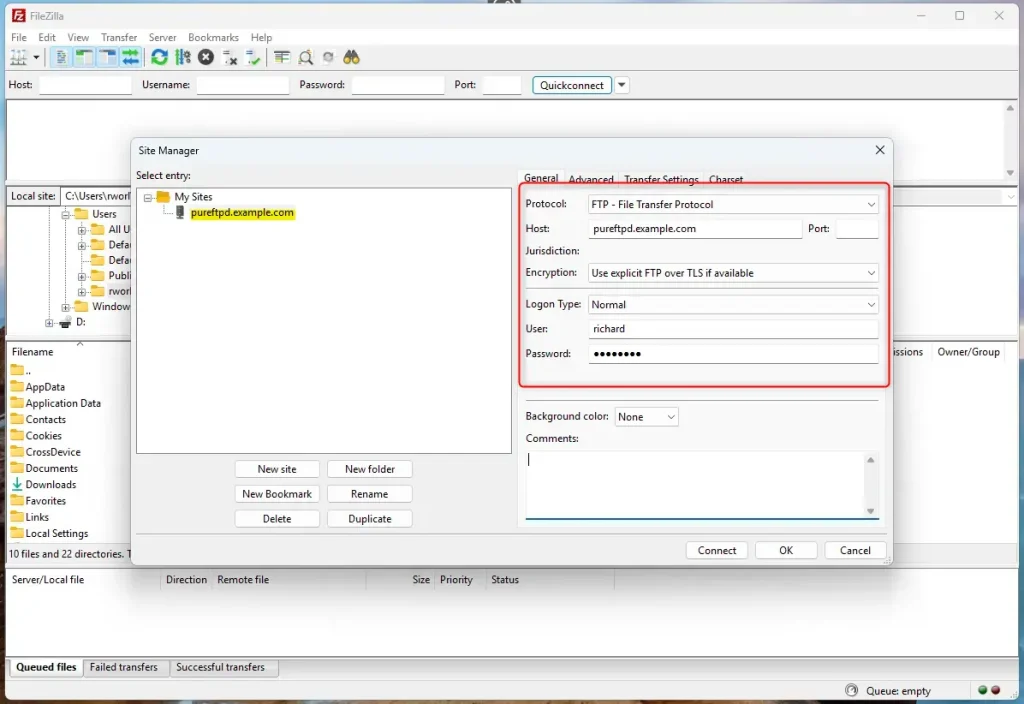
Since we used a self-signed certificate when prompted to trust it, OK.

Now, Pure-FTPd is communicating over SSL/TLS.

That should do it!
Conclusion:
- Installing Pure-FTPd on Ubuntu 24.04 provides a secure and efficient FTP server solution.
- The process includes creating virtual users, allowing for better management in shared hosting scenarios.
- Configuring SSL/TLS enhances security, ensuring encrypted data is transmitted over the FTP channel.
- Generating a self-signed certificate is a straightforward way to secure your FTP connections.
- Regular server updates and maintenance are essential for ongoing security and performance optimization.
This Pure-FTPd installation on Ubuntu 24.04 allows you to manage your FTP needs effectively, prioritizing security and efficiency for all your file transfers.
Did this guide fix your problem?

About the Author
Richard
Tech Writer, IT Professional
Richard is a writer at Geek Rewind who turns complex IT tasks into clear, step-by-step guides. He draws on years of hands-on experience in system administration and enterprise IT operations, focusing on Windows, Linux and WordPress: the problems people actually run into, and the fixes that work. His server and WordPress guides come from systems he runs himself. Richard builds and maintains the platform behind Geek Rewind, from its Ubuntu servers and Nginx configuration to its custom WordPress plugins. Many new tutorials start with readers' questions, and he's always glad to answer them in the comments.
No comments yet — be the first to share your thoughts!