

This article explains the steps to check if your PC has a Neural Processing Unit (NPU) in Windows 11.
What is a Neural Processing Unit?
A Neural Processing Unit (NPU) is a specialized chip inside your computer. It’s designed to handle artificial intelligence (AI) and machine learning (ML) tasks quickly and efficiently. Instead of sending your data to the cloud to be processed, an NPU processes it right on your PC.
Why does this matter? Your regular CPU and GPU can handle most tasks. But an NPU is especially good at AI work that doesn’t use much power. This includes things like voice recognition, photo analysis, and other smart features.
What happens when you have an NPU? Your PC can run AI features faster and use less battery power. You get better performance for tasks like language recognition and image processing.
Why Check for an NPU?
Knowing if your PC has an NPU helps you understand what your computer can do. You can then use its full power for AI tasks and features.
How to Check for NPU Using Task Manager
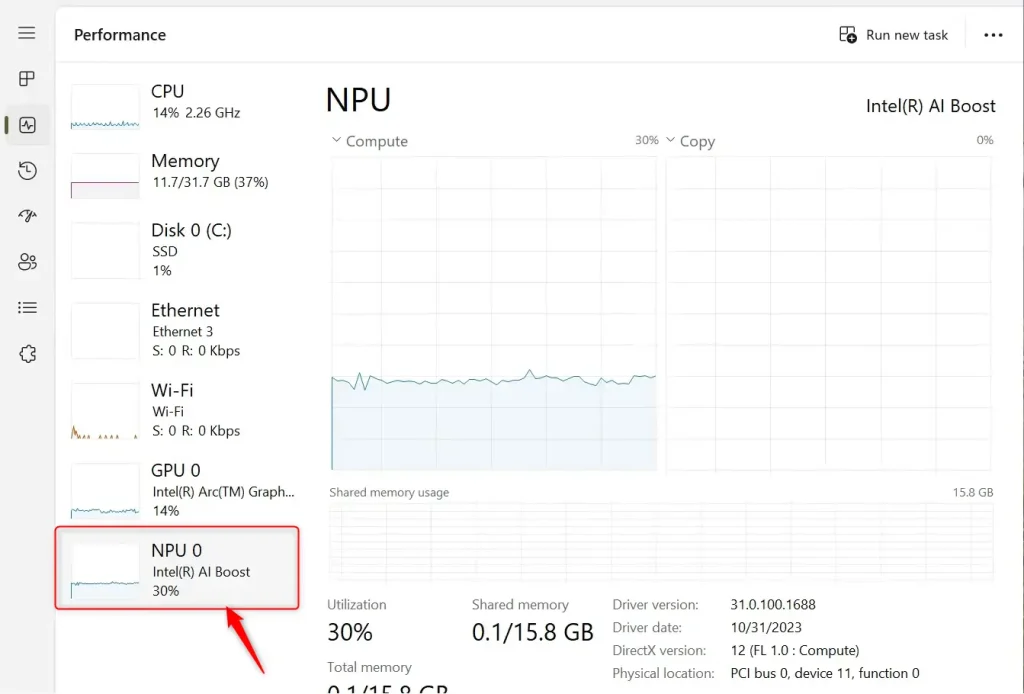
- open the Task Manager or press
Ctrl+Shift+Escon your keyboard. - Look for the Performance tab.
- If your PC has an NPU, you will see an NPU section showing its name and details.
How to Check for NPU Using Device Manager
Another way to check is by using Device Manager.
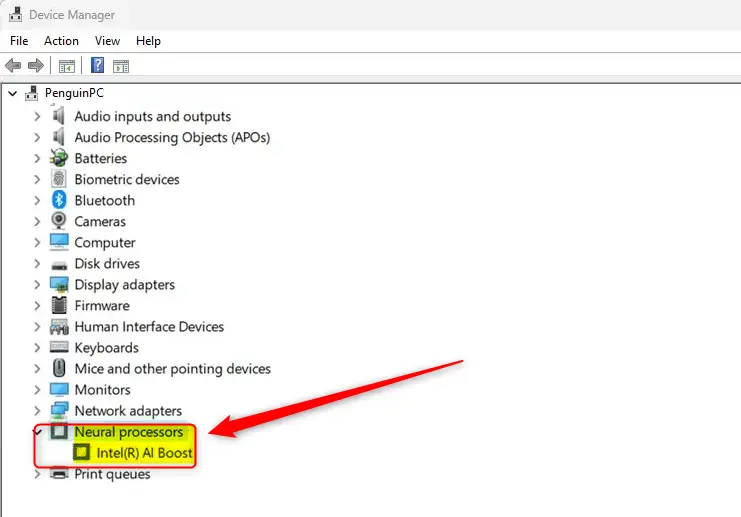
- ⚙️ Admin Required: Open Device Manager by typing
devmgmt.mscin the search box and pressing Enter. - Look through the list of categories.
- If your PC has an NPU, you will see a Neural processors category.
Summary
Checking if your PC has a Neural Processing Unit (NPU) is simple and useful. Windows 11 gives you two easy ways to find out:
- Task Manager: Shows NPU details in the Performance tab.
- Device Manager: Shows a Neural processors category if your PC has an NPU.
Knowing about your NPU helps you understand your computer’s AI capabilities. It lets you get the most out of features like voice recognition and photo editing. These tasks will run faster and use less power with an NPU.
How do I check if my PC has a Neural Processing Unit?
What is a Neural Processing Unit used for?
Can I find the NPU in Device Manager?
Why is it important to know if my PC has an NPU?
What are the benefits of having an NPU in my PC?

Leave a Reply Cancel reply