Enable Single Click in Ubuntu File Manager

You can enable single-click to open files and folders in Ubuntu’s default file manager, changing the standard double-click behavior.
This adjustment lets you open items with just one click, significantly speeding up your workflow on Ubuntu 22.04 LTS and other recent versions.
While Ubuntu traditionally uses double-click to prevent accidental openings, switching to single-click is a simple preference change. You’ll still select items with a single click, and holding CTRL will allow for multi-selection just like before.
Open File Manager and go to Preferences. Under the General tab, select “Single-click” for the “Action to Open Items” option to enable single-click opening. You can switch back to double-click by selecting that option instead.
How to turn on or off single-click to open an item on Ubuntu Linux
You can easily turn on single-click mode in the Ubuntu File Manager to open files and folders with just one click, instead of the usual two.
Open the File Manager, then navigate to Options, then Preferences (the settings menu).
In the General tab, find the ‘Action to Open Items’ setting and select ‘Single click.’
- Single click
- Double click
To change back to Double click, choose that instead.
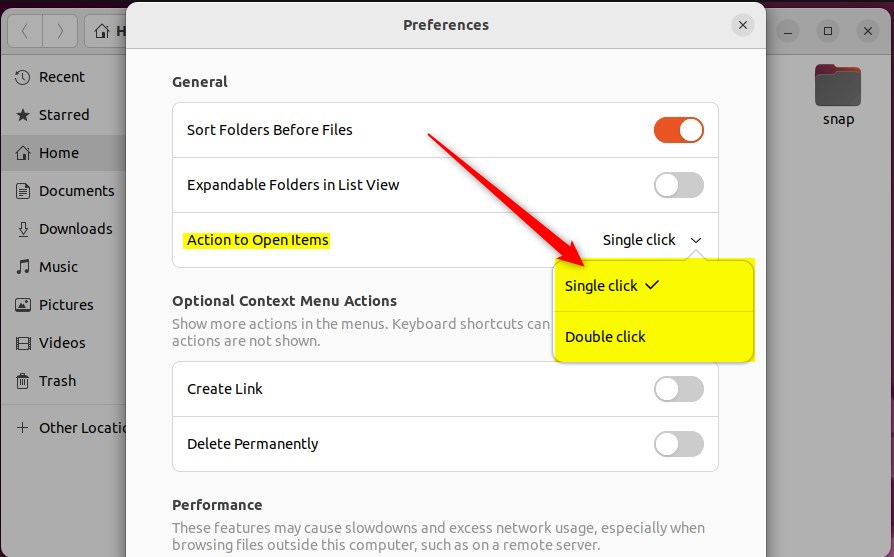
Your changes should take effect right away.
And that’s all there is to it!
Conclusion:
- Switching to single-click mode in Ubuntu Linux makes file and folder navigation more accessible for users who struggle with double-clicking.
- Users can easily revert to the default double-click mode by following the provided steps to adjust preferences in File Manager.
- These straightforward adjustments enhance the usability and ergonomics of Ubuntu Linux for a wider range of individuals.
That sums up enabling or disabling single-click mode in Ubuntu Linux!
How do I turn off single click in File Explorer?
At the top of File Explorer, on the View tab, click Options. On the resulting dialog, you can disable the option to use a single click to open items.
Was this guide helpful?

About the Author
Richard
Tech Writer, IT Professional
Richard, a writer for Geek Rewind, is a tech enthusiast who loves breaking down complex IT topics into simple, easy-to-understand ideas. With years of hands-on experience in system administration and enterprise IT operations, he’s developed a knack for offering practical tips and solutions. Richard aims to make technology more accessible and actionable. He's deeply committed to the Geek Rewind community, always ready to answer questions and engage in discussions.



No comments yet — be the first to share your thoughts!