
This tutorial will show you how to change the touchpad three-finger swipe gestures in Windows 11.
If your Windows 11 device (like a laptop) has a built-in precision touchpad, you can change what happens when you swipe with three fingers. You can set it to do nothing, switch apps and show desktop, switch desktops and show desktop, or change audio and volume.
Option One
Change Touchpad Three-finger Swipe Gestures in Settings
- Open Settings by pressing
Win+I. - Click on Bluetooth & devices on the left side. Then click on Touchpad on the right side. Open Touchpad settings
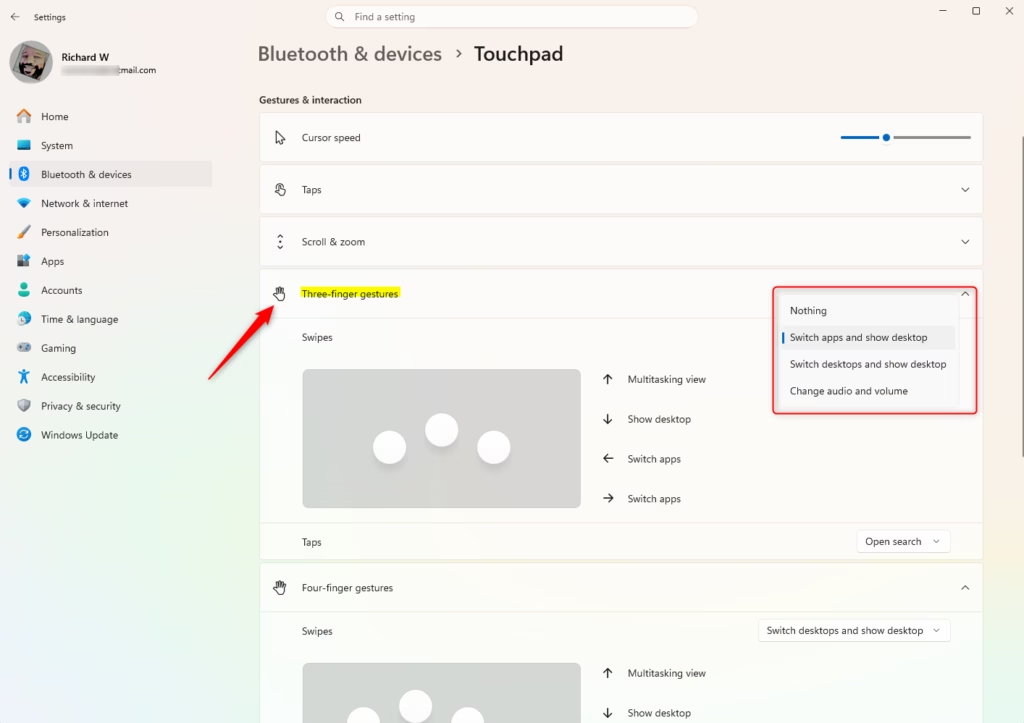
- Click on Three-finger gestures to open it.
- Choose what you want from the Swipes dropdown menu. Your options are:
- Nothing
- Switch apps and show desktop (this is the default)
- Switch desktops and show desktop
- Change audio and volume
- You can now close Settings.
Option Two
Change Touchpad Three-finger Swipe Gestures Using Registry
⚠️ Admin privileges required for this option.
Change Touchpad Three-finger Swipe Gestures to “Nothing”
reg add "HKEY_CURRENT_USER\Software\Microsoft\Windows\CurrentVersion\PrecisionTouchPad" /v ThreeFingerSlideEnabled /t REG_DWORD /d 0 /f
Change Touchpad Three-finger Swipe Gestures to “Switch apps and show desktop”
This is the default setting.reg add
reg add "HKEY_CURRENT_USER\Software\Microsoft\Windows\CurrentVersion\PrecisionTouchPad" /v ThreeFingerSlideEnabled /t REG_DWORD /d 1 /f
Change Touchpad Three-finger Swipe Gestures to “Switch desktops and show desktop”
reg add "HKEY_CURRENT_USER\Software\Microsoft\Windows\CurrentVersion\PrecisionTouchPad" /v ThreeFingerSlideEnabled /t REG_DWORD /d 2 /f
Change Touchpad Three-finger Swipe Gestures to “Change audio and volume”
reg add "HKEY_CURRENT_USER\Software\Microsoft\Windows\CurrentVersion\PrecisionTouchPad" /v ThreeFingerSlideEnabled /t REG_DWORD /d 3 /f
Summary
You can change your three-finger swipe gestures in Windows 11 in two ways. The easiest way is through Settings. Just go to Bluetooth & devices > Touchpad > Three-finger gestures and pick what you want. If you prefer using the registry, you can edit the "ThreeFingerSlideEnabled" value with different numbers (0, 1, 2, or 3) to get the same results.
Leave a Reply