How to Change Device Name in Android Nearby Share on Windows 11

You change your Android Nearby Share device name on Windows 11 through your PC’s settings.
Nearby Share lets you send files like photos and documents wirelessly between your Android phone and Windows 11 PC. This feature typically displays your PC’s default Windows name, which can be confusing if you have several devices.
By personalizing this name, you make it instantly recognizable on your Android phone’s share menu. This helps you confidently select the correct computer, enhancing both convenience and privacy by making your device less easily identifiable to others.
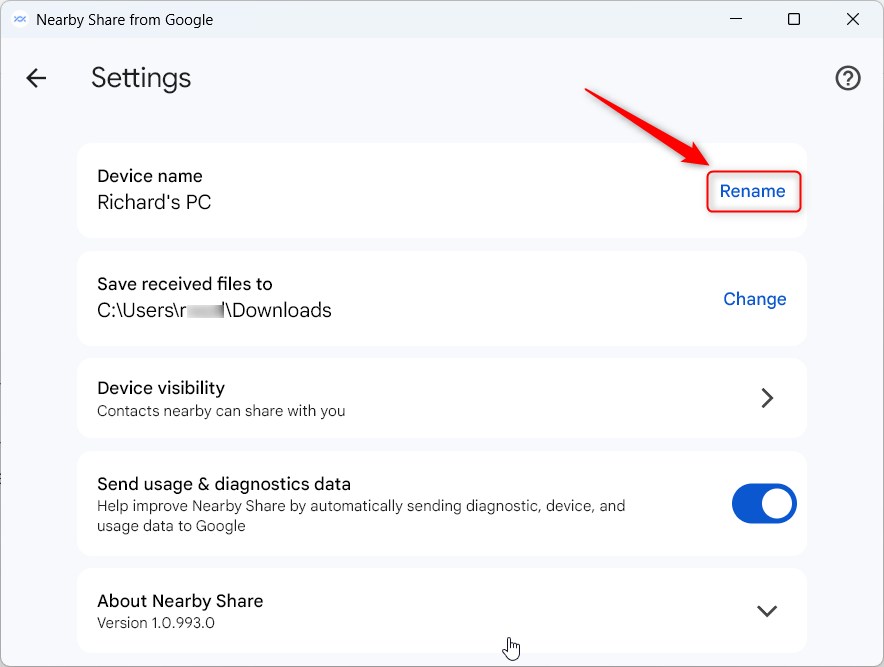
Access Nearby Share settings in Windows and click “Rename” under the Device name tile. Enter your new name and save. This personalized name will then appear on your Android device’s share menu.
How to change your device name
You can change your device name in Nearby Share right from the app settings to make it easier to spot your computer when sharing files.
1. Open the app by clicking the Start menu and finding it in your app list.
2. Click the Settings button (the gear icon) at the top right of the app window.
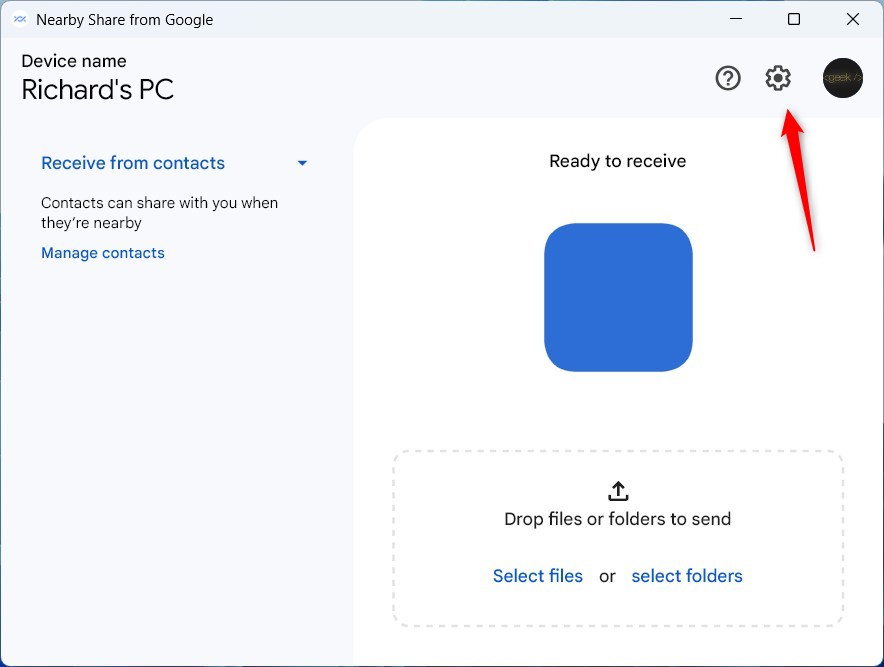
3. Find the Device name tile and click the Rename link.
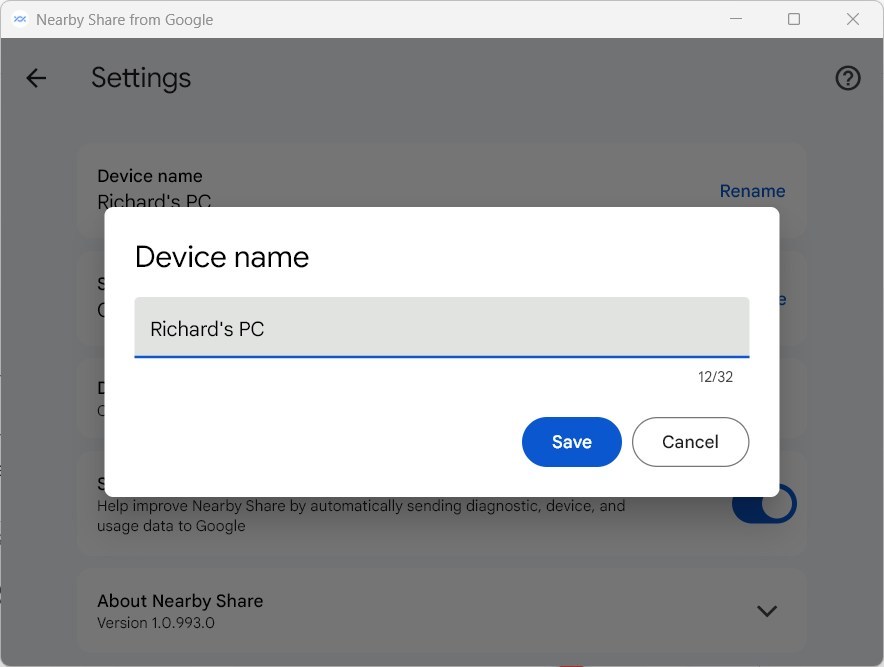
4. Type in your new name and save your changes.
Troubleshooting: When the Name Does Not Update
Sometimes, the name change does not show up immediately due to saved data. If your PC still shows the old name, follow these steps to refresh your network profile and discovery services.
Restarting Discovery Services (Admin Required)
[ADMIN PRIVILEGES REQUIRED] Open the Start menu, type Services, and press Enter. Locate Function Discovery Resource Publication. Right-click it and select Restart. This forces Windows to broadcast your updated friendly name to nearby devices.
Clearing Bluetooth and Wi-Fi Cache
If the name persists, your Android device may have saved the old PC name. Toggle Bluetooth and Wi-Fi off and on again on your phone. This clears the local device cache and forces a fresh scan for nearby devices.
Registry and System Name Sync
Nearby Share usually uses your Windows system name, which is stored in the registry, so syncing them ensures consistency.
Summary
Changing your device name in Nearby Share makes it easier to spot your computer when sharing files and keeps things organized.
Why does my PC show the wrong name in Nearby Share?
Your PC might show the wrong name in Nearby Share if the app or your phone has an old name saved, often fixed by restarting services.
Does changing my computer name automatically update Nearby Share?
Changing your computer name in Windows doesn’t always automatically update Nearby Share, as the app keeps its own settings.
Was this guide helpful?

About the Author
Richard
Tech Writer, IT Professional
Richard, a writer for Geek Rewind, is a tech enthusiast who loves breaking down complex IT topics into simple, easy-to-understand ideas. With years of hands-on experience in system administration and enterprise IT operations, he’s developed a knack for offering practical tips and solutions. Richard aims to make technology more accessible and actionable. He's deeply committed to the Geek Rewind community, always ready to answer questions and engage in discussions.

No comments yet — be the first to share your thoughts!