
This guide will show you how to try out the Quick Machine Recovery feature in Windows 11. It’s a handy tool that helps your PC fix serious problems that stop it from starting up properly.
What is Quick Machine Recovery?
Quick Machine Recovery is a feature in Windows 11 that helps your computer fix itself when it runs into serious errors and can’t start correctly. It can automatically look for fixes online and try to repair your PC without needing you or a technician to do much.
This feature builds on the Startup Repair tool and uses a safe environment called the Windows Recovery Environment (WinRE) to scan for solutions and fix issues.
Starting with Windows 11 build 26120.3653 (Beta 24H2), Quick Machine Recovery is available to test.
How to Test Quick Machine Recovery on Your PC
Follow these simple steps to try out Quick Machine Recovery:
- Open Windows Terminal as Administrator:
– Click the Start button.
– Type Windows Terminal.
– Right-click on it and choose Run as administrator.
– When it opens, click the down arrow (˅) next to the plus (+) tab and select Command Prompt.
- Enable Recovery Test Mode:
Copy and paste the following command into the Terminal window and press Enter:reagentc /SetRecoveryTestmode
- Set Your PC to Boot into Recovery Mode:
Copy and paste this command and press Enter:reagentc /BootToRe
- Restart Your Computer:
Click Start > Power > Restart. Your PC will now start in Quick Machine Recovery test mode.
Note: If your PC does not start in recovery mode after restarting, do this:
- In the recovery screen, choose Continue to boot Windows normally.
- Once Windows starts, open Windows Terminal (Admin) again and run these two commands, pressing Enter after each:
reagentc.exe /Disable
reagentc.exe /Enable
- Try the steps to start Quick Machine Recovery test mode again.
If everything works, you will see the recovery test screen like this:
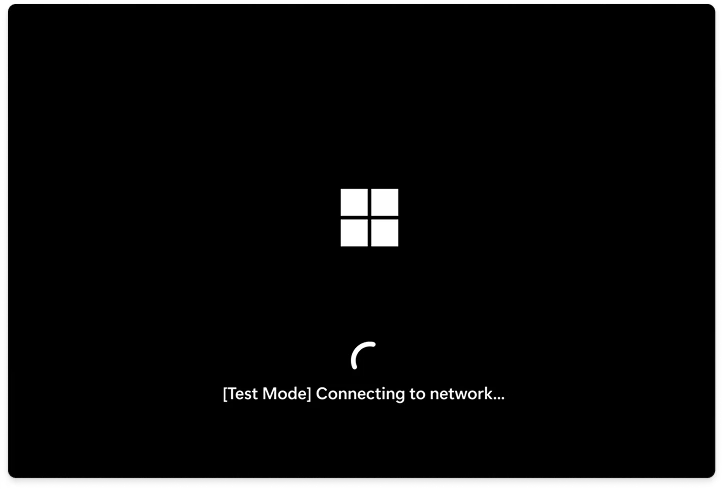
That’s it! You have successfully tested Quick Machine Recovery on your Windows 11 PC.
Summary
- Quick Machine Recovery helps fix serious startup problems automatically using online solutions.
- It uses Windows Recovery Environment (WinRE) and Windows Update to find fixes.
- Testing it requires running simple commands in Windows Terminal as an admin.
- If your PC doesn’t enter recovery mode, you can reset the recovery settings with two commands and try again.
- Seeing the recovery test screen means your PC is ready to recover from future startup issues.
By testing this feature, you’re making sure your PC can handle startup problems better and recover quickly.
Leave a Reply Cancel reply