How to Install Actual Budget on Ubuntu 24.04

You install Actual Budget on Ubuntu 24.04 by downloading and running its AppImage file.
Actual Budget is an open-source personal finance application that helps you manage your money locally, keeping your data private on your own machine.
The AppImage format is a single file containing the application and all its necessary components, simplifying installation on Linux systems like Ubuntu 24.04. For example, the latest stable release (as of recent updates) provides an AppImage for easy deployment.
You’ll grab this AppImage from the official Actual Budget GitHub releases page and then give it execute permissions.
Install Actual Budget on Ubuntu 24.04 by first installing Node.js, npm, and Yarn. Then, clone the Actual Budget server repository, install its dependencies, configure the app, and start it. Finally, create a systemd service for easy management.
Install Node.js
Installing Node.js is the first step to get Actual Budget running on your Ubuntu machine.
Run the command below to install Node and NPM.
sudo apt update
sudo apt install nodejs npm git
More about installing Node.js and Yarn is below.
Install Node and npm on Ubuntu
After installing Node and NPM, run the command below to install Yarn.
sudo npm install --global yarn
At this stage, Node.js, npm, and Yarn should be successfully installed on Ubuntu.
Download Actual Budget files
After setting up your Ubuntu system, run the command below to clone the Actual Budget file. You may choose to save it to your home directory if you prefer.
git clone https://github.com/actualbudget/actual-server.git
Next, change into the clone file and install.
cd actual-server
yarn install
Configure Actual Budget.
After installing Actual Budget, you’ll need to configure it by opening the config.json file to set its network address and port.
nano config.json
Next, specify the IP address of the machine and the port number you want to use for listening.
{
 "hostname": "127.0.0.1",
 "port": 5006
}
Save and exit.
Finally, run the command below to start the app.
yarn start
You can access the app using the IP address and port number specified in the configuration file.
http://localhost:5006
Create an admin password on the welcome screen.
Login and start using the app.
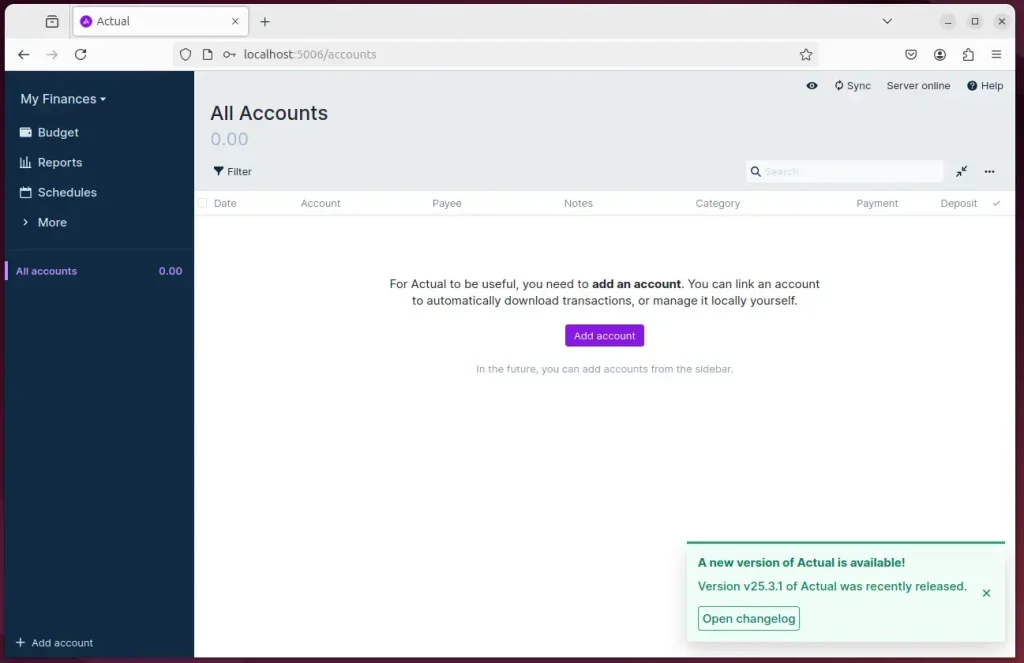
To easily manage the app start-up and shutdown, create a systemd service.
sudo nano /etc/systemd/system/actual.service
Copy and paste the content below into the file. Replace the username highlighted with your own.
[Unit]
Description=Actual-Server (https://actualbudget.org)
After=network.target

[Service]
User=richard
Group=richard
WorkingDirectory=/home/richard/actual-server/
ExecStart=/usr/local/bin/yarn start
Restart=on-watchdog

[Install]
WantedBy=multi-user.target
Save and exit.
Reload the systemd services and start the app.
sudo systemctl daemon-reload
sudo systemctl enable --now actual.service
When you run the service status, you should see the app running.
sudo systemctl status actual.service
The app should be running now.
actual.service - Actual-Server (https://actualbudget.org)
     Loaded: loaded (/etc/systemd/system/actual.service; enabled; preset: enabled)
     Active: active (running) since Sun 2025-03-23 14:52:21 CDT; 2s ago
   Main PID: 6204 (node)
      Tasks: 29 (limit: 4551)
     Memory: 189.6M (peak: 189.9M)
        CPU: 1.036s
     CGroup: /system.slice/actual.service
             ├─6204 node /usr/local/bin/yarn start
             ├─6211 /usr/local/lib/node_modules/node/bin/node /home/richard/actual-server/.yarn/releases/ya>
             └─6222 /usr/local/lib/node_modules/node/bin/node app
That should do it!
Conclusion:
Installing the Actual Budget app on Ubuntu 24.04 allows users to manage their finances efficiently. Here are the key takeaways:
- Simple Installation: The process involves installing Node.js, npm, and Yarn before downloading the Actual Budget app.
- Custom Configuration: Users can easily configure the app by modifying the
config.jsonfile to suit their preferences. - Systemd Service: Creating a systemd service facilitates more straightforward management of the app’s start-up and shutdown processes.
- Local Data Control: Actual Budget provides enhanced control over personal financial data compared to cloud-based options as a locally hosted solution.
- User-Friendly Interface: The app’s intuitive design makes it accessible for users with all levels of financial knowledge.
Following the outlined steps, users can successfully set up and utilize Actual Budget for their financial management.
Is actual Budget open source?
Actual Budget follows the same principles as YNAB but it's way better and more configurable. It's open source for a start, and all the files are local.
Was this guide helpful?

About the Author
Richard
Tech Writer, IT Professional
Richard, a writer for Geek Rewind, is a tech enthusiast who loves breaking down complex IT topics into simple, easy-to-understand ideas. With years of hands-on experience in system administration and enterprise IT operations, he’s developed a knack for offering practical tips and solutions. Richard aims to make technology more accessible and actionable. He's deeply committed to the Geek Rewind community, always ready to answer questions and engage in discussions.




No comments yet — be the first to share your thoughts!