Disable Laptop Suspend When Lid Closes in Ubuntu

You can disable your Ubuntu laptop’s suspend action when the lid closes.
Suspending your laptop upon lid closure is Ubuntu’s default power-saving setting, intended to conserve energy by entering a low-power sleep mode. This usually allows you to resume your work instantly upon opening the lid.
However, you might want your laptop to continue running with the lid closed, perhaps for long downloads or background processes. By adjusting a specific configuration file, you can prevent Ubuntu from suspending.
Edit the logind.conf file to change HandleLidSwitch to ignore. Then, restart the systemd-logind service to apply the changes. Alternatively, use Gnome Tweaks and disable the suspend option.
How to keep the laptop on when the screen is closed in Ubuntu Linux
As described above, Ubuntu Linux automatically suspends when you close the laptop lid to save power. You can change that so it doesn’t sleep; below is how.
To stop Ubuntu Linux from suspending when the lid is closed, follow these steps:
These instructions will only work if you are using systemd.
First, press the Ctrl+Alt+T keyboard shortcut to open the command console terminal.
Open your terminal and run the following commands:
sudo gedit /etc/systemd/logind.conf
This will open a configuration file. Look for the line:
#HandleLidSwitch=suspend
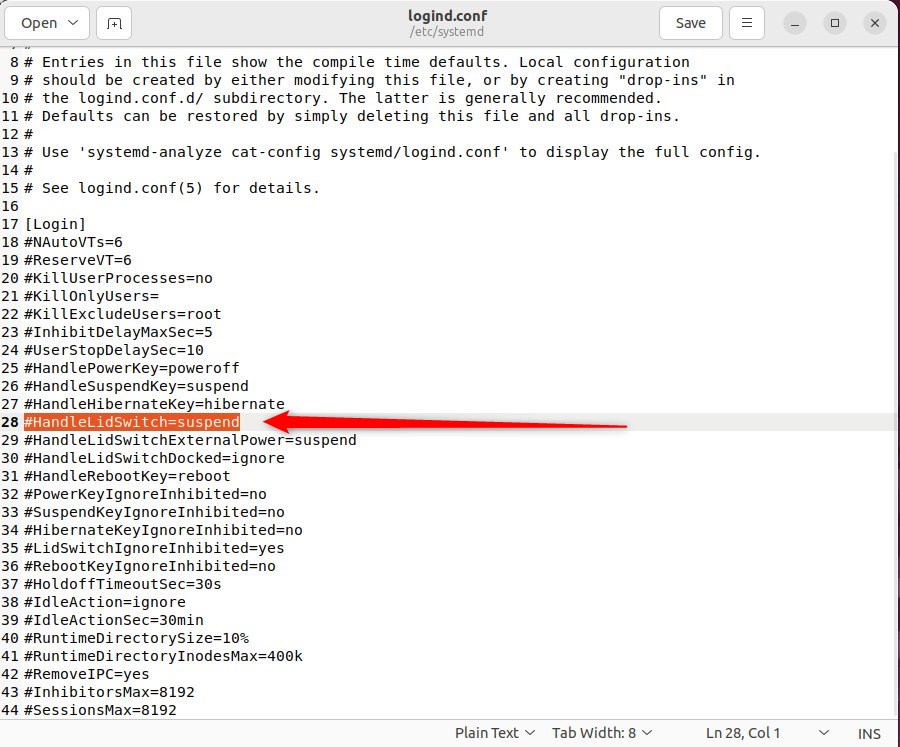
Change it to:
HandleLidSwitch=ignore

Save your changes and exit the editor.
Next, run the commands below to apply your changes.
sudo systemctl restart systemd-logind.service
Finally, you can restart and test your computer to see if it works.
If these steps don’t work, there’s another option. You can install Gnome Tweaks, an application that gives you more control over your laptop’s lid close behavior in Ubuntu Linux.
Run the commands below to install.
sudo apt install gnome-tweaks
After installing the app, go to the Activities overview and search for Tweaks.

Under General, toggle the switch to Off for Suspend in the app when the laptop lid is closed.
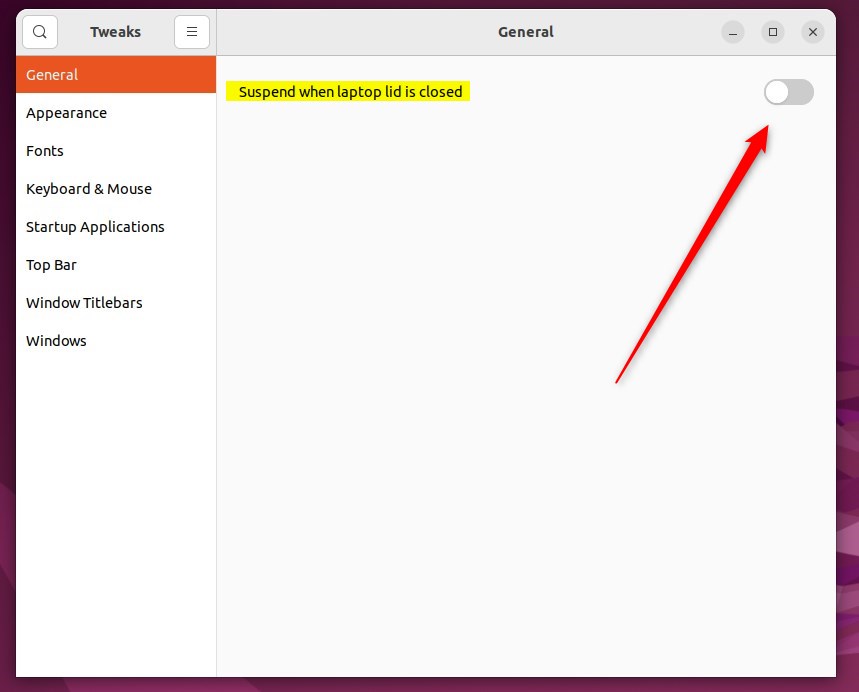
That should do it!
Conclusion:
- Ubuntu Linux provides a straightforward way to change the laptop lid close behavior to “ignore,” allowing users to avoid automatic suspension when the lid is closed.
- Modifying the HandleLidSwitch parameter in the login.conf file or utilizing the Gnome Tweaks application, users can keep their laptop running even when the screen is closed.
- With these simple steps, Ubuntu Linux users can ensure their work continues uninterrupted when the laptop lid is closed, providing greater flexibility and control over power management.
Was this guide helpful?

About the Author
Richard
Tech Writer, IT Professional
Richard, a writer for Geek Rewind, is a tech enthusiast who loves breaking down complex IT topics into simple, easy-to-understand ideas. With years of hands-on experience in system administration and enterprise IT operations, he’s developed a knack for offering practical tips and solutions. Richard aims to make technology more accessible and actionable. He's deeply committed to the Geek Rewind community, always ready to answer questions and engage in discussions.


No comments yet — be the first to share your thoughts!