

This post shows students and new users steps to change how long Windows Security Protection history events are retained in Windows 11.
The Protection history page in the Windows Security app is where you can view actions that Microsoft Defender Antivirus has taken, including Potentially Unwanted Apps removed or critical services turned off.
By default, Protection history only retains events for two weeks, after which they’ll disappear from this page.
You can change how long it takes to keep or retain items in the scan history folder, after which Microsoft Defender removes expired events.
If you specify the value zero ( 0 ), events are never automatically removed by retaining indefinitely.
Below is how to change how long Protection history events are kept in the Windows Security app when using Windows 11
How to change Windows Security Protection history events removal in Windows 11
As mentioned, Protection history only retains events for two weeks, after which they’ll disappear from this page.
However, you can change how long to keep or retain Protection history events or choose not to remove them automatically.
Below is how to do that:
Using PowerShell, open as administrator, then run the commands below to view the current purge settings for Protection history in Windows Security.
Get-MpPreference | Select-Object -Property ScanPurgeItemsAfterDelay
By default, it’s set to 15.
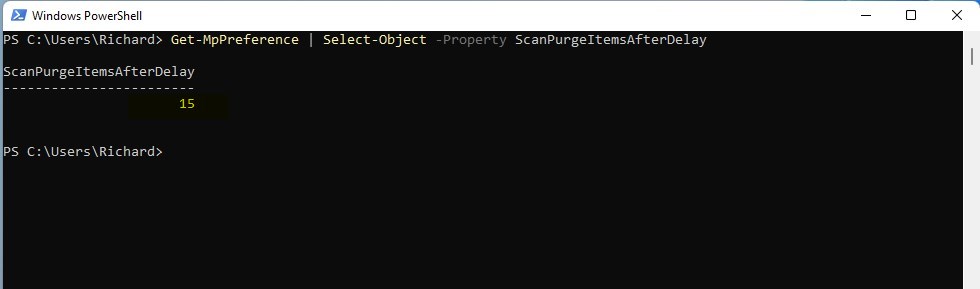
To change how long Protection history events are retained, run the format of the command below:
Set-MpPreference -ScanPurgeItemsAfterDelay <days>
Replace <days> with the number of days to retain Protection history events.
- 15 days = Default.
- 0 days = Protection history events will not automatically be removed.
The screenshot below shows a command to retain the Protection history events for 100 days.

That should do it!
Conclusion:
- The Windows Security app in Windows 11 allows users to view actions taken by Microsoft Defender Antivirus, such as removing Potentially Unwanted Apps or turning off critical services, via the Protection history page.
- By default, Protection history retains events for two weeks before disappearing from the page, but users can modify this setting.
- Using PowerShell, users can change the duration for retaining Protection history events, even opting to never automatically remove them by specifying a value of 0.
Leave a Reply