
This guide will help you easily turn on or off passkey autofill for apps on your Windows 11 computer.
What Are Passkeys?
Passkeys are a safer and easier way to sign in to apps and websites. Instead of typing a password, you can use fingerprint-in-windows-11/” class=”sal-link” rel=”noopener” target=”_blank” data-sal-id=”7187″>Windows Hello to log in using your PIN, face recognition, or fingerprint. This makes signing in faster and safer.
Windows can save these passkeys on your device when you use Windows Hello. Once saved, you just need your face, fingerprint, or PIN to sign in.
How to Enable or Disable Passkey Autofill in Windows 11
Follow these simple steps to turn passkey autofill on or off for apps:
- Open Settings:
- Click the Start menu (Windows icon) at the bottom left of your screen, then select Settings.
- Or press the Windows key + I on your keyboard to open Settings quickly.
- Go to Privacy & Security:
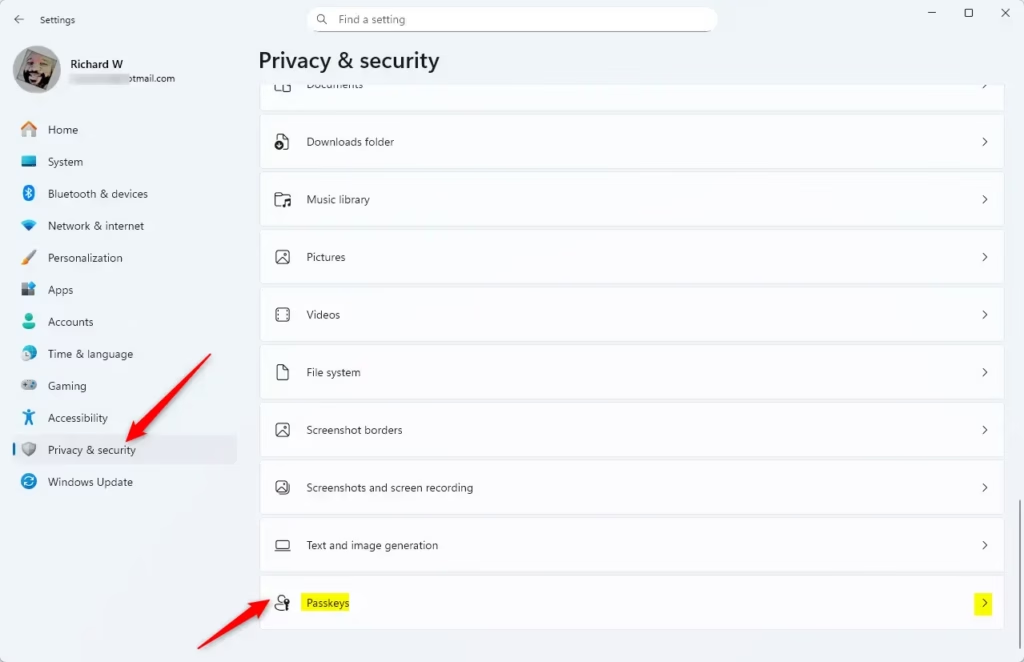
In the Settings window, click Privacy & security on the left side menu.
- Find Passkey Settings:
On the right side, scroll down and find the Passkey section. Click it to open more options.
- Turn Passkey Autofill On or Off:
Look for the Passkey autofill access option. Use the toggle switch to turn this feature on or off, depending on what you want.

That’s it! You’ve now controlled whether apps can use passkey autofill on your Windows 11 computer.
Why Manage Passkey Autofill?
- Passkeys make signing in easier and more secure by using your face, fingerprint, or PIN instead of passwords.
- You can quickly turn autofill on or off to suit your comfort and security needs.
- Allowing autofill saves time during login and helps avoid typing errors.
- Always check your settings to keep your device secure and working the way you want.
- Keep Windows updated to enjoy new security features and improvements.
If you want to learn more about passkeys and Windows Hello features, check out these helpful guides:
Leave a Reply Cancel reply