Enable or Disable Sound Keys in Ubuntu Linux

You can enable or disable the audible alerts for Caps Lock, Num Lock, and Scroll Lock keys in Ubuntu Linux.
These “toggle keys” provide a sound notification when you press them, confirming if the key’s state has changed. This can be incredibly useful, especially in versions like Ubuntu 22.04 LTS, preventing accidental all-caps typing or incorrect number input.
If you find these beeps helpful for confirming key presses, you can easily turn them on. Conversely, if they become a distraction, you can just as readily switch them off.
Open Settings, navigate to Accessibility, then Sound Keys. Toggle the switch to On to enable auditory feedback for Caps Lock, Num Lock, or Scroll Lock, or toggle it Off to disable.
How to enable or disable Toggle Keys Tone in Ubuntu Linux
You can easily turn the sound on or off for your Caps Lock, Num Lock, and Scroll Lock keys in Ubuntu Linux using the simple System Settings panel.
Here’s how you can enable or disable it.
Ubuntu Linux keeps most of its settings in one place. You can adjust everything from system configurations to user accounts and updates within the System Settings panel.
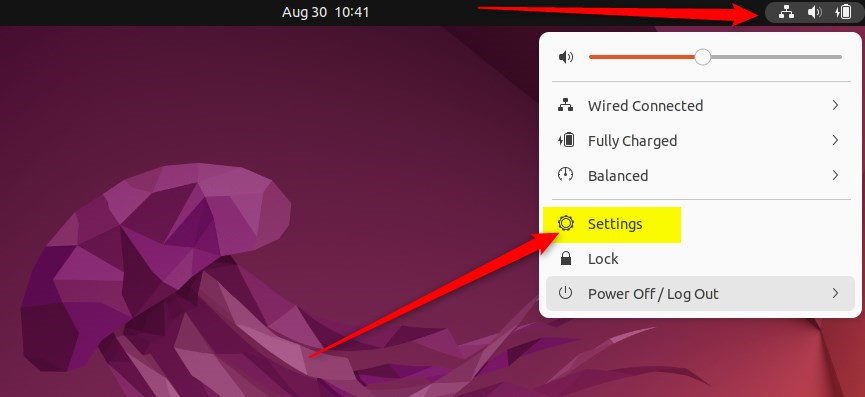
Another way to get there is to click the System menu in the top-right corner of your desktop’s top bar.
From the System menu, select Settings, just like in the image below.
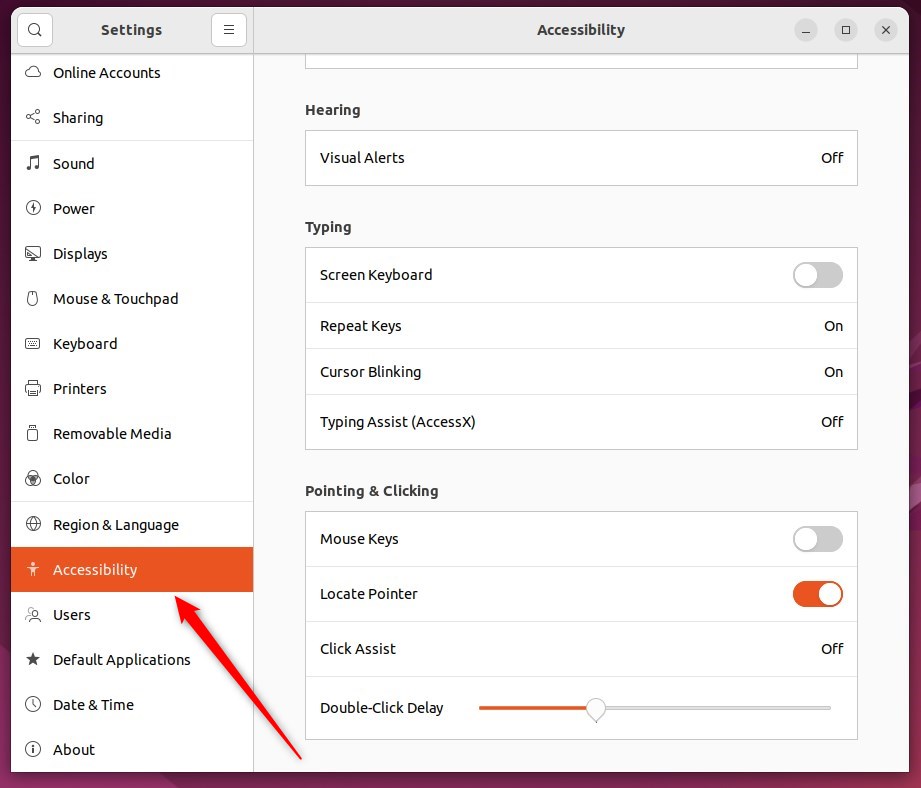
Once you’re in the Settings app, click on the Accessibility tile to open its panel.
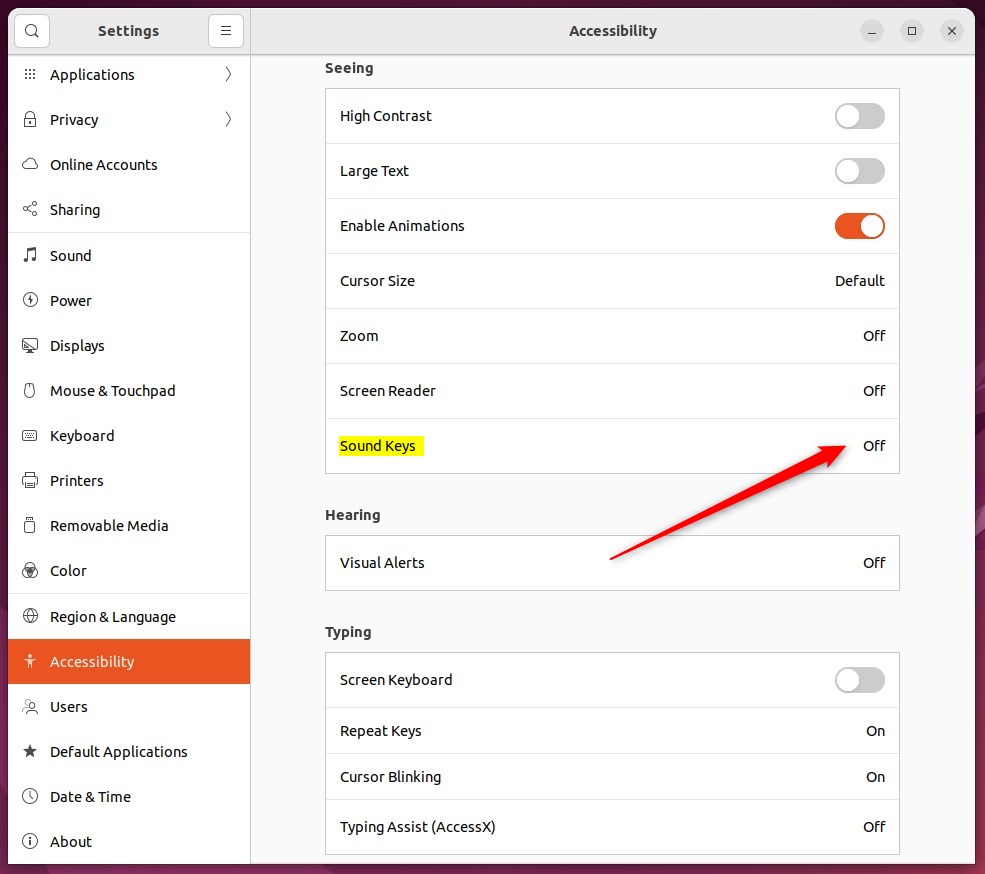
In the System Settings -> Accessibility panel, look under Seeing and select the Sound Keys tile. This will expand to show more options.
In the Sound Keys window, flip the switch to the On position to enable Sound Keys. Your changes will take effect right away.
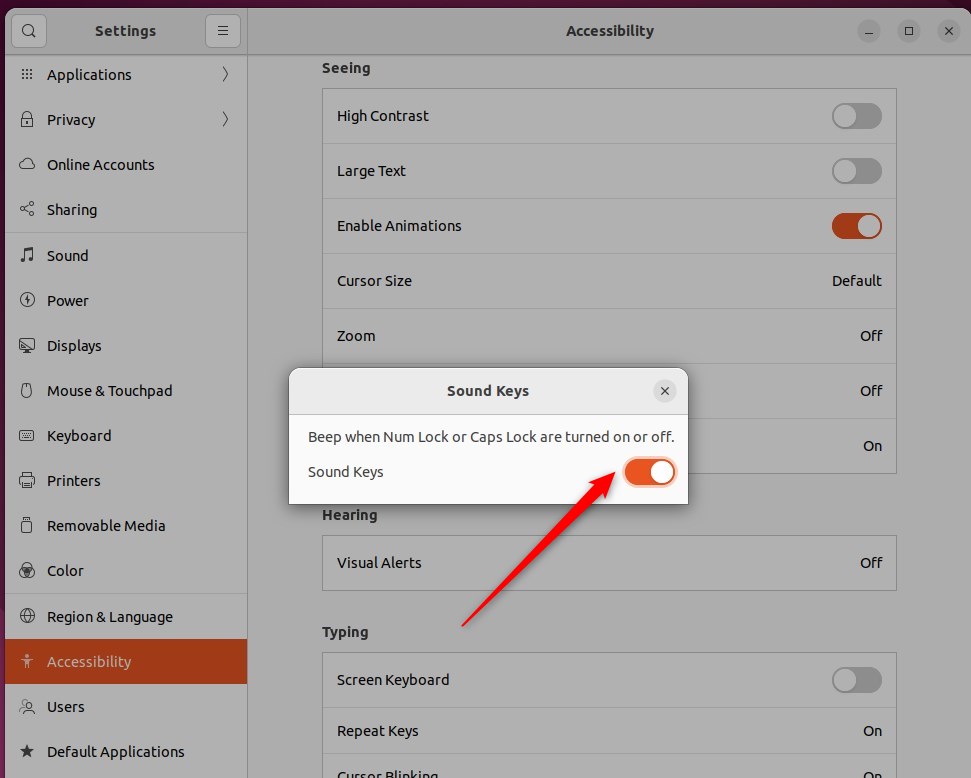
To turn it off, flip the switch back to the Off position.
And that’s it! You can now close the Settings app.
Conclusion:
- Enabling or disabling sound keys in Ubuntu Linux is a simple process done through the System Settings panel.
- The feature provides auditory feedback for Caps lock, Num lock, and Scroll lock keys and can be easily toggled on or off according to individual preference.
- Following the steps outlined in this post, users can efficiently manage the sound keys feature to suit their needs.
How to enable sound in Ubuntu?
Open the Activities overview and start typing Sound. Click on Sound to open the panel. Under Volume Levels, check that your application is not muted. The button at the end of the volume slider toggles Mute on and off.
What are sound keys?
Sound Keys is a plugin for After Effects that analyzes your audio and generates keyframes you can easily link to your layer's animation properties. Scale, rotate, and move to the beat. Or use audio to drive effects.
Was this guide helpful?

About the Author
Richard
Tech Writer, IT Professional
Richard, a writer for Geek Rewind, is a tech enthusiast who loves breaking down complex IT topics into simple, easy-to-understand ideas. With years of hands-on experience in system administration and enterprise IT operations, he’s developed a knack for offering practical tips and solutions. Richard aims to make technology more accessible and actionable. He's deeply committed to the Geek Rewind community, always ready to answer questions and engage in discussions.



No comments yet — be the first to share your thoughts!