

This tutorial shows you how to turn Adaptive Touch mode on or off for your Microsoft Surface device. You’ll need a Surface with a Precision Haptic Touchpad and Windows 11.
What is Adaptive Touch?
Adaptive Touch is an accessibility feature. It lets you use your knuckle, palm, or other body parts on the touchpad. Your Surface Precision Haptic touchpad has motors that give you tactile feedback. This means you feel physical clicks or taps. It makes using your Surface device feel more natural and responsive.
Why Use Adaptive Touch?
When Adaptive Touch is on, your touchpad responds to different types of touches. You can customize how it works for you. For example, you can adjust the right-click area size. You can change how much force is needed for a click. You can also adjust the time between clicks for a double-click.
Important: Touch gestures will not work when Adaptive Touch mode is turned on.
How to Enable or Disable Adaptive Touch
- Open the Surface app.
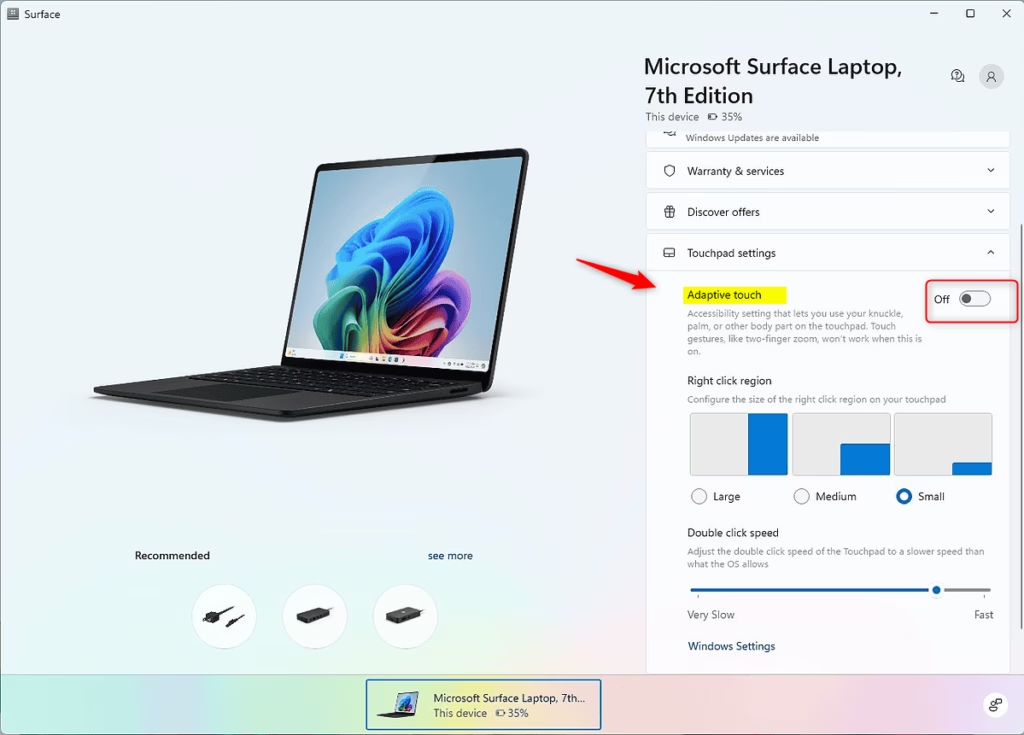
- Click or tap on Touchpad settings to open it.
- Turn Adaptive Touch on or off. The default setting is off.
- If you turned on Adaptive Touch, click or tap Turn on to confirm.
- You can now close the Surface app if you like.
Learn More
Accessibility in Surface Copilot+ PCs: Innovation meets inclusivity | Microsoft Community Hub See how Microsoft’s latest inclusive products help create a more comfortable computing experience for everyone.
How we’re making Copilot+ PCs from Surface more accessible | Microsoft Surface Learn about the accessibility features available with Surface Laptops and Surface Pro 2-in-1 PCs. See how Surface devices are inclusive from concept to creation.
Summary
Adaptive Touch is an accessibility feature on Microsoft Surface devices that lets you use different body parts on the touchpad with tactile feedback. When you enable it, your touchpad responds to knuckle, palm, and other inputs. You can customize haptic settings and touchpad behavior to match your needs. To enable or disable it, open the Surface app, expand Touchpad settings, and toggle Adaptive Touch on or off. Remember that touch gestures won’t work when Adaptive Touch is active.
Leave a Reply Cancel reply