

Want to know what kind of Wi-Fi your computer can use? This simple guide will show you how to find out the types of Wi-Fi your Windows 11 (or Windows 10) wireless adapter supports.
What is Wi-Fi Radio Type?
Wi-Fi is the technology that lets your computer connect to the internet without wires. Wi-Fi uses radio waves to send and receive data.
“Wi-Fi radio types” are different Wi-Fi versions or standards your computer can use to connect. Each type has its own speed, range, and features. Some common types are called 802.11a, b, g, n, ac, ax, and be.
Common Wi-Fi Types You Might See
| Wi-Fi Type | What It Means |
|---|---|
| 802.11a | Works on 5 GHz band, up to 54 Mbps speed. Has shorter range than 2.4 GHz types. |
| 802.11b | Works on 2.4 GHz band, up to 11 Mbps speed. Good range and can go through walls. |
| 802.11g | Also 2.4 GHz, faster up to 54 Mbps, compatible with 802.11b. |
| 802.11n (Wi-Fi 4) | Works on 2.4 & 5 GHz, speeds up to 600 Mbps, better range and speed. |
| 802.11ac (Wi-Fi 5) | Mainly 5 GHz, speeds over 1 Gbps, supports many devices at once. |
| 802.11ax (Wi-Fi 6 / 6E) | Works on 2.4, 5 & 6 GHz (6E only), speeds up to 9.6 Gbps, great for busy networks. |
| 802.11be (Wi-Fi 7) | Upcoming standard, super fast (up to 46 Gbps), can use multiple bands at once. |
How to Check Your Wi-Fi Types on Windows 11
Follow these easy steps:
- Open Windows Terminal:
- Click the Start button (Windows icon) or press Win key.
- Type Windows Terminal.
- Click on Windows Terminal to open it.
- Choose PowerShell or Command Prompt: In Windows Terminal, click the down arrow next to the tab and pick Windows PowerShell or Command Prompt.
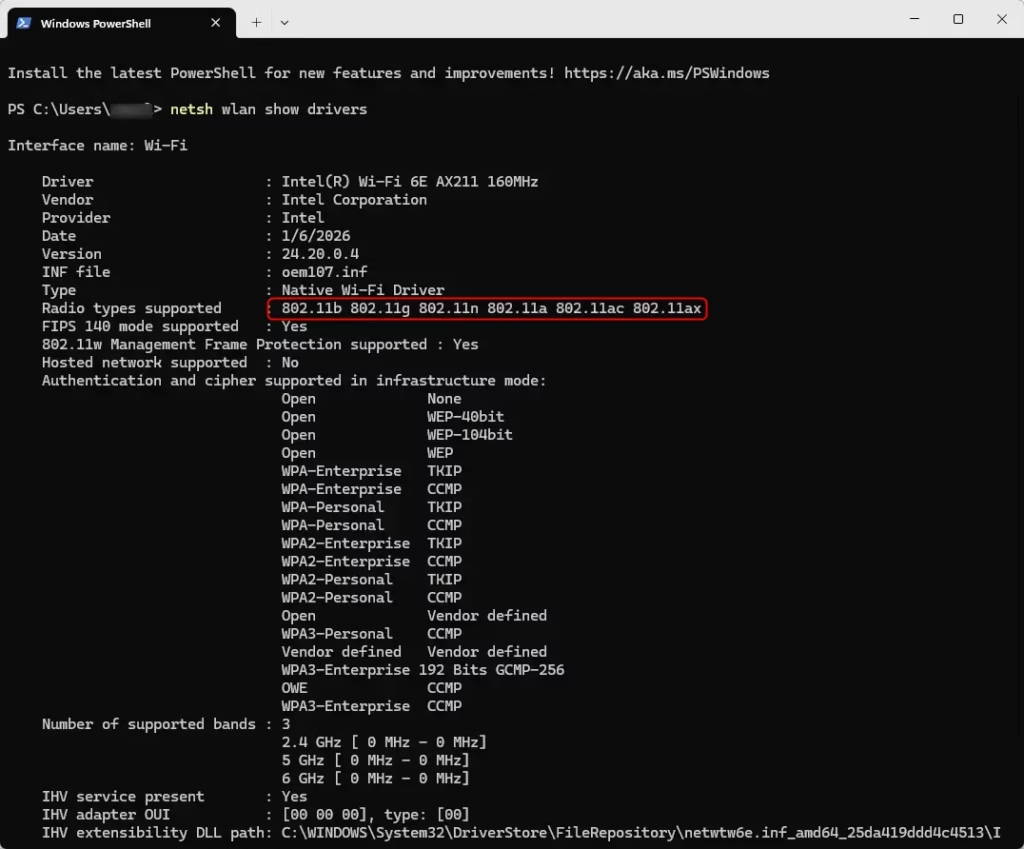
- Type this command and press Enter:
netsh wlan show driversThis command shows information about your wireless adapter.
Look for the line that says Radio types supported. It will list all the Wi-Fi types your computer’s adapter can use.
Example:
Summary
- Wi-Fi types are different versions of Wi-Fi technology with different speeds and ranges.
- Newer Wi-Fi types like Wi-Fi 6 and Wi-Fi 7 are faster and better for many devices.
- Your computer might support several Wi-Fi types — checking helps you know what speeds and features you can get.
- You can easily check this using a simple command in Windows Terminal.
- Future Wi-Fi types like Wi-Fi 8 are coming with even more improvements.
Knowing your Wi-Fi types can help you decide if you need a new router or adapter for faster internet.
More Info
Learn more about Wi-Fi standards on Wikipedia – IEEE 802.11
Or explore Wi-Fi technologies at the Wi-Fi Alliance website


Leave a Reply Cancel reply