Setting Up Apache with PHP-FPM on Ubuntu 24.04

Running Apache with PHP-FPM on Ubuntu 24.04 makes your websites load faster by handling PHP code separately from normal web pages. PHP-FPM (FastCGI Process Manager, a tool that handles dynamic script requests) acts like a background helper that processes heavy script requests so your server does not slow down when visitors open your site at the same time.
This setup uses fewer system resources than older methods like mod_php, which keeps your server running smoothly even during traffic spikes. You can connect Apache to PHP-FPM using a Unix socket or a local network port to speed up page delivery for blogs, online stores, and other web projects.
Install PHP and PHP-FPM using `apt`. Enable the `proxy_fcgi` module and `php8.3-fpm` configuration with `a2enmod` and `a2enconf`. Restart Apache and PHP-FPM services.
Install PHP
You can install PHP on Ubuntu 24.04 by running the package manager update command followed by the PHP installation command in your terminal. This downloads the necessary software packages for your web server. You can then check that the installation worked by running the version check command to see your active PHP version.
Successful output looks like this: PHP 8.3.6 (cli) (built: May 23 2024 11:34:18) (NTS).
sudo apt update
sudo apt install php8.3 php-mbstring php-pear
Confirm the installation details by running the command below.
php -i | head
Successful execution generates output matching these lines.
phpinfo()
PHP Version => 8.3.6

System => Linux Ubuntu 6.11.0-17-generic #17~24.04.2-Ubuntu SMP PREEMPT_DYNAMIC Mon Jan 20 22:48:29 UTC 2 x86_64
Build Date => Dec  2 2024 12:36:18
Build System => Linux
Server API => Command Line Interface
Virtual Directory Support => disabled
Configuration File (php.ini) Path => /etc/php/8.3/cli
Loaded Configuration File => /etc/php/8.3/cli/php.ini
Install and enable PHP-FPM
Install the PHP-FPM package alongside Apache by running the terminal command below.
sudo apt install php8.3-fpm
Enable the required PHP-FPM module next.
sudo a2enmod proxy_fcgi setenvif
sudo a2enconf php8.3-fpm
Restart both Apache and PHP-FPM services.
sudo systemctl restart php8.3-fpm apache2
Use PHP-FPM with Apache
You use PHP-FPM with Apache on Ubuntu 24.04 by editing the main pool configuration file to change how the web server passes processing requests. Opening this file lets you adjust the listen directive so Apache and PHP-FPM can talk to each other properly on your server.
Open the primary PHP-FPM configuration file.
sudo nano /etc/php/8.3/fpm/pool.d/www.conf
Locate and comment out the active listen directive. Reference the listen directive configured with [127.0.0.1:9000].
; Note: This value is mandatory.

;listen = /run/php/php8.3-fpm.sock
listen = 127.0.0.1:9000
Save changes, close the editor, and restart PHP-FPM.
Insert the highlighted code block into the virtual host configuration to route PHP requests through FPM.
<VirtualHost *:80>
  ServerName example.com
  ServerAdmin admin@example.com
  DocumentRoot /var/www/example.com

  <Directory /var/www/example.com/>
       Options FollowSymlinks
       AllowOverride All
       Require all granted
  </Directory>

  <FilesMatch ".php$">
       SetHandler "proxy:fcgi://127.0.0.1:9000/"
  </FilesMatch>

       ErrorLog ${APACHE_LOG_DIR}/error.log
       CustomLog ${APACHE_LOG_DIR}/access.log combined
</VirtualHost>
Verify Apache successfully communicates with PHP-FPM.
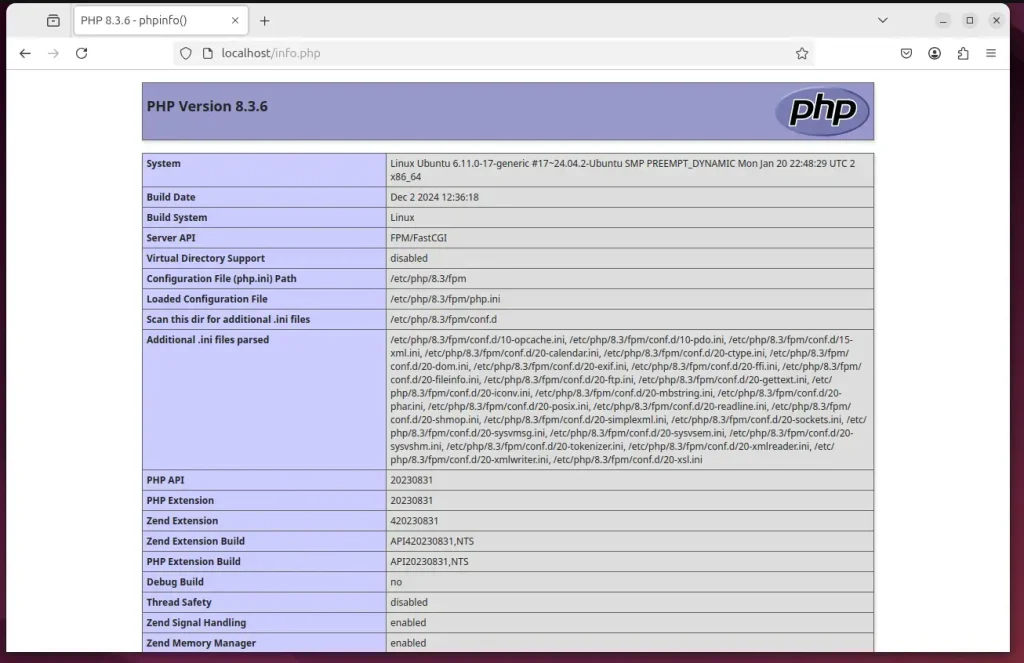
Configuration is complete.
Integrating PHP-FPM with Apache boosts overall application performance and reliability.
- Improved Performance: PHP-FPM allows simultaneous handling of multiple requests, leading to faster response times.
- Efficient Resource Management: It manages PHP worker pools, optimizing server resource utilization.
- Enhanced Reliability: With the ability to manage multiple PHP processes, applications become more robust and less prone to failures.
- Easy Installation: The installation and configuration process is straightforward, allowing for quick setup.
- Future-Proofing: Keeping PHP and its components updated ensures your server remains secure and efficient.
Separating PHP processing from core Apache threads allows web servers to handle higher request volumes simultaneously. Independent process management reduces load times and improves overall site responsiveness.
Was this guide helpful?

About the Author
Richard
Tech Writer, IT Professional
Richard is a writer at Geek Rewind who turns complex IT tasks into clear, step-by-step guides. He draws on years of hands-on experience in system administration and enterprise IT operations, focusing on Windows, Linux and WordPress: the problems people actually run into, and the fixes that work. His server and WordPress guides come from systems he runs himself. Richard builds and maintains the platform behind Geek Rewind, from its Ubuntu servers and Nginx configuration to its custom WordPress plugins. Many new tutorials start with readers' questions, and he's always glad to answer them in the comments.


No comments yet — be the first to share your thoughts!