

This brief tutorial shows students and new users how to install Apache Spark on Ubuntu 20.04 | 18.04.
Apache Spark is a powerful open-source big data processing and analysis framework. It has higher-level libraries that support SQL queries, streaming data, machine learning, and graph processing.
By installing Apache Spark on Ubuntu Linux, you can take advantage of its features and analyze large amounts of data, distribute it across clusters, and process it in parallel.
Additionally, Ubuntu Linux is a popular and reliable operating system widely used by developers, making it a great choice for running Apache Spark.
I am getting started with installing Apache Spark on Ubuntu.
Install Java JDK
Apache Spark requires Java JDK. In Ubuntu, the commands below can install the latest version.
sudo apt update
sudo apt install default-jdk
After installing, run the commands below to verify the version of Java installed.
java --version
That should display similar lines as shown below:
openjdk 11.0.10 2021-01-19
OpenJDK Runtime Environment (build 11.0.10+9-Ubuntu-0ubuntu1.20.04)
OpenJDK 64-Bit Server VM (build 11.0.10+9-Ubuntu-0ubuntu1.20.04, mixed mode, sharing)
Install Scala
One package that you’ll also need to run Apache Spark in Scala. To install in Ubuntu, simply run the commands below:
sudo apt install scala
To verify the version of Scala installed, run the commands below:
scala -version
Doing that will display a similar line below:
Scala code runner version 2.11.12 -- Copyright 2002-2017, LAMP/EPFL
Install Apache Spark
Now that you have installed the required packages to run Apache Spark, continue below to install it.
Run the commands below to download the latest version.
cd /tmp
wget https://archive.apache.org/dist/spark/spark-2.4.6/spark-2.4.6-bin-hadoop2.7.tgz
Next, extract the downloaded file and move it to the /opt directory.
tar -xvzf spark-2.4.6-bin-hadoop2.7.tgz
sudo mv spark-2.4.6-bin-hadoop2.7 /opt/spark
Next, create environment variables to be able to execute and run Spark.
nano ~/.bashrc
Then, add the lines at the bottom of the file and save.
export SPARK_HOME=/opt/spark
export PATH=$PATH:$SPARK_HOME/bin:$SPARK_HOME/sbin
After that, run the commands below to apply your environment changes.
source ~/.bashrc
Start Apache Spark
At this point, Apache Spark is installed and ready to use. Run the commands below to start it up.
start-master.sh
Next, start the Spark work process by running the commands below.
start-slave.sh spark://localhost:7077
You can replace the localhost host with the server hostname or IP address. When the process starts, open your browser and browse to the server hostname or IP address.
http://localhost:8080
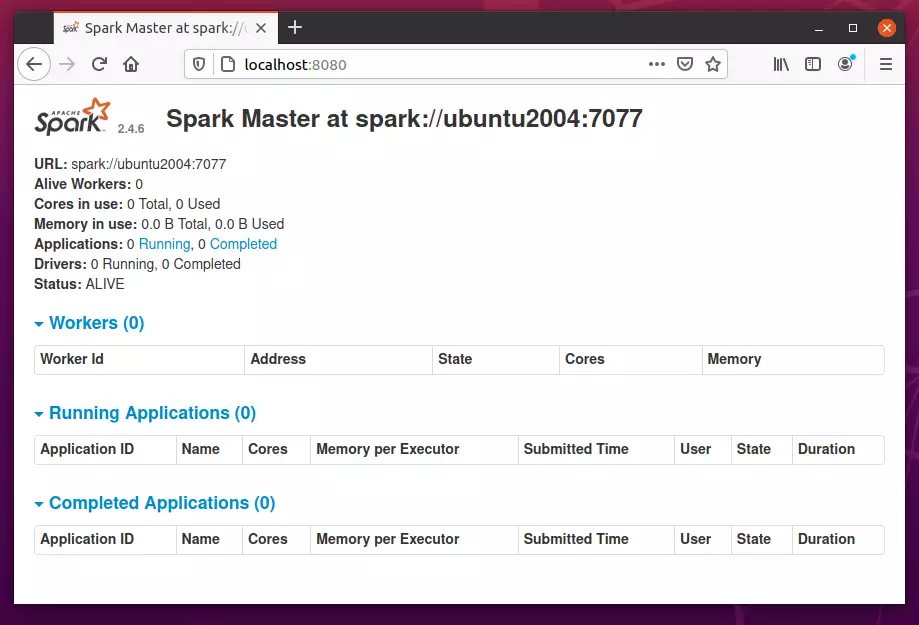
If you wish to connect to Spark via its command shell, run the commands below:
spark-shell
The commands above will launch Spark Shell.
Spark session available as 'spark'.
Welcome to
      ____              __
     / __/__  ___ _____/ /__
    _ / _ / _ `/ __/  '_/
   /___/ .__/_,_/_/ /_/_   version 2.4.6
      /_/

Using Scala version 2.11.12 (OpenJDK 64-Bit Server VM, Java 11.0.10)
Type in expressions to have them evaluated.
Type :help for more information.

scala>
That should do it!
Conclusion:
This post showed you how to install Apache Spark on Ubuntu 20.04 | 18.04. If you find any error above, please use the form below to report.



Leave a Reply Cancel reply