How to Filter Profanity in Windows 11 Voice Typing
Windows 11 has a handy feature called Voice Typing that lets you type by speaking into your microphone. This means you can talk to your computer and it will turn your words into text.
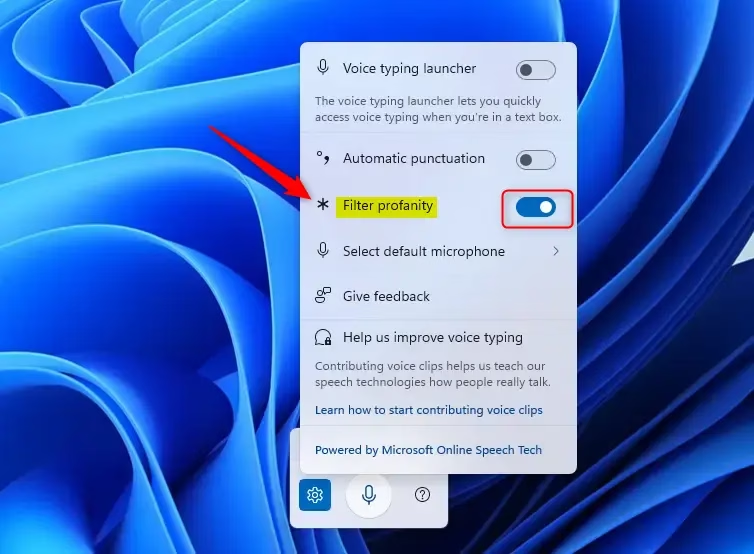
Sometimes, you might say words that are not polite. Thankfully, Windows 11 now lets you choose if you want to block those words (called a “profanity filter”) or allow them to be typed as you say them.
What is Voice Typing?
Voice typing uses online speech technology (helped by Microsoft’s Azure Speech Services) to understand your voice and type what you say. You can even use voice commands like saying “delete that” to erase text or “select that” to highlight words.
Windows 11’s voice typing is a smart way to type by speaking. The new profanity filter lets you decide if you want bad words hidden or shown. It’s easy to turn the filter on or off, giving you more control over your typing experience.
Speak to type easily with voice typing.
Choose to block or allow profanity.
Simple settings to turn the filter on or off.
Improve your typing experience based on your needs.


Leave a Reply Cancel reply